
 Upgrade Storage
Citation Graph for Zotero: see how your library cites itself (public beta, FOSS)
Hi everyone,
If you're like me, your Zotero library is a mix of papers you've read, papers you meant to read, and papers you've been meaning to mean to read. Every now and then a quiet voice asks: am I missing the one paper everybody in this field cites? And: how do all of these actually connect?
Connected Papers, Research Rabbit and Inciteful are great at answering that, but they live outside Zotero, and a few of them have discovered pricing pages. I wanted the same thing inside Zotero, working from the PDFs I already have, without sending my reading habits anywhere. So I built it, and it has now reached the "other people should try to break it" stage.
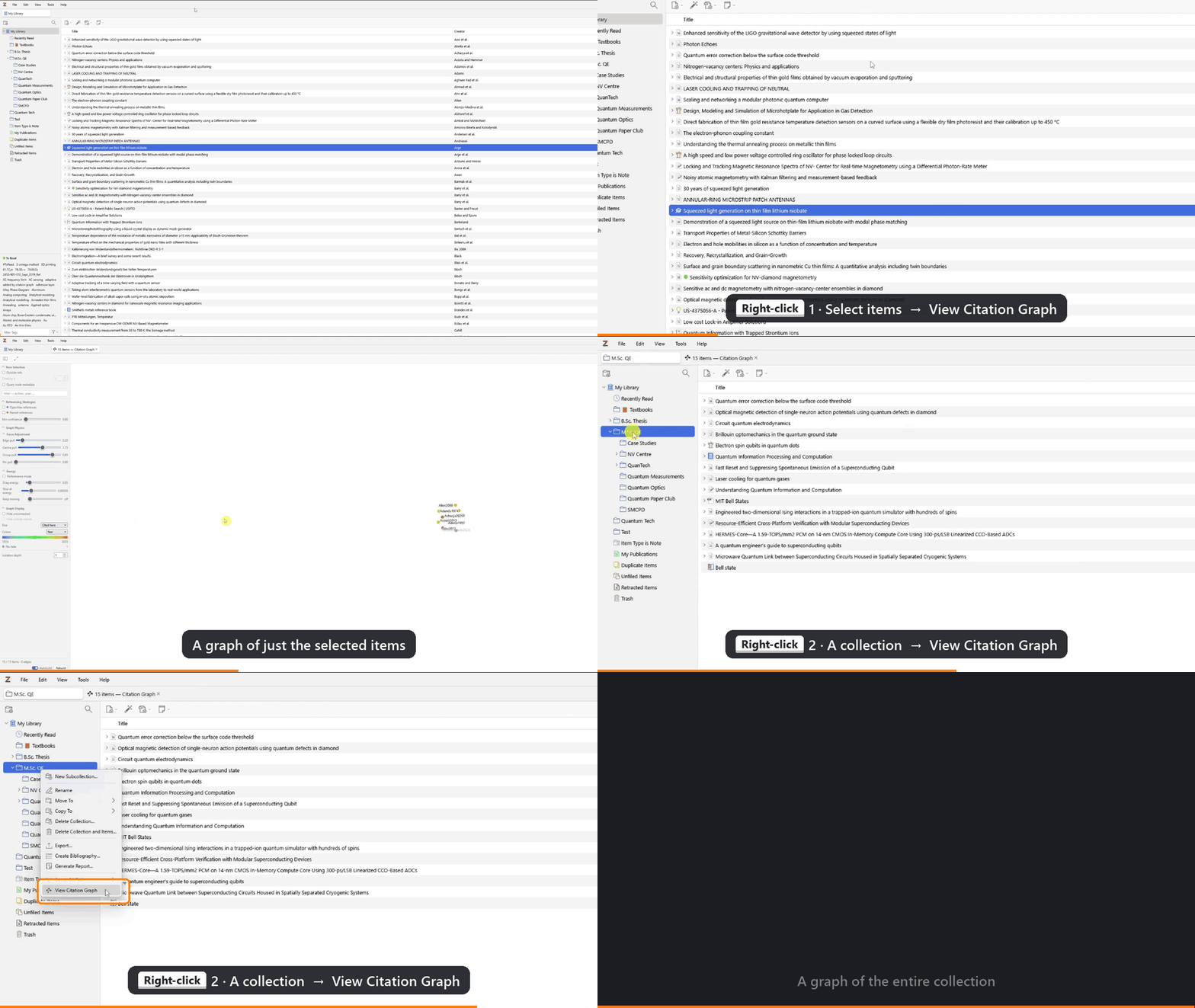
[Citation Graph for Zotero](https://github.com/Jajaho/zotero-citation-graph) draws a collection (or any selection of items) as a force-directed graph, Obsidian-style: papers are nodes, citations are edges, and a small physics simulation does the layout. Right-click a collection → View Citation Graph, and that's it.
https://s3.amazonaws.com/zotero.org/images/forums/u14843143/nebvso6b84ptvr5rb2mw.gif
What it does:
- Builds citation edges offline from your existing PDFs: embedded DOI links, DOIs in the text, your items' titles showing up in reference lists, and a few more tricks. Nothing leaves your machine.
- Optional OpenAlex lookup (off by default) for better coverage. It only ever sends bare DOIs: no titles, notes, tags, collection names or anything else about you.
- Shows papers you cite but don't own, with authors, year and citation counts, plus *Open in Browser* and one-click *Add to Zotero*.
- "What's missing?": a ranked list of papers your library keeps citing but doesn't contain. Mildly confronting, very useful.
- Topic clustering, plus filtering, grouping, colouring and sizing nodes (by year, collection, citation count…).
- Isolation view: double-click a node to see only what it cites and what cites it, for when the full graph looks like a plate of spaghetti.
https://s3.amazonaws.com/zotero.org/images/forums/u14843143/xzo5a43ealvis6lbzyhe.gif
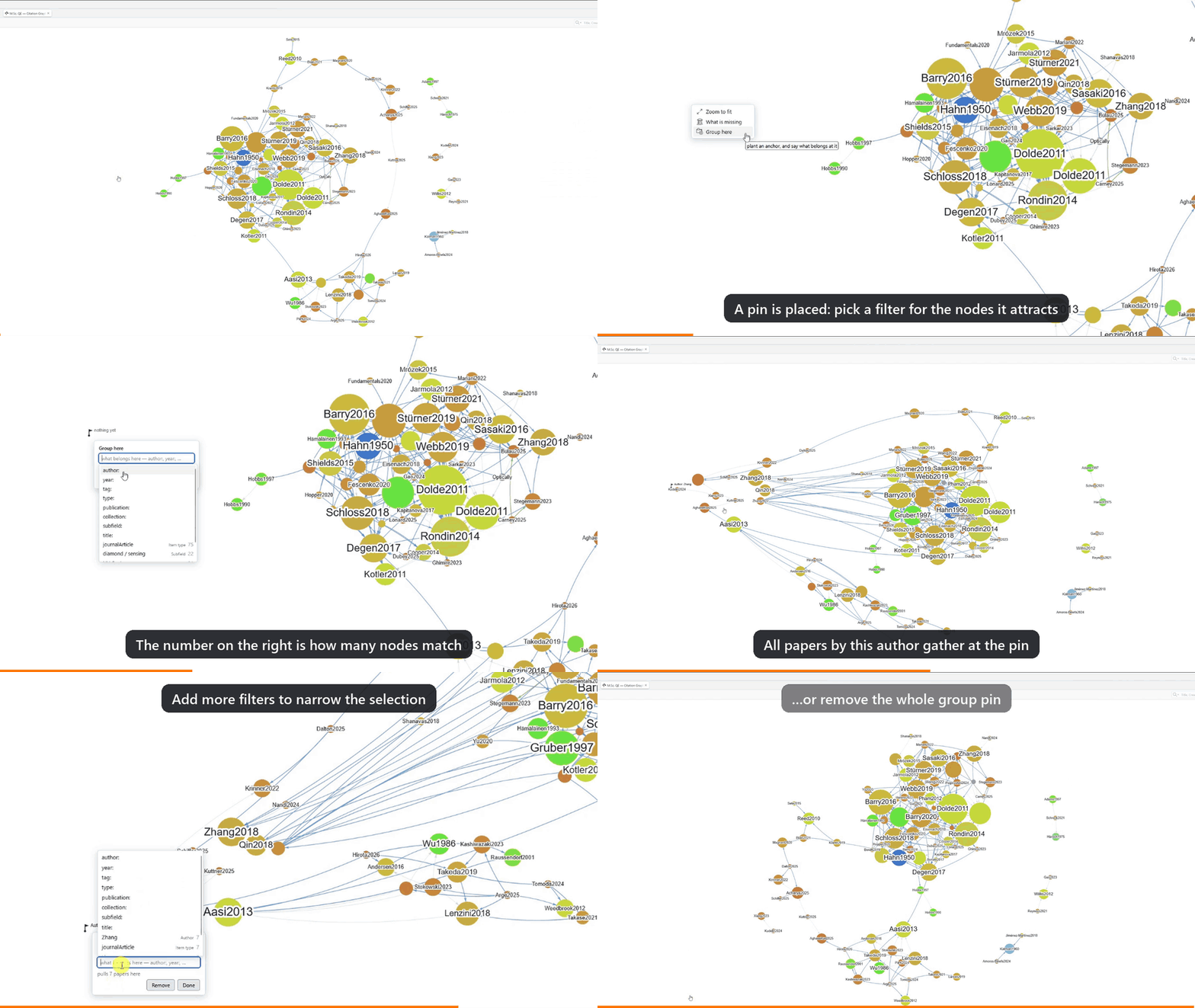
- Group pins: drop a pin on the canvas and every paper matching a filter (an author, a journal, a tag…) gets pulled towards it. Weirdly satisfying to watch.
https://s3.amazonaws.com/zotero.org/images/forums/u14843143/8bmjbgeio6uvs80hkocj.gif
- Feels like Zotero: context menus, the info pane, Locate, advanced search, keyboard shortcuts. Available in English and German, and translations are very welcome.
It's AGPL-3.0, with no telemetry, no account, no paywall, and there never will be.
Install: Zotero 10 or later (Windows, macOS or Linux). Grab the `.xpi` from the latest release at https://github.com/Jajaho/zotero-citation-graph/releases/latest), then go to Tools → Plugins → ⚙️ → Install Plugin From File…. If View Citation Graph
shows up when you right-click a collection, you're done.
Honest caveats: this is a beta. Your library is safe (the plugin only adds items when you ask it to), but expect rough edges.
- Offline extraction depends heavily on how the publisher built the PDF. Scanned PDFs without OCR give it nothing to read. Some publishers hyperlink every DOI generously; others treat DOIs as state secrets.
- The graph is a research aid, not a bibliographic record, so some edges will be missing or wrong.
- About 1,500 items stays interactive. Bigger libraries will want *Performance Mode* and a bit of patience on the first build.
Bug reports, feature ideas and "it did something weird" stories are all welcome, here or on GitHub at https://github.com/Jajaho/zotero-citation-graph/issues. Please include your Zotero version and OS.
Thanks to everyone who already sat through usability sessions and sent feedback. You made this a lot less confusing than it was.
Jakob
If you're like me, your Zotero library is a mix of papers you've read, papers you meant to read, and papers you've been meaning to mean to read. Every now and then a quiet voice asks: am I missing the one paper everybody in this field cites? And: how do all of these actually connect?
Connected Papers, Research Rabbit and Inciteful are great at answering that, but they live outside Zotero, and a few of them have discovered pricing pages. I wanted the same thing inside Zotero, working from the PDFs I already have, without sending my reading habits anywhere. So I built it, and it has now reached the "other people should try to break it" stage.
[Citation Graph for Zotero](https://github.com/Jajaho/zotero-citation-graph) draws a collection (or any selection of items) as a force-directed graph, Obsidian-style: papers are nodes, citations are edges, and a small physics simulation does the layout. Right-click a collection → View Citation Graph, and that's it.
https://s3.amazonaws.com/zotero.org/images/forums/u14843143/nebvso6b84ptvr5rb2mw.gif
What it does:
- Builds citation edges offline from your existing PDFs: embedded DOI links, DOIs in the text, your items' titles showing up in reference lists, and a few more tricks. Nothing leaves your machine.
- Optional OpenAlex lookup (off by default) for better coverage. It only ever sends bare DOIs: no titles, notes, tags, collection names or anything else about you.
- Shows papers you cite but don't own, with authors, year and citation counts, plus *Open in Browser* and one-click *Add to Zotero*.
- "What's missing?": a ranked list of papers your library keeps citing but doesn't contain. Mildly confronting, very useful.
- Topic clustering, plus filtering, grouping, colouring and sizing nodes (by year, collection, citation count…).
- Isolation view: double-click a node to see only what it cites and what cites it, for when the full graph looks like a plate of spaghetti.
https://s3.amazonaws.com/zotero.org/images/forums/u14843143/xzo5a43ealvis6lbzyhe.gif

- Group pins: drop a pin on the canvas and every paper matching a filter (an author, a journal, a tag…) gets pulled towards it. Weirdly satisfying to watch.
https://s3.amazonaws.com/zotero.org/images/forums/u14843143/8bmjbgeio6uvs80hkocj.gif
- Feels like Zotero: context menus, the info pane, Locate, advanced search, keyboard shortcuts. Available in English and German, and translations are very welcome.
It's AGPL-3.0, with no telemetry, no account, no paywall, and there never will be.
Install: Zotero 10 or later (Windows, macOS or Linux). Grab the `.xpi` from the latest release at https://github.com/Jajaho/zotero-citation-graph/releases/latest), then go to Tools → Plugins → ⚙️ → Install Plugin From File…. If View Citation Graph
shows up when you right-click a collection, you're done.
Honest caveats: this is a beta. Your library is safe (the plugin only adds items when you ask it to), but expect rough edges.
- Offline extraction depends heavily on how the publisher built the PDF. Scanned PDFs without OCR give it nothing to read. Some publishers hyperlink every DOI generously; others treat DOIs as state secrets.
- The graph is a research aid, not a bibliographic record, so some edges will be missing or wrong.
- About 1,500 items stays interactive. Bigger libraries will want *Performance Mode* and a bit of patience on the first build.
Bug reports, feature ideas and "it did something weird" stories are all welcome, here or on GitHub at https://github.com/Jajaho/zotero-citation-graph/issues. Please include your Zotero version and OS.
Thanks to everyone who already sat through usability sessions and sent feedback. You made this a lot less confusing than it was.
Jakob
And the 'what's missing' function was helpful. Just in testing the tool I found 4 gaps in one topic - one paper that was unknown to me, one I was aware of but it wasn't in Zotero, and two that were in my library but without the DOI information. Your tool provided a quick way to find all 4 problems and fix these gaps. Thanks.
thank you very much for your lovely feeback, I'm really glad you like it!
Feel free to tell me what you think the app is missing too, please - unfortunately I don't have a button for that, yet ;) I appreciate constructive criticism and feature requests.
Be sure to also tell your friends and coworkers!
Best, Jakob