
 Upgrade Storage
Citation Graph for Zotero: see how your library cites itself (public beta, FOSS)
Hi everyone,
If you're like me, your Zotero library is a mix of papers you've read, papers you meant to read, and papers you've been meaning to mean to read. Every now and then a quiet voice asks: am I missing the one paper everybody in this field cites? And: how do all of these actually connect?
Connected Papers, Research Rabbit and Inciteful are great at answering that, but they live outside Zotero, and a few of them have discovered pricing pages. I wanted the same thing inside Zotero, working from the PDFs I already have, without sending my reading habits anywhere. So I built it, and it has now reached the "other people should try to break it" stage.
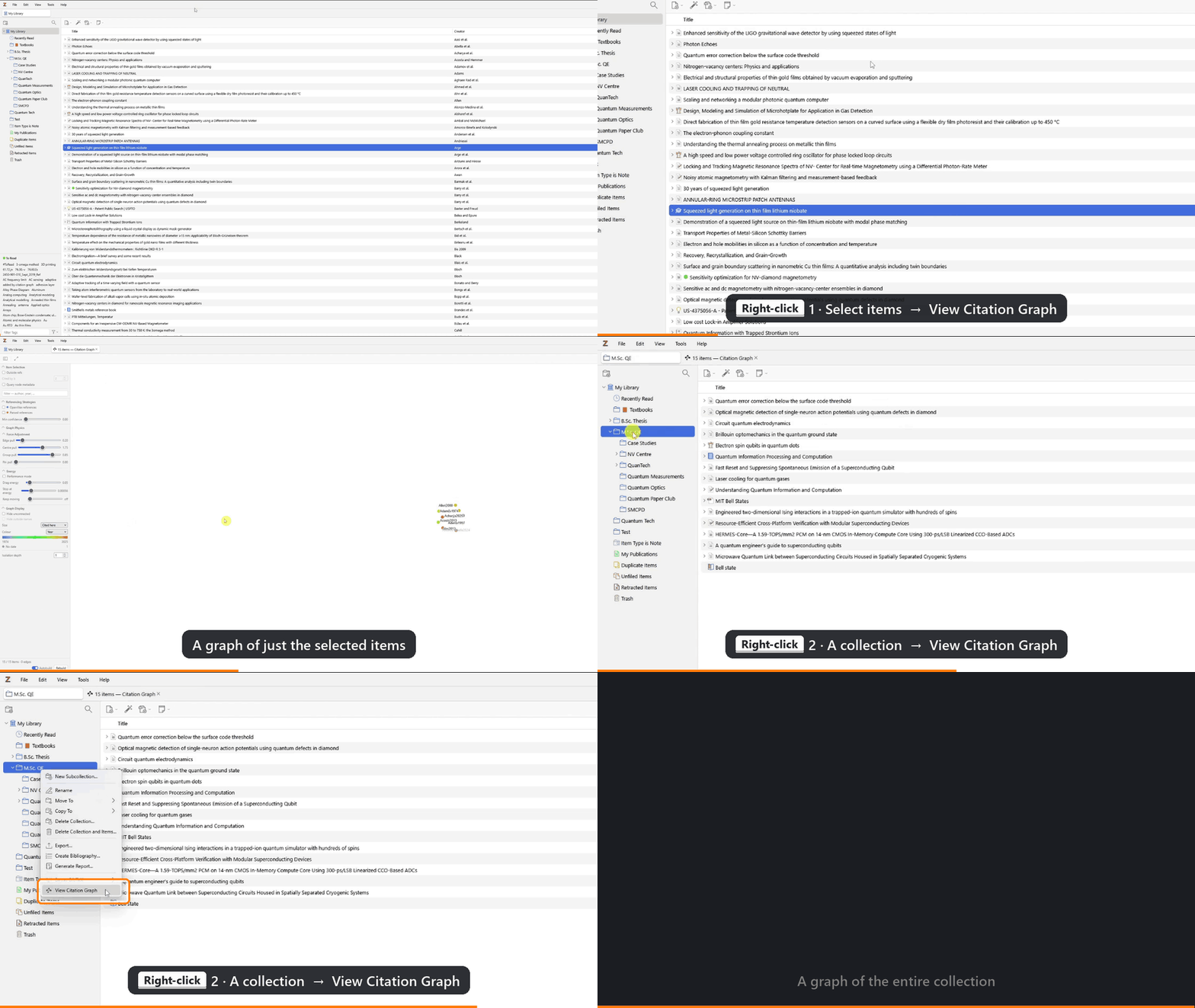
Citation Graph for Zotero draws a collection (or any selection of items) as a force-directed graph, Obsidian-style: papers are nodes, citations are edges, and a small physics simulation does the layout. Right-click a collection → View Citation Graph, and that's it.
https://s3.amazonaws.com/zotero.org/images/forums/u14843143/nebvso6b84ptvr5rb2mw.gif
What it does:
- Builds citation edges offline from your existing PDFs: embedded DOI links, DOIs in the text, your items' titles showing up in reference lists, and a few more tricks. Nothing leaves your machine.
- Optional OpenAlex lookup (off by default) for better coverage. It only ever sends bare DOIs: no titles, notes, tags, collection names or anything else about you.
- Shows papers you cite but don't own, with authors, year and citation counts, plus *Open in Browser* and one-click *Add to Zotero*.
- "What's missing?": a ranked list of papers your library keeps citing but doesn't contain. Mildly confronting, very useful.
- Topic clustering, plus filtering, grouping, colouring and sizing nodes (by year, collection, citation count…).
- Isolation view: double-click a node to see only what it cites and what cites it, for when the full graph looks like a plate of spaghetti.
https://s3.amazonaws.com/zotero.org/images/forums/u14843143/xzo5a43ealvis6lbzyhe.gif
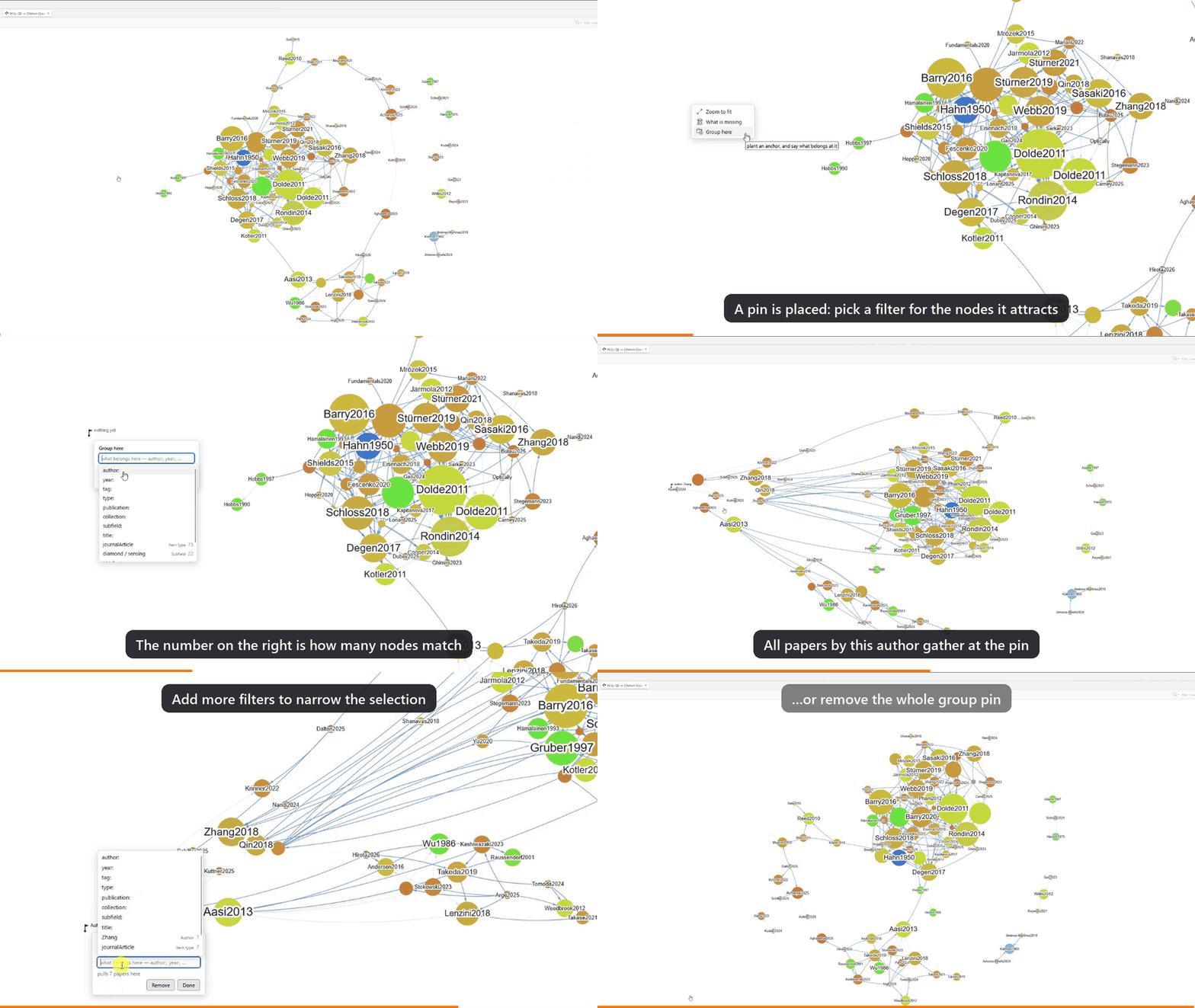
- Group pins: drop a pin on the canvas and every paper matching a filter (an author, a journal, a tag…) gets pulled towards it. Weirdly satisfying to watch.
https://s3.amazonaws.com/zotero.org/images/forums/u14843143/8bmjbgeio6uvs80hkocj.gif
- Feels like Zotero: context menus, the info pane, Locate, advanced search, keyboard shortcuts. Available in English and German, and translations are very welcome.
It's AGPL-3.0, with no telemetry, no account, no paywall, and there never will be.
Install: Zotero 10 or later (Windows, macOS or Linux). Grab the `.xpi` from the latest release at https://github.com/Jajaho/zotero-citation-graph/releases/latest), then go to Tools → Plugins → ⚙️ → Install Plugin From File…. If View Citation Graph
shows up when you right-click a collection, you're done.
Honest caveats: this is a beta. Your library is safe (the plugin only adds items when you ask it to), but expect rough edges.
- Offline extraction depends heavily on how the publisher built the PDF. Scanned PDFs without OCR give it nothing to read. Some publishers hyperlink every DOI generously; others treat DOIs as state secrets.
- The graph is a research aid, not a bibliographic record, so some edges will be missing or wrong.
- About 1,500 items stays interactive. Bigger libraries will want *Performance Mode* and a bit of patience on the first build.
Bug reports, feature ideas and "it did something weird" stories are all welcome, here or on GitHub at https://github.com/Jajaho/zotero-citation-graph/issues. Please include your Zotero version and OS.
Thanks to everyone who already sat through usability sessions and sent feedback. You made this a lot less confusing than it was.
Jakob
If you're like me, your Zotero library is a mix of papers you've read, papers you meant to read, and papers you've been meaning to mean to read. Every now and then a quiet voice asks: am I missing the one paper everybody in this field cites? And: how do all of these actually connect?
Connected Papers, Research Rabbit and Inciteful are great at answering that, but they live outside Zotero, and a few of them have discovered pricing pages. I wanted the same thing inside Zotero, working from the PDFs I already have, without sending my reading habits anywhere. So I built it, and it has now reached the "other people should try to break it" stage.
Citation Graph for Zotero draws a collection (or any selection of items) as a force-directed graph, Obsidian-style: papers are nodes, citations are edges, and a small physics simulation does the layout. Right-click a collection → View Citation Graph, and that's it.
https://s3.amazonaws.com/zotero.org/images/forums/u14843143/nebvso6b84ptvr5rb2mw.gif
What it does:
- Builds citation edges offline from your existing PDFs: embedded DOI links, DOIs in the text, your items' titles showing up in reference lists, and a few more tricks. Nothing leaves your machine.
- Optional OpenAlex lookup (off by default) for better coverage. It only ever sends bare DOIs: no titles, notes, tags, collection names or anything else about you.
- Shows papers you cite but don't own, with authors, year and citation counts, plus *Open in Browser* and one-click *Add to Zotero*.
- "What's missing?": a ranked list of papers your library keeps citing but doesn't contain. Mildly confronting, very useful.
- Topic clustering, plus filtering, grouping, colouring and sizing nodes (by year, collection, citation count…).
- Isolation view: double-click a node to see only what it cites and what cites it, for when the full graph looks like a plate of spaghetti.
https://s3.amazonaws.com/zotero.org/images/forums/u14843143/xzo5a43ealvis6lbzyhe.gif

- Group pins: drop a pin on the canvas and every paper matching a filter (an author, a journal, a tag…) gets pulled towards it. Weirdly satisfying to watch.
https://s3.amazonaws.com/zotero.org/images/forums/u14843143/8bmjbgeio6uvs80hkocj.gif
- Feels like Zotero: context menus, the info pane, Locate, advanced search, keyboard shortcuts. Available in English and German, and translations are very welcome.
It's AGPL-3.0, with no telemetry, no account, no paywall, and there never will be.
Install: Zotero 10 or later (Windows, macOS or Linux). Grab the `.xpi` from the latest release at https://github.com/Jajaho/zotero-citation-graph/releases/latest), then go to Tools → Plugins → ⚙️ → Install Plugin From File…. If View Citation Graph
shows up when you right-click a collection, you're done.
Honest caveats: this is a beta. Your library is safe (the plugin only adds items when you ask it to), but expect rough edges.
- Offline extraction depends heavily on how the publisher built the PDF. Scanned PDFs without OCR give it nothing to read. Some publishers hyperlink every DOI generously; others treat DOIs as state secrets.
- The graph is a research aid, not a bibliographic record, so some edges will be missing or wrong.
- About 1,500 items stays interactive. Bigger libraries will want *Performance Mode* and a bit of patience on the first build.
Bug reports, feature ideas and "it did something weird" stories are all welcome, here or on GitHub at https://github.com/Jajaho/zotero-citation-graph/issues. Please include your Zotero version and OS.
Thanks to everyone who already sat through usability sessions and sent feedback. You made this a lot less confusing than it was.
Jakob