
 Upgrade Storage
Cite Note/Annotation in Word: Only add reference, no body text
I am new to Zotero, coming from Citavi.
I installed Zotero 10 yesterday, I work with the Word plugin in Word 365 on a Windows 11 machine. I have not added any plugins or add-ons to Zotero. I intend to use OSCOLA 4th edn. as citation style.
My workflow would be as follows:
1. Add a source in Zotero, attach a pdf.
2. Read the pdf, highlight an interesting section and add a comment ("annotation") to the highlight. This comment is intended for my internal thought process, I would for example highlight a paragraph and comment a very short summary and maybe personal thoughts. (Let's take for example the Odyssee, I would highlight the part about Odysseus' stay with Circe and comment "Odysseus stays with Circe for a year. Shouldn't have done that.")
3. Write my document in Word. When I get to the relevant point, I want to reference the source I had read before, specifically the location that I have added the annotation for. I click "add annotation" and select the annotation that I had made. I would maybe write a paragraph describing Odysseus' time with Circe. To cite a source, I would cite the annotation I had made earlier to insert a reference. But I do not want to add a quote from the Odyssee or the comment that I had made for my own purposes.)
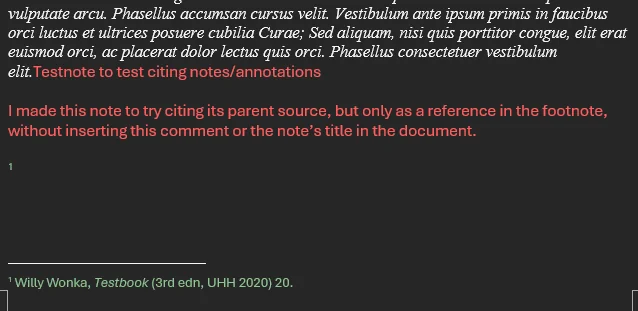
This is where Zotero behaves differently than I want it to. It adds (a) the quote I had highlighted, (b) a footnote with the reference, (c) the comment I attached to the annotation. (a) and (c) are shown here in red, (b) in green.
https://s3.amazonaws.com/zotero.org/images/forums/u21305170/4krf8a27tjl7u2aa9ww2.png
However, I do not want Zotero to add to my body text (red), I only want the reference in the footnote (green).
A similar thing happens when I cite a note instead:
https://s3.amazonaws.com/zotero.org/images/forums/u21305170/vzufrw6nqk6e5ujwys7u.png
Only when I use "add citation", Zotero adds only the reference and no additional text in my document. But that way, I have to manually input the page number that I first have to remember or note down some other way.
Am I doing something wrong? Could this be fixed?
I would appreciate any input. Thank you also for your patience, English is not my first language, I am happy to clarify if necessary.
I installed Zotero 10 yesterday, I work with the Word plugin in Word 365 on a Windows 11 machine. I have not added any plugins or add-ons to Zotero. I intend to use OSCOLA 4th edn. as citation style.
My workflow would be as follows:
1. Add a source in Zotero, attach a pdf.
2. Read the pdf, highlight an interesting section and add a comment ("annotation") to the highlight. This comment is intended for my internal thought process, I would for example highlight a paragraph and comment a very short summary and maybe personal thoughts. (Let's take for example the Odyssee, I would highlight the part about Odysseus' stay with Circe and comment "Odysseus stays with Circe for a year. Shouldn't have done that.")
3. Write my document in Word. When I get to the relevant point, I want to reference the source I had read before, specifically the location that I have added the annotation for. I click "add annotation" and select the annotation that I had made. I would maybe write a paragraph describing Odysseus' time with Circe. To cite a source, I would cite the annotation I had made earlier to insert a reference. But I do not want to add a quote from the Odyssee or the comment that I had made for my own purposes.)
This is where Zotero behaves differently than I want it to. It adds (a) the quote I had highlighted, (b) a footnote with the reference, (c) the comment I attached to the annotation. (a) and (c) are shown here in red, (b) in green.
https://s3.amazonaws.com/zotero.org/images/forums/u21305170/4krf8a27tjl7u2aa9ww2.png

However, I do not want Zotero to add to my body text (red), I only want the reference in the footnote (green).
A similar thing happens when I cite a note instead:
https://s3.amazonaws.com/zotero.org/images/forums/u21305170/vzufrw6nqk6e5ujwys7u.png
Only when I use "add citation", Zotero adds only the reference and no additional text in my document. But that way, I have to manually input the page number that I first have to remember or note down some other way.
Am I doing something wrong? Could this be fixed?
I would appreciate any input. Thank you also for your patience, English is not my first language, I am happy to clarify if necessary.
In an upcoming version, Zotero will offer the current page number in the reader when citing an open document (which you could get to by double-clicking the annotation in the items list in Zotero's library tab). It's sounds like that's what you're looking for.
For me, the whole point of annotations or notes is to remember where to find something I want to cite later. Maybe like a bookmark if you will.
As I see it, in the current state, there is no way within the Zotero Word plugin to add only a reference in a footnote, without remembering by heart which page it is on or manually checking in the source again.
That is a little cumbersome to me, because usually (in Citavi, so far) I read a bunch of sources at a time, take notes along the way, tag and categorize the notes. I might not even write the resulting text until months later. But when that time comes, I have all the notes that I had taken before, and can compile my text, referencing the sources along the way without having to look at them again.
I understand that that is not (yet) a feature and I will have to find a workaround. I appreciate your help nonetheless, thank you.
I'd like to request more flexibility in what gets inserted, in two layers (this is how Citavi handles it, and it works very well in practice):
1. A global default for what "Add Annotation" inserts
A preference (e.g. "When adding annotations, insert: [Full annotation | Citation only]") that controls the default behavior. Many of us primarily want the pinpoint reference – the citation with the page number – and only occasionally the quoted text.
2. A per-insertion choice in the annotation picker
When selecting annotations in the picker, a checkbox like "Insert citation only" (or a modifier-click), so the choice can be made per insertion and per annotation, overriding the default. This mirrors Citavi's "Insert with options" behavior, where the default is just the reference and you opt into the quotation when you actually need it.
Why this matters for my use case (and I suspect many others'):
In legal and much of humanities writing, the standard citation is a source + page reference in a footnote; the verbatim quote goes into the running text only when the exact wording matters. My highlights in the PDF are markers of relevance while reading – weeks or months later, when I draft the brief or paper, I paraphrase and need the footnote reference, not the pasted quotation.
Currently the only way to get just the reference is Add/Edit Citation, which loses the annotation's automatic page number – I have to open the PDF and find the page manually. The planned improvement (offering the current page of an open document) helps only if the right document happens to be open at that moment; it doesn't help when citing from the annotation picker later on.
Pasting the full annotation and then deleting the body text each time is error-prone: a forgotten deletion accidentally turns a paraphrase into an apparent quotation – a real problem in disciplines where the distinction between direct and indirect citation is critical.
Implementation-wise, this seems very tractable: the picker already knows each annotation's page label, and "citation only" could simply skip the body/comment HTML and insert the citation field with the locator – essentially the same output Add Citation produces, but with the page number sourced from the annotation instead of typed by hand.
---
Related gap: annotations for sources without a full-text file
The same workflow breaks down entirely for print sources. As discussed in the "Annotations for physical items?" thread, annotations can only exist on file attachments (PDF, EPUB, HTML snapshot) – for a print book or a source consulted in a library, there is no way to create an annotation with a page number at all. The suggested alternative, regular notes, lacks exactly the properties that make annotations valuable for citation: a structured, editable page label, colors, types, and above all integration with the word processor plugins.
Two things would help here:
Allow annotations on regular (parent) items with a manually entered page label – a "print annotation" that behaves like a PDF annotation (appears in the annotations tab, is selectable in the Add Annotation picker, carries a locator) but references a physical page of a print source.
At minimum, allow manual page labels where they're currently missing – e.g. EPUB annotations only get page numbers when the EPUB ships embedded pagination, and there's no way to correct or add one manually, which is a problem for e-books with non-matching print pagination.
Together, these two FRs describe one coherent workflow: capture a pinpoint (with page) while reading – whether the source is digital or print – and later cite just the reference, with the quote only where it's actually needed. This is essentially the Citavi model, and it's the main reason many legal scholars in the German-speaking world have stuck with Citavi so far. Making this possible natively would remove a significant adoption barrier.
With that functionality you should get what you asked for :)
I'll implement it and get back to you through github or your blog or some other way should I encounter any issues.