
 Upgrade Storage
Hyperlinks to PDF Annotations
I'm relatively new to zotero. I'm not familiar with coding or anything. I'm just using it to complete thesis work. Several searches have indicated that I should be able to create hyperlinks to annotations I have made inside of the PDFs saved in Zotero. Most advice indicates that I should just be able to right click on the note itself and an option to link should appear but I only get what is indicated in the image. I have tried also to right click on the PDF in the main library but none of the options will create a zotero link I can add to the excel document where I am organizing thematically. I am using a mac. Has anyone got any advice?
https://s3.amazonaws.com/zotero.org/images/forums/u17703593/y970e692rfxuxcdvtqhk.png
https://s3.amazonaws.com/zotero.org/images/forums/u17703593/y970e692rfxuxcdvtqhk.png
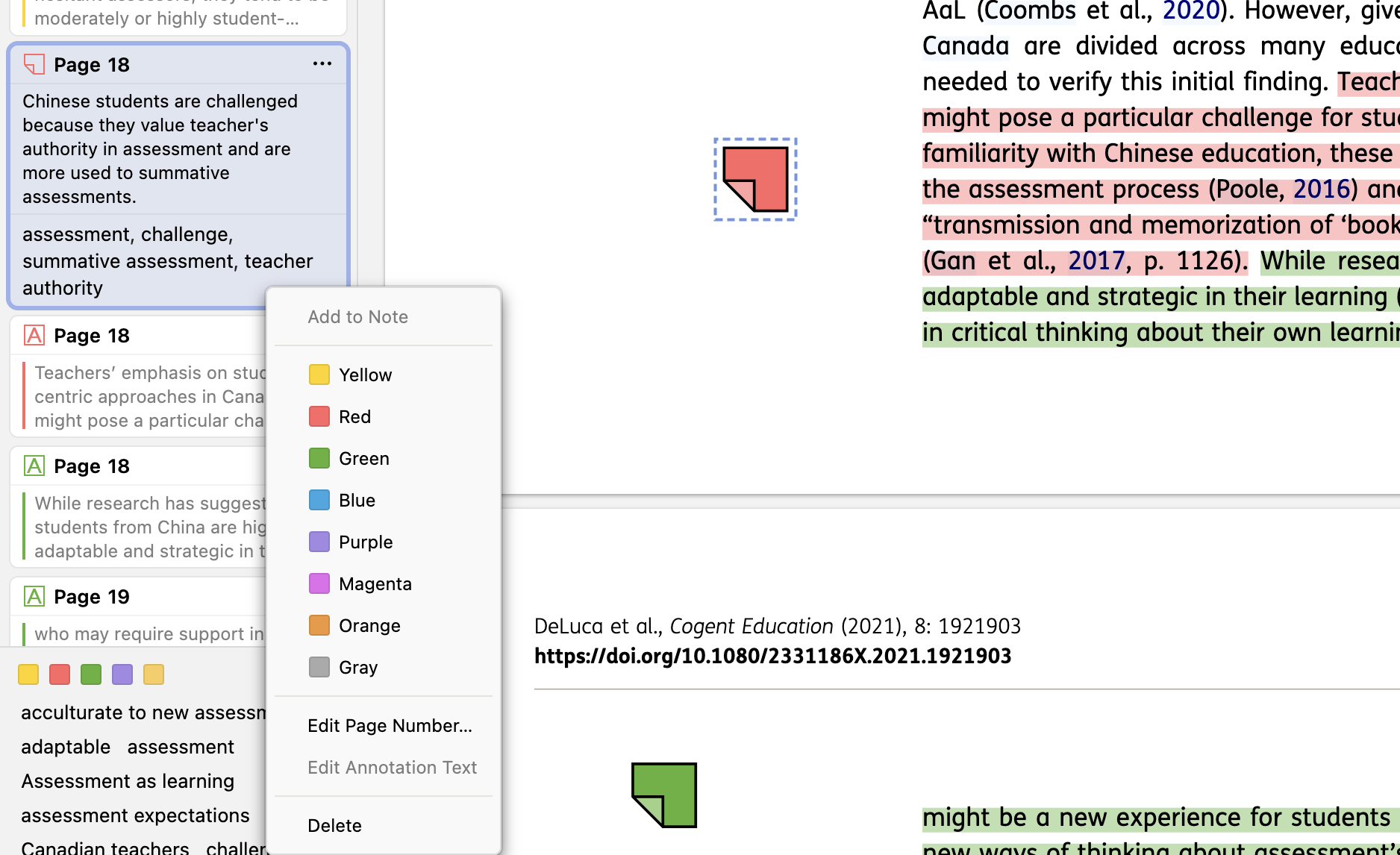
Summary of options known to me:
a) "copy the annotation and paste it into a plain text editor to view the actual annotation link" (https://forums.zotero.org/discussion/comment/474353/#Comment_474353). So create the highlight, and then right-click on it, and then "Ctrl + C" (to copy the annotation to the clipboard). Thus, this procedure does not explicitly show an option to copy the link.
When you paste the clipboard in a text file, you'll see something like The first is the link to the item, the second to the actual annotation in the PDF (and the text is the actual text in the highlight with the citation and page).
b) Install "Actions and Tags for Zotero" (https://github.com/windingwind/zotero-actions-tags) and then the "Copy Zotero link" script : https://github.com/windingwind/zotero-actions-tags/discussions/115 . This does add a "Copy Zotero link" to the menu that appears when you right-click on the annotation.
When you paste the clipboard in a text file, you'll see something like (I don't use Excel or Macs; on Linux, the standard OS procedure ---via xdg-open, gio, etc--- knows what to do with "zotero://" URIs in most cases. I assume a similar thing holds for other systems).
If I understand the issue correctly, it is about links for annotations.
This is provided in a more direct way using Zotero Weavero plugin (among many other functions)
https://github.com/mjthoraval/Weavero
Right clicking the annotation shows option to copy links to the annotation ("Copy select link":a link for the annotation sub-item in the main library, and "Copy open link": link to open the item and highlight the annotation).
Also Zotero Better notes plugin provides this feature for notes (not annotations) with the ability to link notes together
https://github.com/windingwind/zotero-better-notes
I hope this helps.