
 Upgrade Storage
[Zotero 10] Undo/redo buttons greyed out
Just updated to 10.0.3 on Windows 11.
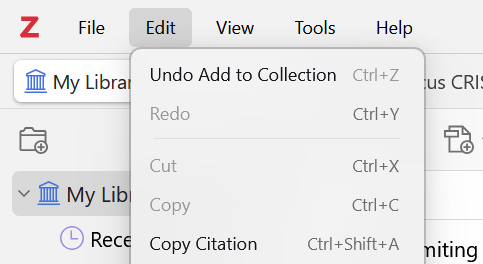
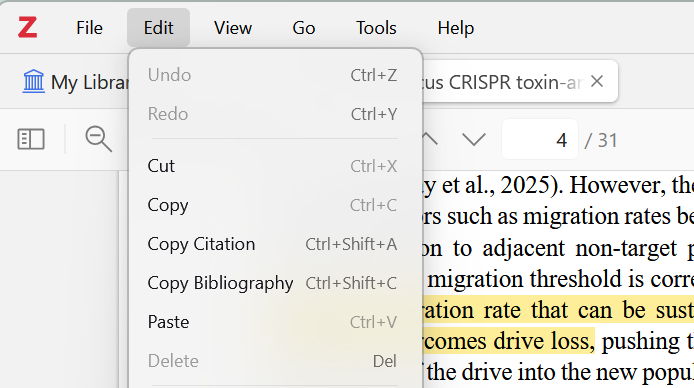
If I edit something in My Library, such as article info, then click Edit, I can select "Undo [action]" or "Redo [action]". However, if I open a file and make an annotation, the Undo and Redo options under the Edit tab remain greyed out and are not functional.
https://s3.amazonaws.com/zotero.org/images/forums/u19175514/wikjlk8hmi6rx90i59x1.png
https://s3.amazonaws.com/zotero.org/images/forums/u19175514/i26igb5xqkcspvtiw4d9.png
It's not a huge problem for me as keyboard shortcuts work in both modes (although it's Ctrl+Shift+Z for me, not Ctrl+Y), but I figured it's worth mentioning.
If I edit something in My Library, such as article info, then click Edit, I can select "Undo [action]" or "Redo [action]". However, if I open a file and make an annotation, the Undo and Redo options under the Edit tab remain greyed out and are not functional.
https://s3.amazonaws.com/zotero.org/images/forums/u19175514/wikjlk8hmi6rx90i59x1.png
https://s3.amazonaws.com/zotero.org/images/forums/u19175514/i26igb5xqkcspvtiw4d9.png
It's not a huge problem for me as keyboard shortcuts work in both modes (although it's Ctrl+Shift+Z for me, not Ctrl+Y), but I figured it's worth mentioning.
https://forums.zotero.org/discussion/121533/undo-redo-in-reader-edit-menu-are-grayed-out#latest