
 Upgrade Storage
Keep file extension in Attachment Title when there is no dedicated icon
After importing the supplementary files for the article below:
https://pubs.rsc.org/en/content/articlelanding/2024/sm/d3sm01657a
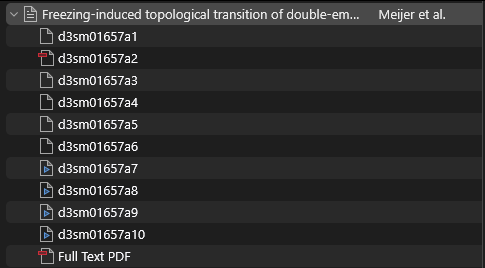
Here is what I get in the items list:
https://s3.amazonaws.com/zotero.org/images/forums/u265723/elsk8xs7req2cuy9uj2e.png
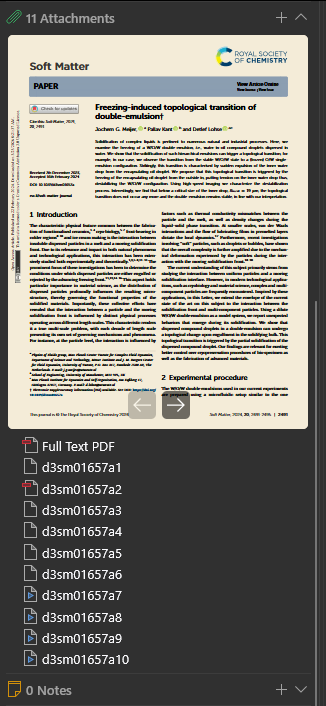
And in the Item Pane:
https://s3.amazonaws.com/zotero.org/images/forums/u265723/dj8nmlgez6gapfdv01fe.png
All the files that do not get a dedicated icon cannot be recognized, as their file extension has been removed from the title (.txt and .eps here).
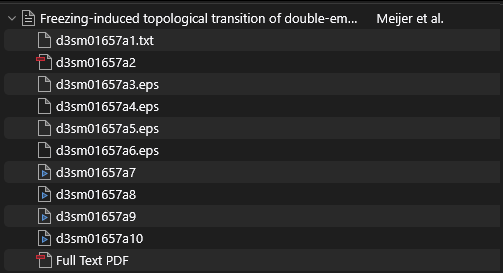
I would prefer that the file extension is kept for these files, so that I can identify them quickly:
https://s3.amazonaws.com/zotero.org/images/forums/u265723/04hgs67k5xipl9d8xx60.png
It is the same problem for all the other file types that can be found in some supplementary files, such as .pptx, .docx, ...
Zotero 9.0-beta.16+6140088b0 (64-bit)
Windows 11
Here is a previous similar request:
https://forums.zotero.org/discussion/119799/retaining-file-extensions-for-attachments-in-zotero
https://pubs.rsc.org/en/content/articlelanding/2024/sm/d3sm01657a
Here is what I get in the items list:
https://s3.amazonaws.com/zotero.org/images/forums/u265723/elsk8xs7req2cuy9uj2e.png
And in the Item Pane:
https://s3.amazonaws.com/zotero.org/images/forums/u265723/dj8nmlgez6gapfdv01fe.png
All the files that do not get a dedicated icon cannot be recognized, as their file extension has been removed from the title (.txt and .eps here).
I would prefer that the file extension is kept for these files, so that I can identify them quickly:
https://s3.amazonaws.com/zotero.org/images/forums/u265723/04hgs67k5xipl9d8xx60.png
It is the same problem for all the other file types that can be found in some supplementary files, such as .pptx, .docx, ...
Zotero 9.0-beta.16+6140088b0 (64-bit)
Windows 11
Here is a previous similar request:
https://forums.zotero.org/discussion/119799/retaining-file-extensions-for-attachments-in-zotero