
 Upgrade Storage
Zotero not exporting original date to CSV
Hello.
Zotero is not exporting the original date to the csv export:
https://s3.amazonaws.com/zotero.org/images/forums/u5877315/yklysyg25yh5itvxrtq9.png
https://s3.amazonaws.com/zotero.org/images/forums/u5877315/rm4thsqg5mqrob64pdbm.png
Zotero is not exporting the original date to the csv export:
https://s3.amazonaws.com/zotero.org/images/forums/u5877315/yklysyg25yh5itvxrtq9.png
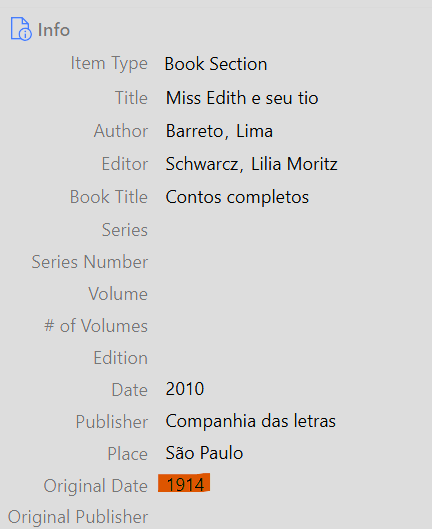
https://s3.amazonaws.com/zotero.org/images/forums/u5877315/rm4thsqg5mqrob64pdbm.png

And I don't think this used to be the case. I have past exports where I was getting the Original Date in my export
It has been two months since these posts, and it doesn't seem this field has yet been included.
The CSV export does provide two columns that have dates in them: "Publication Year" and "Date"
...both of them provide the value listed for "Date" in the application.
Neither of them provides the "Original Date" field from the application.
I'd like to have the Original Date as well as the Publication Date because -- as is the case with reprinted books, the content of the book may be from an earlier date than the date of publication.
Any helps or updates would be appreciated.