
 Upgrade Storage
iPadOS windows resizing issue
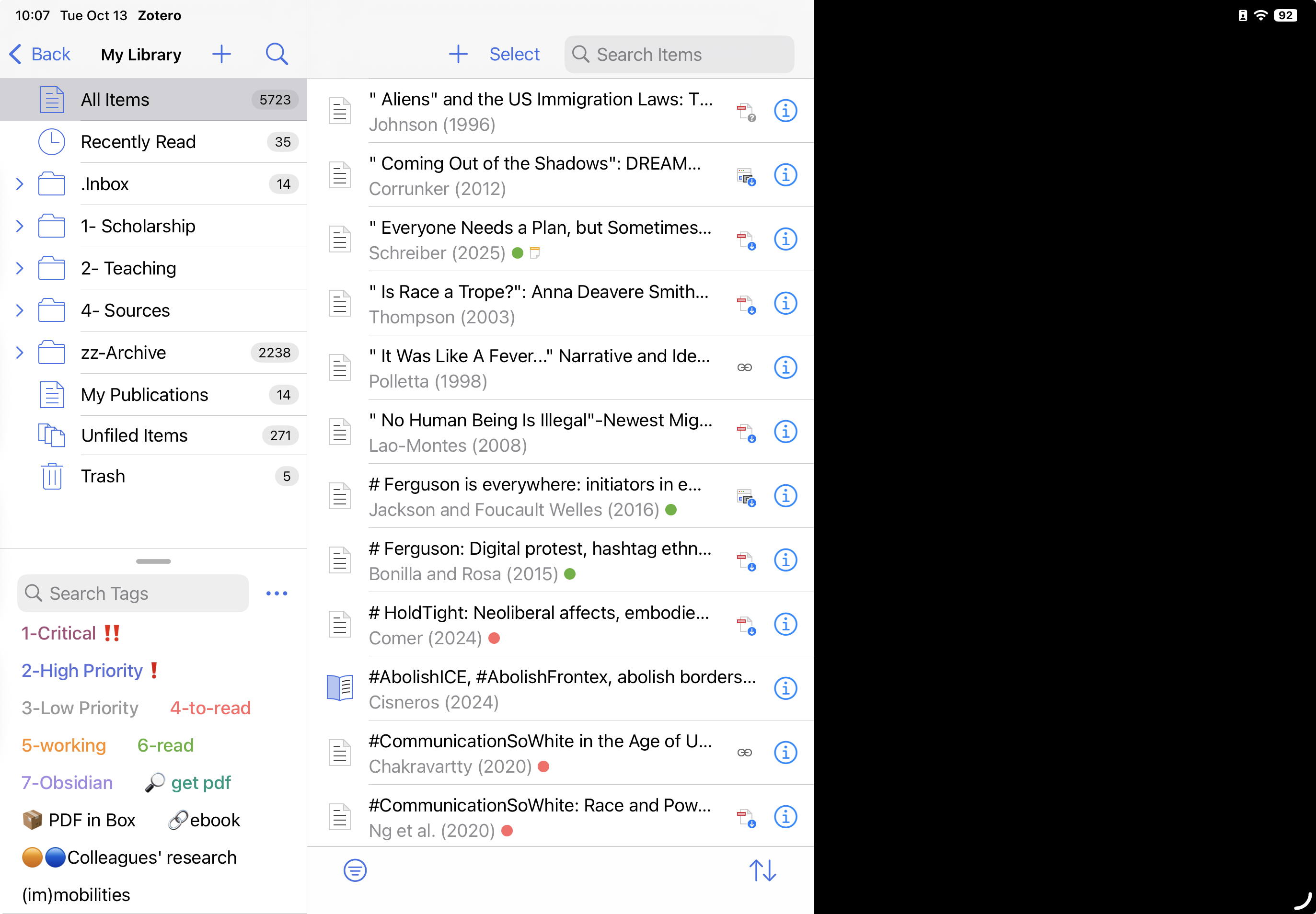
I am having a windows resizing issue on Zotero for iPad. I am on the latest version of Zotero and iPadOS. I have Zotero in a window that takes up about half of the area of my iPad screen. Whenever I try to resize the Zotero window or to make it full screen, I get huge black bars at the sides and bottom of the areas where window should be expanding. In other words, the size of the Zotero window stays the same but the rest of the screen is taken up by these big black bars.
https://s3.amazonaws.com/zotero.org/images/forums/u2595451/ty6qskepd42vc8jaev4e.png
I have tried uninstalling and reinstalling Zotero and restarting my iPad. Anybody have any other ideas about what could be causing this, or is it a bug? Thank you!
https://s3.amazonaws.com/zotero.org/images/forums/u2595451/ty6qskepd42vc8jaev4e.png
I have tried uninstalling and reinstalling Zotero and restarting my iPad. Anybody have any other ideas about what could be causing this, or is it a bug? Thank you!
Thank you!
This issue only happens while I launch Zotero as non-maximized status; while I maximize the window and quit Zotero, then launch again as maximized style, and restore the Zotero window, then resize it, the zotero window can correctly resize its elements