
 Upgrade Storage
Web files not syncing to Library
Hi there, I have used Zotero in the past and had no issues with web extensions and syncing. However I recently have started using it again, and today, I tried to add a paper to my library through the Edge extension, but it was not working.
Evidently, the issue was I didn't have enough storage "You have reached your Zotero File Storage quota. Some files were not uploaded. Other Zotero data will continue to sync to the server." My understanding is that I don't need to pay for files to be added to library, and have looked at another forum to work out how to change my sync settings, to no prevail. This is what my settings currently look like.
https://s3.amazonaws.com/zotero.org/images/forums/u22111551/vsw78q643hor634iunbq.png
Any help on how to keep my files stored locally and begin syncing from my browser extension would be great. Thank you
Evidently, the issue was I didn't have enough storage "You have reached your Zotero File Storage quota. Some files were not uploaded. Other Zotero data will continue to sync to the server." My understanding is that I don't need to pay for files to be added to library, and have looked at another forum to work out how to change my sync settings, to no prevail. This is what my settings currently look like.
https://s3.amazonaws.com/zotero.org/images/forums/u22111551/vsw78q643hor634iunbq.png
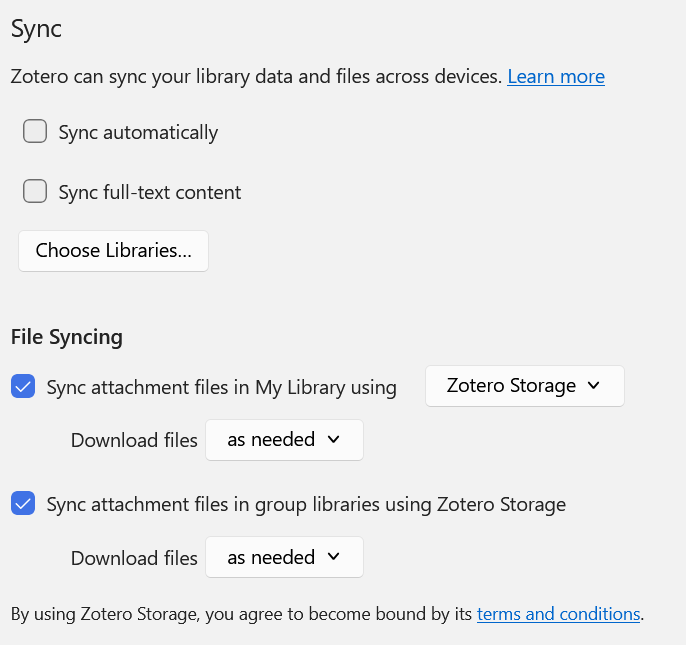
Any help on how to keep my files stored locally and begin syncing from my browser extension would be great. Thank you
So exceeding your online file storage quota only stops that online file syncing - it has no effect on your ability to save files via the Zotero web connector to local storage on that computer. There are other reasons why a particular URL's PDF save operation to your local computer via the web connector might fail (eg lack of legal access to a paywalled PDF), but being over your online file storage quota is not one of them.
The key setting that activates automatic PDF download to your local computer, via the web connector, is under Edit\Settings\General\File Handling, and is enabled by default:
"Automatically attach associated PDFs and other files when saving items"
https://www.zotero.org/support/preferences/general
Regarding the settings in your screenshot, if you wish to continue using *data* syncing to Zotero servers (free and unlimited), you should have the top two settings turned ON. The meaning of those two settings is explained here:
https://www.zotero.org/support/preferences/sync#data_syncing