
 Upgrade Storage
Read aloud hard to access iOS Debug Log: D451125924
I love the read aloud feature and have been using it constantly. It’s a life changing tool, to have every text available for read aloud. Thank you AI and thank you Zotero.
One big issue with it: It needs to be easier to access the button to start read aloud in the middle of a text.
(This is different from the headphones button on top bc that just starts from the very beginning of the text.)
Right now I have to hold down on a word, which is already annoying especially when the font is small (which shouldn’t be an issue when listening!). If that works, I have to click the very tiny arrow one two or three times (not sure why it moves around) to get to the read aloud button. Then when I click it, it works fine. However it’s a lot of clicking; often I’m using this feature when I can’t look at my phone, like driving or doing chores/errands, whereas if I can look at my phone I’d just read.
Plus the little tiny arrow you need to press is easy to miss and every time you miss it you have to start the holding and clicking process over again.
Rarely am I listening (or reading, for that matter) a long text from very beginning to end. So this is a functionality I am using all the time.
I would suggest actually taking the read aloud (at location) button out of that hard to access menu and making it its own thing, somehow.
Either you could add an option when clicking the main headphones to “start from beginning” or “start from top of view”/“start from highlighted sentence”.
I think promoting this button in this way is justified since this feature will become extremely popular, I predict.
Thank you for this incredible product!
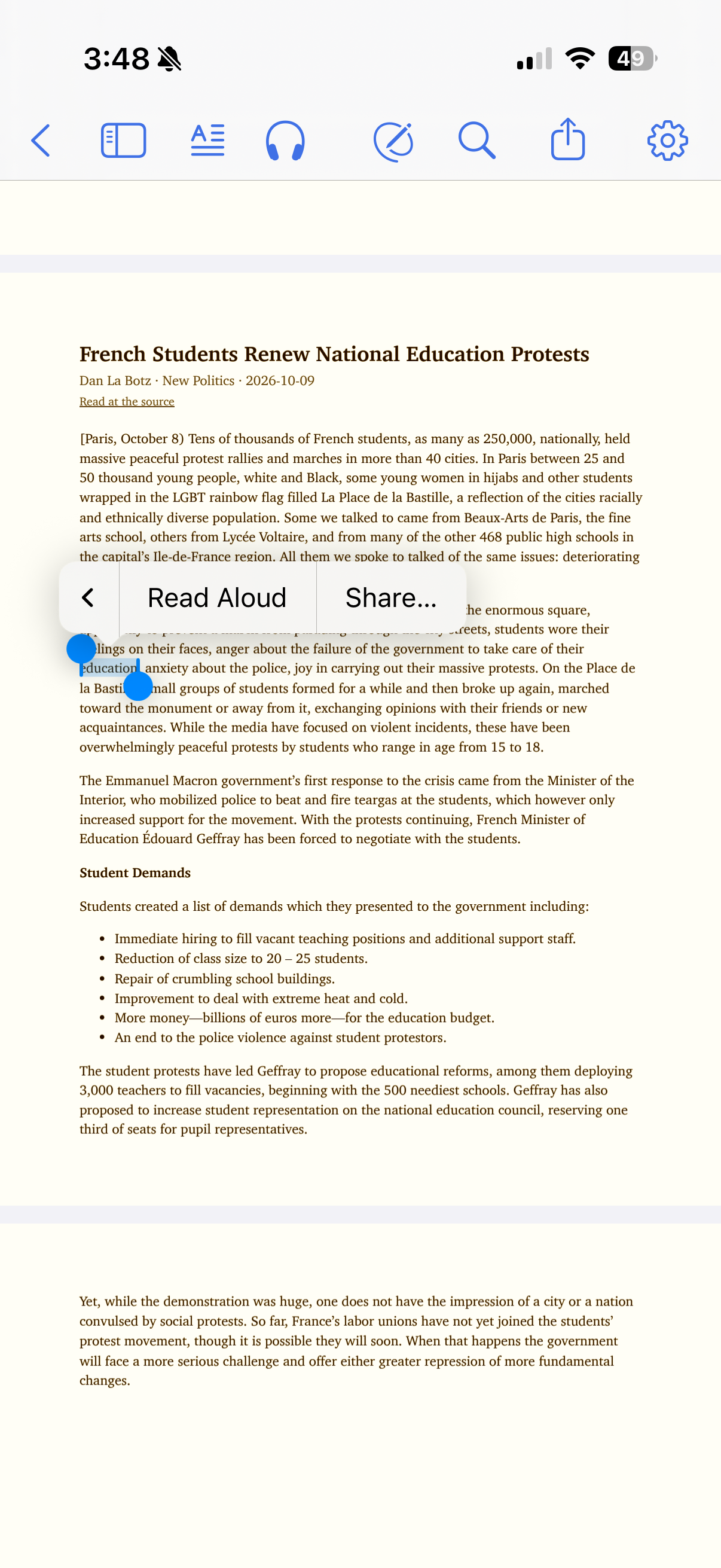
In the screenshot, I had to hold to highlight and then click the arrow 3 times to get to the 4th menu before I could see read aloud button.
https://s3.amazonaws.com/zotero.org/images/forums/u9559725/97g2ixxmppw1hh6oby5j.png
One big issue with it: It needs to be easier to access the button to start read aloud in the middle of a text.
(This is different from the headphones button on top bc that just starts from the very beginning of the text.)
Right now I have to hold down on a word, which is already annoying especially when the font is small (which shouldn’t be an issue when listening!). If that works, I have to click the very tiny arrow one two or three times (not sure why it moves around) to get to the read aloud button. Then when I click it, it works fine. However it’s a lot of clicking; often I’m using this feature when I can’t look at my phone, like driving or doing chores/errands, whereas if I can look at my phone I’d just read.
Plus the little tiny arrow you need to press is easy to miss and every time you miss it you have to start the holding and clicking process over again.
Rarely am I listening (or reading, for that matter) a long text from very beginning to end. So this is a functionality I am using all the time.
I would suggest actually taking the read aloud (at location) button out of that hard to access menu and making it its own thing, somehow.
Either you could add an option when clicking the main headphones to “start from beginning” or “start from top of view”/“start from highlighted sentence”.
I think promoting this button in this way is justified since this feature will become extremely popular, I predict.
Thank you for this incredible product!
In the screenshot, I had to hold to highlight and then click the arrow 3 times to get to the 4th menu before I could see read aloud button.
https://s3.amazonaws.com/zotero.org/images/forums/u9559725/97g2ixxmppw1hh6oby5j.png
The Read Aloud toolbar button should also start at the page you're viewing, and you can then use the skip-by-paragraph button to relatively quickly get to where you want it to start from.