
 Upgrade Storage
Phantom selection persists after focus changes after drag and drop import
The screenshot shows my library after dragging a pdf. Selection works as normal – any reference I selected highlights in blue, but the phantom grey selection, which was the reference selected before adding the pdf, remains grey. This has happened a couple of times previously but I've only thought to report it now. Zotero 10.0.5 on a Macbook running 14.8.9
https://s3.amazonaws.com/zotero.org/images/forums/u6613072/679sbkvh1ovfrx9eh8h1.png
https://s3.amazonaws.com/zotero.org/images/forums/u6613072/679sbkvh1ovfrx9eh8h1.png
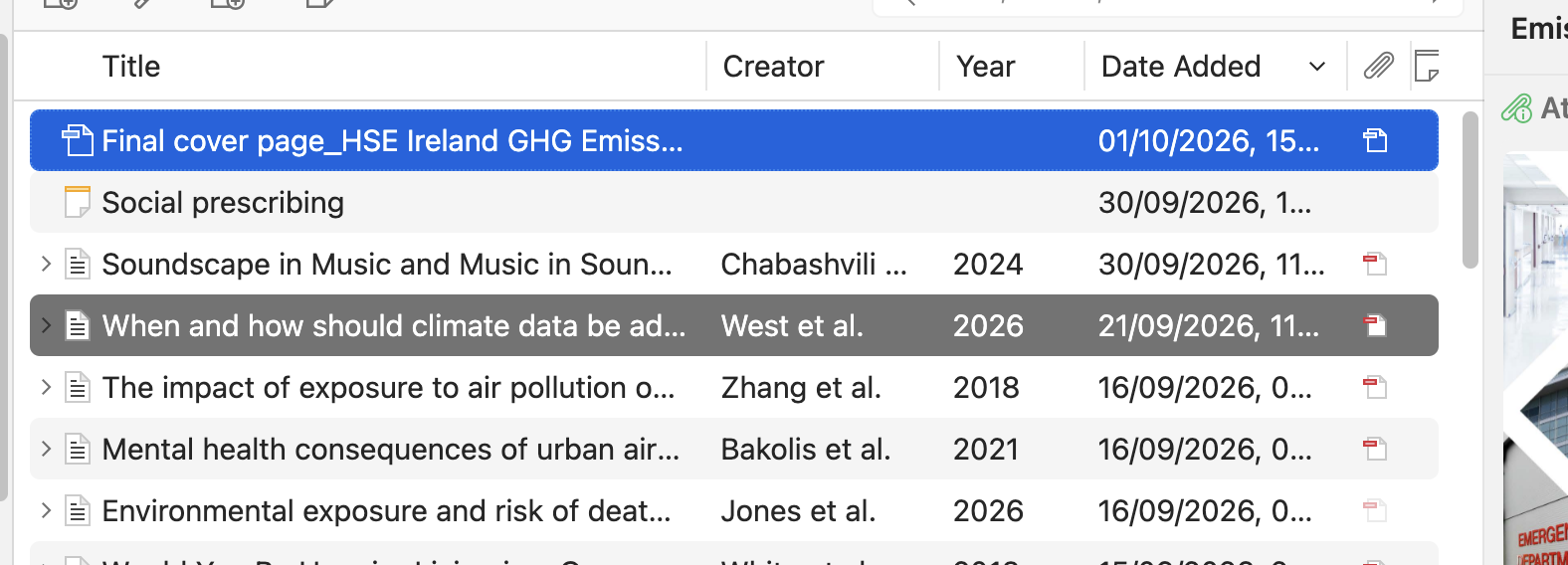
https://s3.amazonaws.com/zotero.org/images/forums/u265723/xuarh9lik0z0tk52ogoi.png
Steps to reproduce:
1. In Explorer, start dragging any file, e.g. a PDF.
2. Move it over the items list and hover a few rows, so the row under the pointer turns grey (the normal drop-target highlight).
3. Move the pointer quickly out of the row and out of the Zotero window, e.g. through the item pane, and release the file outside Zotero.
4. A row stays grey. It is not selected: clicking other items selects them normally in blue.
5. It stays until the next drag over the items list.
It does not happen every time: it depends on how fast the pointer leaves the last row. Moving quickly away from the row while dragging reproduces it within a few tries. The same happens in the collections pane: drag over a few collections and leave quickly.
Probably the same as this earlier report: https://forums.zotero.org/discussion/133039/bug-or-user-issue-random-irremovable-highlighting-of-records