
 Upgrade Storage
LiquidText Integration
Hello I connected the LiquidText-Zotero Integration and can access Zotero files in LT, and can sync back to the Web Zotero instance. I can't get the desktop Zotero to show that PDF annotation though.
Mac Zotero 9.0.6
I tried syncing via sync button and Library - right click, sync.
I checked settings (as pictured below)
https://s3.amazonaws.com/zotero.org/images/forums/u168245/e8mv4n2hgpa2mroqups4.png
I tried resetting file sync history, it saw a conflict in that file, and I chose the remote file, and it still doesn't show in the desktop app.
Thanks!
Mac Zotero 9.0.6
I tried syncing via sync button and Library - right click, sync.
I checked settings (as pictured below)
https://s3.amazonaws.com/zotero.org/images/forums/u168245/e8mv4n2hgpa2mroqups4.png
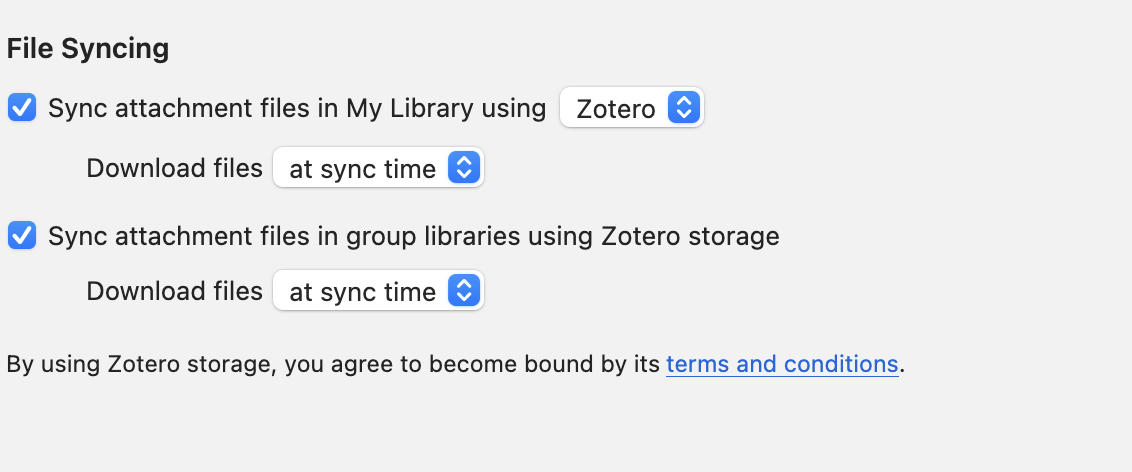
I tried resetting file sync history, it saw a conflict in that file, and I chose the remote file, and it still doesn't show in the desktop app.
Thanks!
For anything that's actually liquid text related, you'd have to ask them or whoever developed the integration (which isn't by Zotero).
It seems to be a problem in "2) The right device hasn’t fully synced"
Here's my steps I followed:
1. I annotate the pdf in LiquidText, and then it shows it is sending to Zotero.
2. I go to web library and I see the annotations appear on the Web Library
3. I go to the desktop client and I click the sync button, it shows that it has synced successfully
4. I open the pdf in the desktop client and it is still the original version (not matching the version on the web library)
Debug: D1347995117
Link: https://www.zotero.org/lpassenger/collections/7YLDQC7T/items/AK46PI4B/attachment/64QBHB9C/item-details
(I also ran the debug log on a sync without making any updates (so only step 4 above): D1378368130)
My zotero desktop version updated to 10.0.4 yesterday, so this problem is also existing in this version.
Thanks!