
 Upgrade Storage
[Plugin] Zotero-TTS: enhance Zotero Read Aloud, more voices, custom shortcuts and highlight colors
Hi everyone,
I've written a plugin that enhances Zotero 10's built-in Read Aloud: it adds voices from providers of your choice, and gives you more control over highlighting and playback. Free and open source (AGPL): https://github.com/xujialiu/Zotero-TTS
https://s3.amazonaws.com/zotero.org/images/forums/u10985638/9zbpylj6mgy77i3zu66u.gif
What it does:
- More voices in the Read Aloud popup (under the Local tier):
- OpenAI or any OpenAI-compatible server.
- Azure Speech,
- Kokoro-FastAPI server
- Zotero's Standard and Premium voices stay as they are.
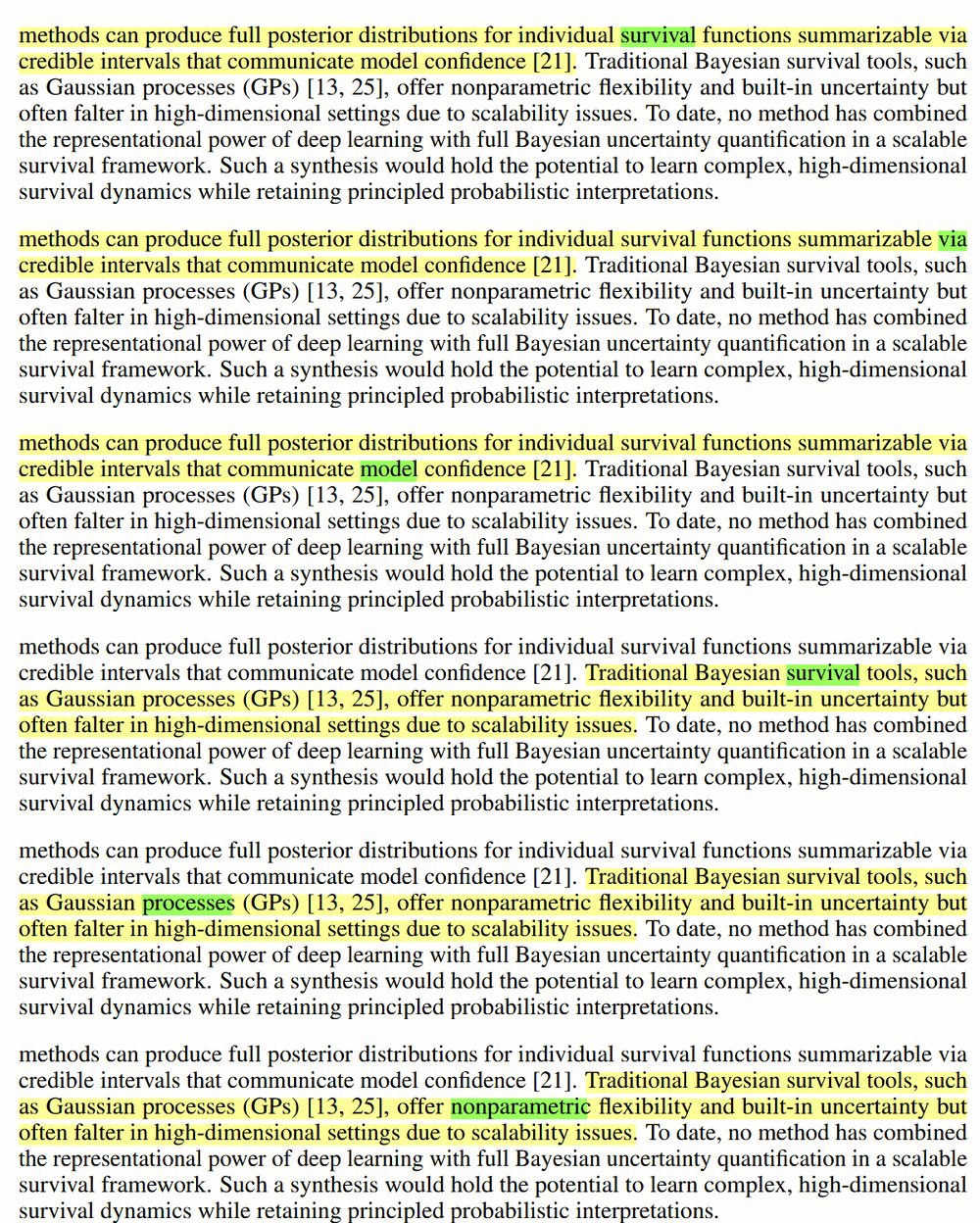
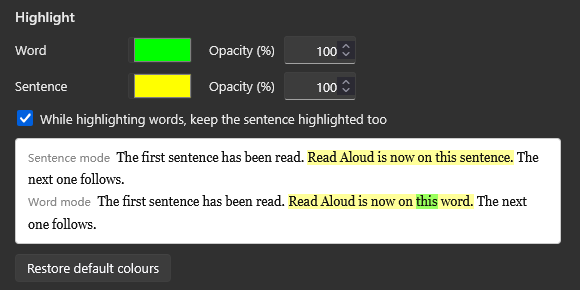
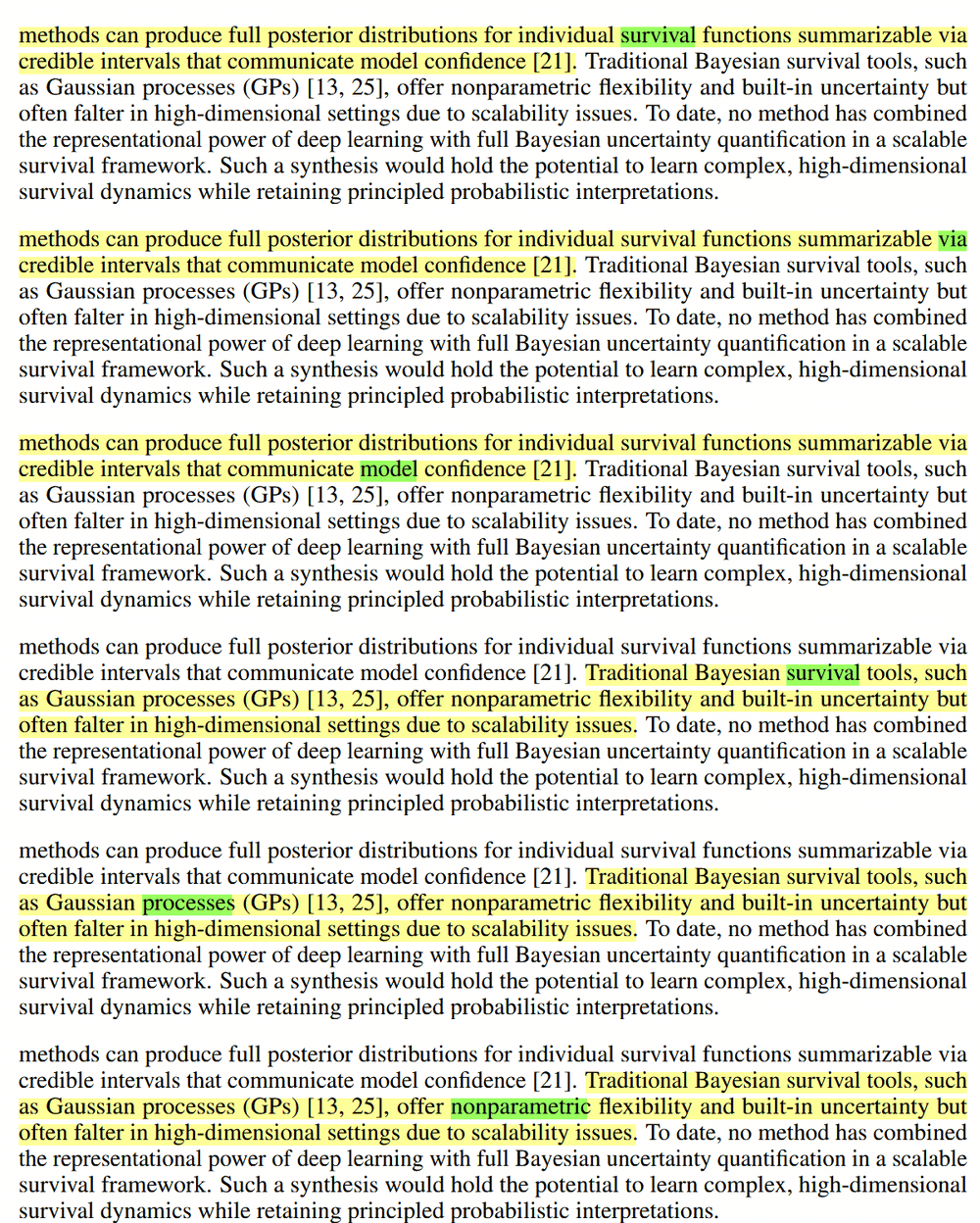
- Word and sentence highlighted at the same time, in colors and opacities you pick.
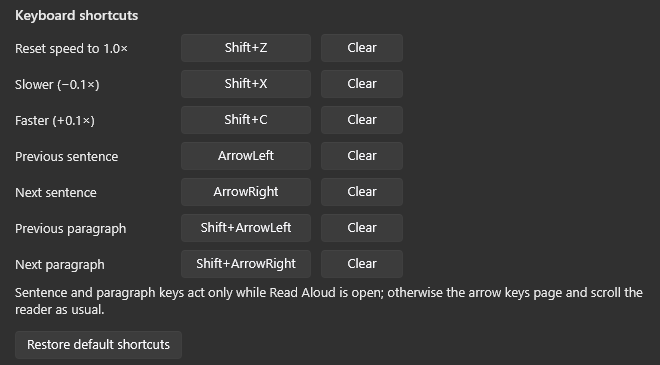
- Keyboard shortcuts, all rebindable: speed down / up / reset, previous / next sentence and paragraph.
https://s3.amazonaws.com/zotero.org/images/forums/u10985638/76blh2x2qznqymetvlwu.png
https://s3.amazonaws.com/zotero.org/images/forums/u10985638/vhrlh12wgeozlincc1w4.png
Everything runs inside Read Aloud itself — no second player. https://raw.githubusercontent.com/xujialiu/Zotero-TTS/main/assets/word-highlight.gif
About the providers:
- OpenAI-compatible option takes a custom base URL, model and voice list, plus extra headers for a server behind a gateway.
- Azure Speech needs a key + region (the free tier gives 500,000 characters a month, word timings included);
- Kokoro-FastAPI is a free local server (CPU or GPU);
The repo has setup tutorials for Azure and for running Kokoro or Chatterbox in Docker.
Install: download zotero-tts.xpi from https://github.com/xujialiu/Zotero-TTS/releases/latest
A few honest caveats: Zotero 10 desktop only.
Feedback, feature requests and bug reports are very welcome — here or on GitHub: https://github.com/xujialiu/Zotero-TTS/issues
I've written a plugin that enhances Zotero 10's built-in Read Aloud: it adds voices from providers of your choice, and gives you more control over highlighting and playback. Free and open source (AGPL): https://github.com/xujialiu/Zotero-TTS
https://s3.amazonaws.com/zotero.org/images/forums/u10985638/9zbpylj6mgy77i3zu66u.gif
What it does:
- More voices in the Read Aloud popup (under the Local tier):
- OpenAI or any OpenAI-compatible server.
- Azure Speech,
- Kokoro-FastAPI server
- Zotero's Standard and Premium voices stay as they are.
- Word and sentence highlighted at the same time, in colors and opacities you pick.
- Keyboard shortcuts, all rebindable: speed down / up / reset, previous / next sentence and paragraph.
https://s3.amazonaws.com/zotero.org/images/forums/u10985638/76blh2x2qznqymetvlwu.png
https://s3.amazonaws.com/zotero.org/images/forums/u10985638/vhrlh12wgeozlincc1w4.png
Everything runs inside Read Aloud itself — no second player. https://raw.githubusercontent.com/xujialiu/Zotero-TTS/main/assets/word-highlight.gif
About the providers:
- OpenAI-compatible option takes a custom base URL, model and voice list, plus extra headers for a server behind a gateway.
- Azure Speech needs a key + region (the free tier gives 500,000 characters a month, word timings included);
- Kokoro-FastAPI is a free local server (CPU or GPU);
The repo has setup tutorials for Azure and for running Kokoro or Chatterbox in Docker.
Install: download zotero-tts.xpi from https://github.com/xujialiu/Zotero-TTS/releases/latest
A few honest caveats: Zotero 10 desktop only.
Feedback, feature requests and bug reports are very welcome — here or on GitHub: https://github.com/xujialiu/Zotero-TTS/issues
I respect all efforts and works done by the Zotero team and this plugin is just something I do for enhancing my own experience of the already very good read aloud function. No intention to hinder the Zotero team interest.
Every audiobook player remembers where you stopped — reopen the book and it picks up from there. Read Aloud doesn't, so I added it to the plugin.
The plugin now remembers a reading position per document. Close a PDF in the middle of listening, open it again later, press Shift+Space, and Read Aloud starts at the exact sentence you left off on. If the document has never been read aloud, it simply starts from the page you are looking at.
Shift+Space is now the single play key and does the right thing in every state:
- reading → pause
- paused → resume
- idle, with text selected → start there (same as right click menu's "Read Aloud from Here")
- idle, nothing selected → resume from where you last stopped
Zotero's default Read Aloud shortcut keys (Cmd/Ctrl-Shift-R/L) also behave exactly like you describe.
It's fine to extend built-in functionality, but please don't misrepresent it. And if something seems like it's not working properly, please just report it as a bug so it can get fixed for everyone.
I'll correct the update above. To state precisely what the plugin adds, so it isn't overstated again:
- Zotero clears the saved position once the view is more than a few pages away from it (isPositionNearView), so "pause, scroll off to check a reference, close" loses it. The plugin keeps a local copy that survives that. I understand this is by design; if Zotero ever keeps it, I'll drop mine.
- It resumes on the sentence rather than the start of the paragraph — thanks for planning to fix that in Zotero.
- Shift+Space is only a rebindable variant of Cmd/Ctrl-Shift-R that pauses instead of closing the popup.
Thanks for the correction, and for Read Aloud — it's the reason this plugin exists.
Try it yourself and if there are any problems, feel free to contact me and I will fix them asap.
You can go to "Tools->Plugins->Settings (gear icon) -> Check for updates" to update all plugins.
BTW, the plugin v1.16.0 is already out with estimated time for doc and section. Check it out.
Shift+R returns to the current sentence without changing the mode; Shift+Enter returns and turns auto-scroll on.
Check it out in v1.16.1. Thanks again for your advice!