
 Upgrade Storage
Change formatting on exported bibliography entries
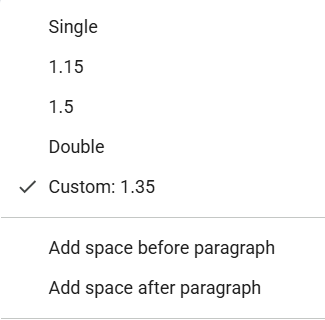
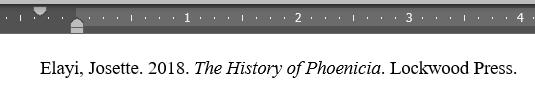
I make use of both Chicago and American Journal of Archaeology (which is based on chicago) citation styles, which require .5 inch hanging indent, single spacing, and space between entries. When I export my citations, they have a weird indentation (in Google Docs, first line at .30 and subsequent lines at .60. In Word, first line is behind 0 and subsequent are at 0), 1.35 spacing, and no space after paragraph.
https://s3.amazonaws.com/zotero.org/images/forums/u15003760/hiav12gcm5jo1xjvdenu.png
https://s3.amazonaws.com/zotero.org/images/forums/u15003760/rh7n1xnwjrbuhzdcnvk6.png
https://s3.amazonaws.com/zotero.org/images/forums/u15003760/48smb9sl9n1x2y2xwkmd.png
The problem exists in both Word and google docs.
Can I change how Zotero formats exported entries? I find it frustrating to keep having to fix them. I assume it has something to do with Edit>Settings>Cite>Tools>Style Editor, but I don't see how to change this.
https://s3.amazonaws.com/zotero.org/images/forums/u15003760/hiav12gcm5jo1xjvdenu.png

https://s3.amazonaws.com/zotero.org/images/forums/u15003760/rh7n1xnwjrbuhzdcnvk6.png
https://s3.amazonaws.com/zotero.org/images/forums/u15003760/48smb9sl9n1x2y2xwkmd.png
The problem exists in both Word and google docs.
Can I change how Zotero formats exported entries? I find it frustrating to keep having to fix them. I assume it has something to do with Edit>Settings>Cite>Tools>Style Editor, but I don't see how to change this.
-
dstillman Zotero Teamedited 28 days agoWhat do you mean by "exported"? Are you using the word processor plugins, copying a bibliography to the clipboard, or exporting to a file? You'll want to use the plugin for proper formatting.
-
audkinneyOh, I was just copying the bibliography to clipboard. I wasn't aware of a google docs plugin, though I do know about the word one.
-
dstillman Zotero TeamZotero can only copy a single format to the clipboard, without knowing where you're going to paste it, and different programs interpret different markup differently. So the only way to get reliable output across different programs is to use the plugins.