
 Upgrade Storage
Issue with generating citation in Zotero web library
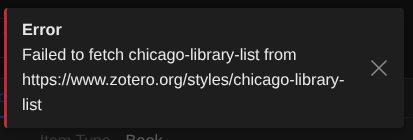
In the Zotero web library, my last selected citation system was Chicago library list but since a few days every time I click the generate citation button it gives me this error and the page gets stuck in a loading screen, I cannot close the notification and the loading does not seem to end. It seems that the cause is that the Chicago library list is not supported anymore which is fine however I can also not select a different citation system since that choice is (as far as I am aware) locked behind the generate citation button (or the generate bibliography option but that does the same as the generate citation button).
https://s3.amazonaws.com/zotero.org/images/forums/u8547551/h8l3oc1rhqpq81s17ykp.png
https://s3.amazonaws.com/zotero.org/images/forums/u8547551/h8l3oc1rhqpq81s17ykp.png
Here is a workaround you can use to clear this problem now:
While on the web library page, open the browser console and run:
localStorage.removeItem('zotero-web-library-prefs')
then reload the page. Note: this also clears your other web library preferences, most notably the column order, so you'll need to reconfigure those afterward.