
 Upgrade Storage
[Bug] Style Preview Window
Report-ID: 218139140
Debug-ID: D2002146590
Hello,
I experience the following problem after having updated to Zotero 10 (it worked fine in Zotero 9):
The Style Preview Window (via Edit --> Settings --> Cite) jumps into the background whenever I click on "Refresh", so that the main window of Zotero is now in the foreground and I always have to switch the window again. Moreover, a small bugged window appears in the bottom right corner, saying "Create Bibliography from Items... Zotero Style Preview" (see attached picture - the bugged window disappears after clicking on it).
Kind regards,
Goethe
https://s3.amazonaws.com/zotero.org/images/forums/u20067623/7l0dq9m0w2xy5oc2ba9v.png
Debug-ID: D2002146590
Hello,
I experience the following problem after having updated to Zotero 10 (it worked fine in Zotero 9):
The Style Preview Window (via Edit --> Settings --> Cite) jumps into the background whenever I click on "Refresh", so that the main window of Zotero is now in the foreground and I always have to switch the window again. Moreover, a small bugged window appears in the bottom right corner, saying "Create Bibliography from Items... Zotero Style Preview" (see attached picture - the bugged window disappears after clicking on it).
Kind regards,
Goethe
https://s3.amazonaws.com/zotero.org/images/forums/u20067623/7l0dq9m0w2xy5oc2ba9v.png
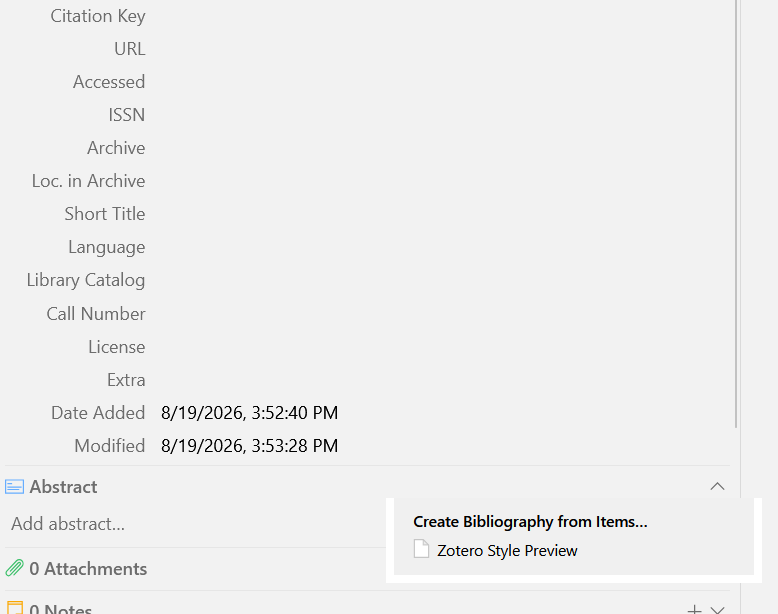
(That popup has always appeared as part of the main window, but Zotero 10 fixed a bug that could cause those popups to appear on top of other apps, and a side effect on Windows is apparently to bring the main window to the front. It also looks like you're seeing a rendering issue, which we'll also look into.)