
 Upgrade Storage
Repited constant error when starting Zotero 10.0-beta.23
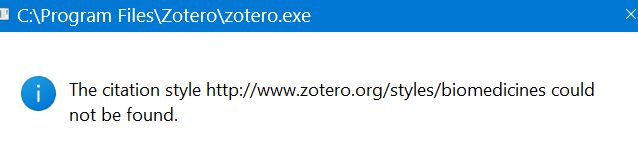
Since installing Zotero 10.0‑beta.22, I’ve been getting a constant error every time Zotero starts. When I try to generate a bibliography in a previously working Word document, I get the same error.
Screenshot:
https://s3.amazonaws.com/zotero.org/images/forums/u39229/4urfy6nl1e93jnha3ixv.png
Below is the full error log I’m seeing. The report ID is 22074140. The log shows repeated messages such as:
“ChromeUtils.import() has been removed. Use importESModule()…”
“ItemTreeColumnManager: The 'defaultIn' property is deprecated. Use 'enabledTreeIDs' instead.”
“TypeError: can't access property '_resetColumns', this.tree is undefined” (itemTree.js:2941)
Multiple TimeoutError entries from chrome://zotero/content/xpcom/db.js
I’m currently on Zotero 10.0‑beta.23+14fd49985 (Windows 11) and using several plugins (Better Notes, ZotMeta, Zoplicate, Reading List, Linter, Weavero, etc.)
Any guidance on what’s causing this and how to fix it would be appreciated.
Thanks
Screenshot:
https://s3.amazonaws.com/zotero.org/images/forums/u39229/4urfy6nl1e93jnha3ixv.png
Below is the full error log I’m seeing. The report ID is 22074140. The log shows repeated messages such as:
“ChromeUtils.import() has been removed. Use importESModule()…”
“ItemTreeColumnManager: The 'defaultIn' property is deprecated. Use 'enabledTreeIDs' instead.”
“TypeError: can't access property '_resetColumns', this.tree is undefined” (itemTree.js:2941)
Multiple TimeoutError entries from chrome://zotero/content/xpcom/db.js
I’m currently on Zotero 10.0‑beta.23+14fd49985 (Windows 11) and using several plugins (Better Notes, ZotMeta, Zoplicate, Reading List, Linter, Weavero, etc.)
Any guidance on what’s causing this and how to fix it would be appreciated.
Thanks
If the problem persists after that, see if you can reproduce the error after disabling all plugins.
Thanks!
Turning off a couple of plugins fixed the problem.