
 Upgrade Storage
Zotero won't update and indicates another version of zotero is running
Hello,
I have had a persistent problem updating Zotero.
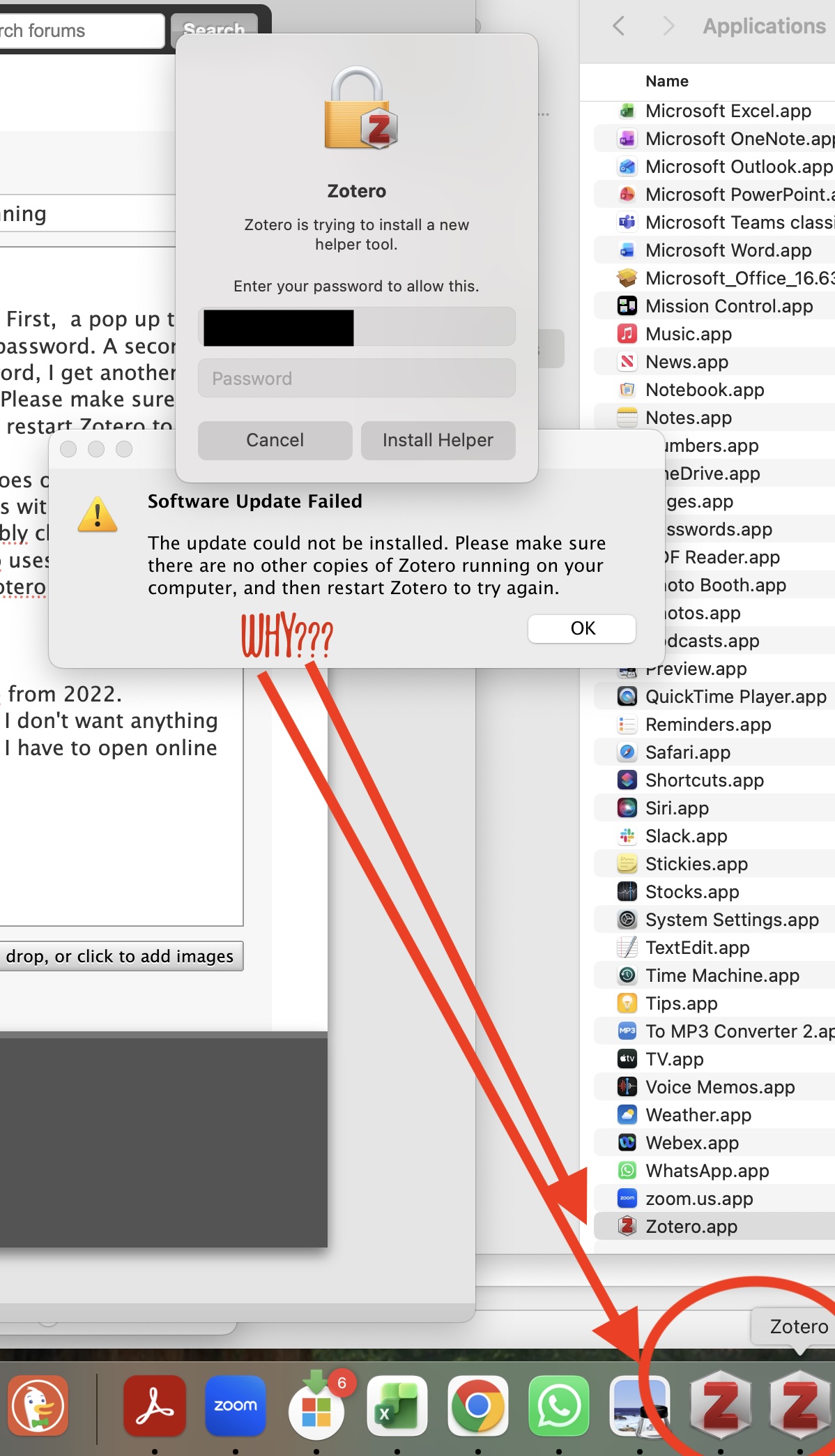
When I open my desktop version of Zotero, several things happen. First, a pop up tells me "zotero is trying to install a new helper tool" and requests my password. A second zotero icon shows up on my dock. Before I can even enter a password, I get another popup "Software Update Failed: the update could not be installed. Please make sure there are no other copies of Zotero running on your computer, and then restart Zotero to try again.
When I enter my password and press "install helper" then Zotero does open, but I get a popup telling Zotero.app would like to access data from other apps with a don't allow and allow button. Clicking allow or do not allow does not discernably change anything.
Also a pop up saying Zotero Integration error: the pipe that Zotero uses to communicate with the word processor could not be initialized. Would you like Zotero to attempt to correct this error? You will be prompted for this password.
Clocking ok on that fixes nothing.
When I look in finder at my apps, I only have one version of Zotero from 2022.
I cannot copy and past a citation out of Zotero into my word docs. I don't want anything fancy, I just want to copy and paste citations, and this won't work. I have to open online zotero to have this option which is not ideal.
I am using Mac OS Sequoia 15.3.1 and MS Word for Mac 365.
https://s3.amazonaws.com/zotero.org/images/forums/u1918425/nn23r0kk2fwol48ho3nb.jpg
I have had a persistent problem updating Zotero.
When I open my desktop version of Zotero, several things happen. First, a pop up tells me "zotero is trying to install a new helper tool" and requests my password. A second zotero icon shows up on my dock. Before I can even enter a password, I get another popup "Software Update Failed: the update could not be installed. Please make sure there are no other copies of Zotero running on your computer, and then restart Zotero to try again.
When I enter my password and press "install helper" then Zotero does open, but I get a popup telling Zotero.app would like to access data from other apps with a don't allow and allow button. Clicking allow or do not allow does not discernably change anything.
Also a pop up saying Zotero Integration error: the pipe that Zotero uses to communicate with the word processor could not be initialized. Would you like Zotero to attempt to correct this error? You will be prompted for this password.
Clocking ok on that fixes nothing.
When I look in finder at my apps, I only have one version of Zotero from 2022.
I cannot copy and past a citation out of Zotero into my word docs. I don't want anything fancy, I just want to copy and paste citations, and this won't work. I have to open online zotero to have this option which is not ideal.
I am using Mac OS Sequoia 15.3.1 and MS Word for Mac 365.
https://s3.amazonaws.com/zotero.org/images/forums/u1918425/nn23r0kk2fwol48ho3nb.jpg
-
margaret.hobart.phdSolved problem by deleting desktop app and reloading the updated one.