
 Upgrade Storage
Search reset
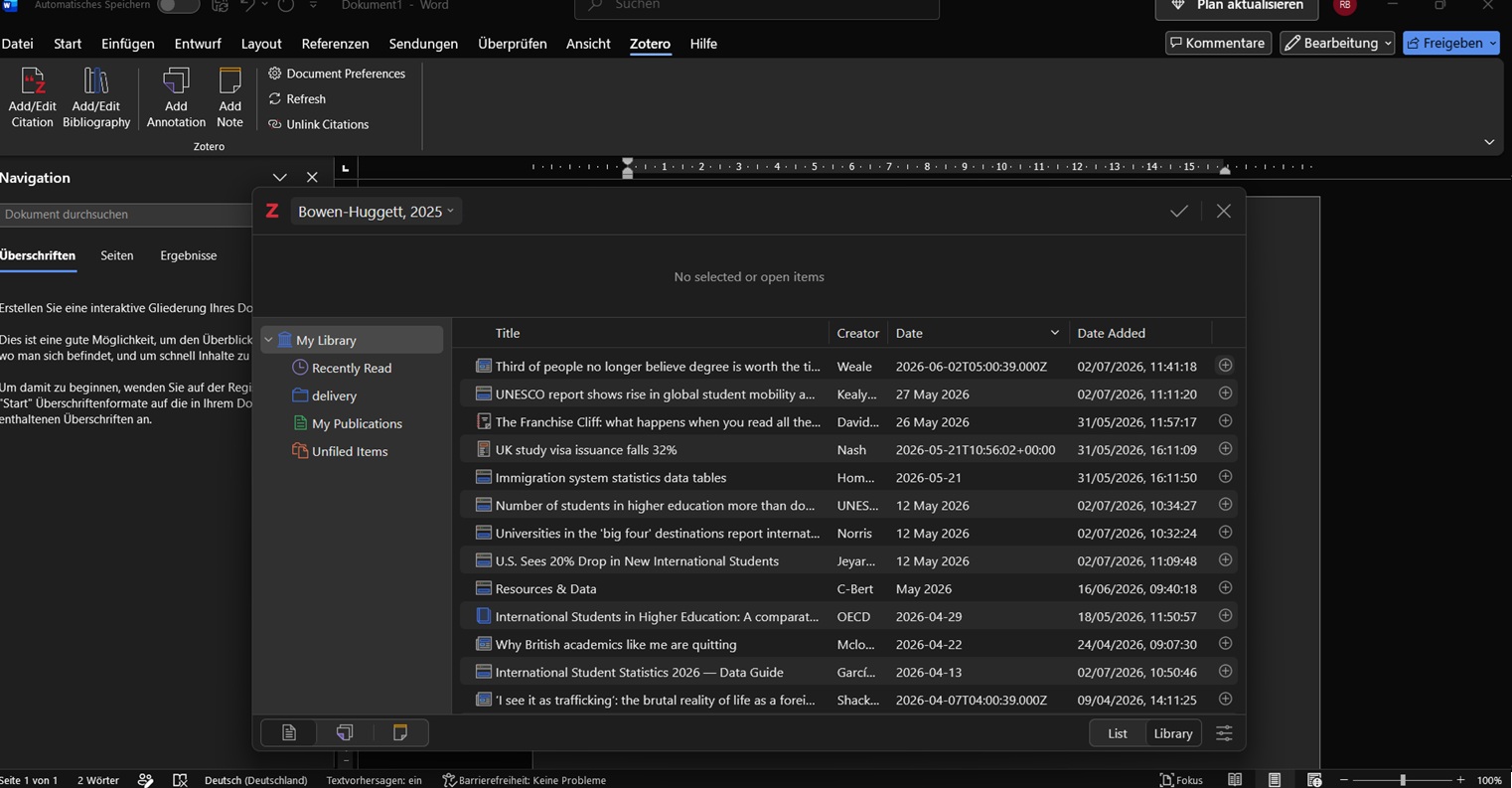
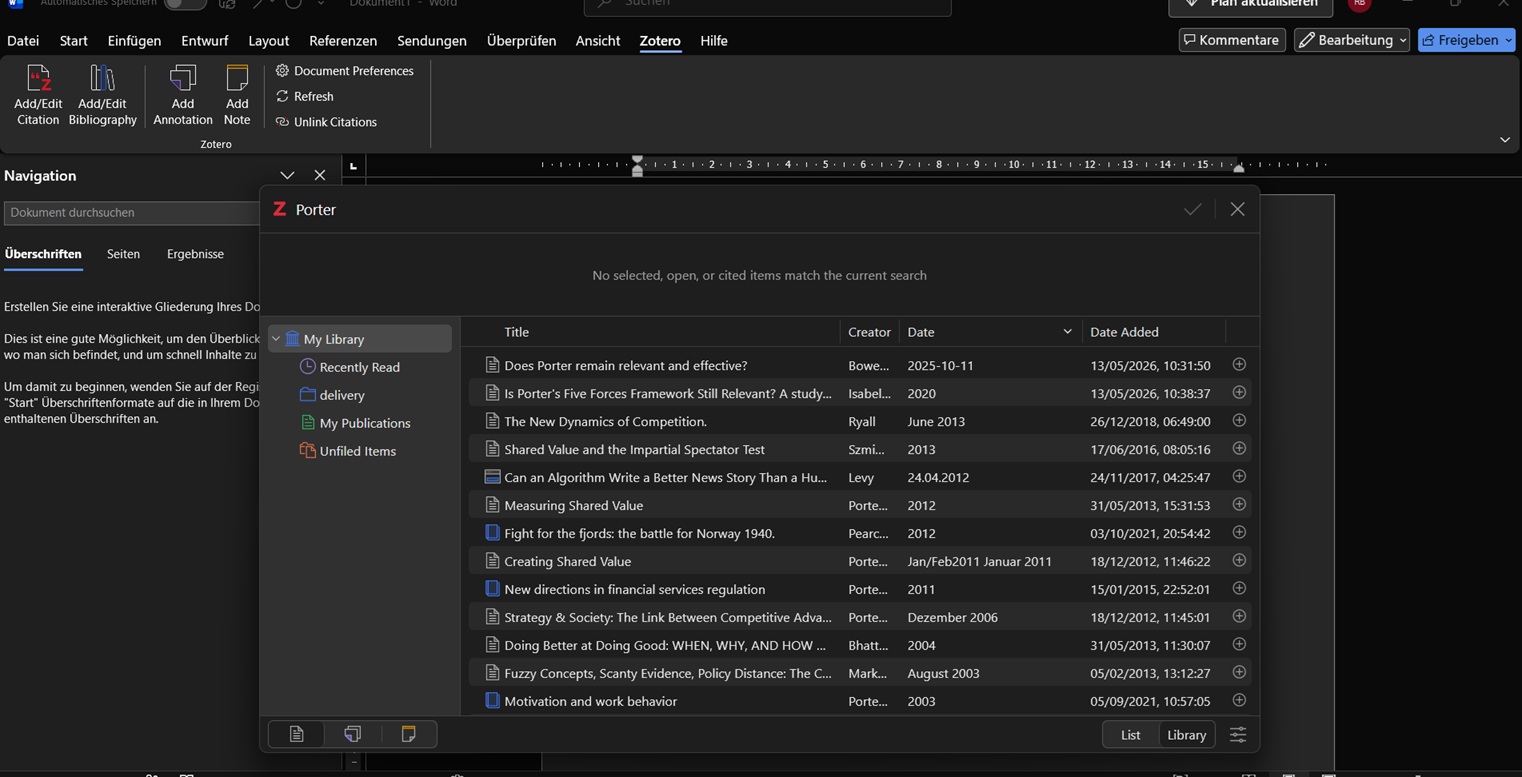
When I search for a reference and the system filters the relevant results, the displayed items reset after selecting ONE reference. If I wish to add a second reference from the very same keyword I need to do the search again.
This is not helpful, can this PLEASE be revisited so that keyword search filtered items remain until a new search term is entered or the selected references are validated?
https://s3.amazonaws.com/zotero.org/images/forums/u1123309/ixmvj15m13uwwxllpt1b.jpg
https://s3.amazonaws.com/zotero.org/images/forums/u1123309/uiw4temxq6wf9iubseet.jpg
This is not helpful, can this PLEASE be revisited so that keyword search filtered items remain until a new search term is entered or the selected references are validated?
https://s3.amazonaws.com/zotero.org/images/forums/u1123309/ixmvj15m13uwwxllpt1b.jpg
https://s3.amazonaws.com/zotero.org/images/forums/u1123309/uiw4temxq6wf9iubseet.jpg
https://s3.amazonaws.com/zotero.org/images/forums/u2433/tya1d6vwtz207vw93g59.png
The previous citation dialogue allowed "Multiple" and "Single" sources in a much more obvious fashion. It also maintained the keyword search when you moved one of the filtered sources into the "multiple" box on the right.
Your description would also make it "unintuitive" how to perform a second keyword search for the same in text citation. I can assure you that is clear. The search bar is very prominent.
The underlying problem is a workflow that is disconnected from the previous experience and smooth workflow.
The + button to the right of the individual sources is the obvious way to add a source.
However, I cannot be convinced that this logically means I want to reset the filtered results from my keyword search. We can use the word counterintuitive.
It's super quick to select multiple items and you know how, even if you don't find it intuitive. Hard to argue about intuition, I find pressing return pretty natural but YMMV.
But if the search filter remained active, it'd have to keep displaying the previous search term(s) next to the added item, which would mean you'd have to delete it to
a) return to the full view
b) search for something different
c) add a page number
where especially b and c are fairly frequent operations. Making these more cumbersome would certainly significantly impact my user experience.
One issue is that pressing the plus button only works for the source where you press it, even if you select hundreds of others. You also cannot press the tick button as it is greyed out.
The most "intuitive" follow up from that is to add each source individually, which is definitely more cumbersome as you retype keywords multiple times. Pressing return when all the sources you want are selected is not on my list of the most logical option.
Your own argument and a,b,c also contradicts itself here.
Say your argument where pressing return is logical. You still need to perform the second search - same as I - and I cannot see how that is in line with your logic or how your way of doing that is different from when I do it.
Adding page numbers is easier once you have all your sources selected. THAT change in the citation dialogue is actually way better than the old dialogue.
The second issue I begin to have is that all similar threads about the new citation dialogue seem to be defending the new normal and argue that others are doing it wrong for not recognising brilliance when they see it.
I think it is much easier to understand if I put it like this:
Keyword search -> results
New dialogue: highlight all sources you want, press return
Old dialogue: highlight all sources you want, press the >>> button for multiple sources.
New/same keyword search (intuition issue)
New dialogue: type (new/same) keywords to filter sources
Old dialogue: old filter remains, only if new keywords are needed you type a new search. (much more structured approach imho)
Transfer finalised citations
New dialogue: press return (again) or click tick icon
Old dialogue: click "finish"
Going through this I would add that pressing return prematurely and initiating the transfer before you are done is also much more likely in the new dialogue.