
 Upgrade Storage
[Plugin] Reading Flow — Progress / Status / Last Read columns for Zotero 9,10 reading workflows
Hi all,
Updated for v1.3.6 — Zotero 9 and 10
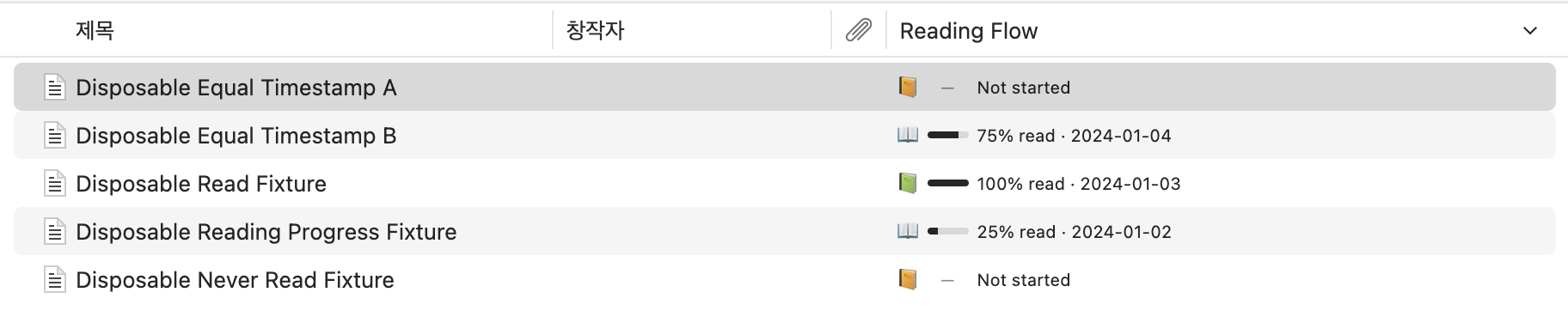
Reading Flow is a small, local-first Zotero plugin for keeping reading progress, status, and last-read time visible directly in the library item tree. It is designed for managing a real research library without an external database, telemetry, or PDF modification.
Reading Flow in Zotero:
https://s3.amazonaws.com/zotero.org/images/forums/u19432898/mx5sk2ovolg6sojk89ny.png
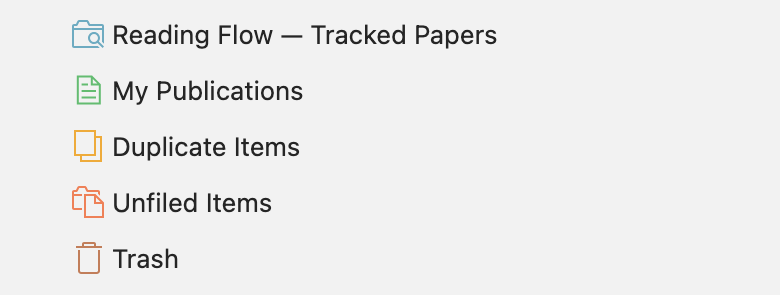
Tracked papers in Zotero's left sidebar:
https://s3.amazonaws.com/zotero.org/images/forums/u19432898/573v9hs2pzocr9g9i1yu.png
What it does
- Adds Progress, Status, and Last Read columns to the Zotero item tree.
- Tracks PDF reading progress while you read and can reopen the tracked PDF near its saved page.
- Lets you manually mark selected papers as To Read, Reading, Skimmed, Read, or Important.
- Supports bulk status changes for selected regular items (or their PDF attachments). Updates affecting 100 or more papers ask for confirmation, and multi-item updates report changed, unchanged, skipped, and failed items.
- Keeps papers without a manual status or recorded PDF progress as Unassigned, so a large existing library is not automatically labelled “To Read”.
- Lets you opt into a prospective default status for eligible papers newly added after the setting is changed. Existing, historical sync, read-only, attachment, and already-tracked items are preserved.
- Adds Reading Flow — Tracked Papers as one native Saved Search under Saved Searches in the selected editable library’s left sidebar. It lists top-level papers with Reading Flow data; it is not a separate plugin sidebar or a status-specific folder.
- Stores Reading Flow data in one namespaced ReadingFlow: line in the parent item’s Extra field.
Compatibility
- Zotero 9.0.x and 10.0.x
- Validated with Zotero 10.0 on macOS ARM64
- Plugin ID: readingflow@moon.com
Install
Latest XPI:
https://github.com/Moonweave-Research/zotero-reading-flow/releases/latest/download/zotero-reading-flow.xpi
Auto-update manifest:
https://github.com/Moonweave-Research/zotero-reading-flow/releases/latest/download/updates.json
Repository, screenshots, and issues:
https://github.com/Moonweave-Research/zotero-reading-flow
Feedback is welcome, especially on multi-attachment items, unusual PDF page-count metadata, and workflow ideas that would make the plugin more useful in real research reading.
Updated for v1.3.6 — Zotero 9 and 10
Reading Flow is a small, local-first Zotero plugin for keeping reading progress, status, and last-read time visible directly in the library item tree. It is designed for managing a real research library without an external database, telemetry, or PDF modification.
Reading Flow in Zotero:
https://s3.amazonaws.com/zotero.org/images/forums/u19432898/mx5sk2ovolg6sojk89ny.png
Tracked papers in Zotero's left sidebar:
https://s3.amazonaws.com/zotero.org/images/forums/u19432898/573v9hs2pzocr9g9i1yu.png
What it does
- Adds Progress, Status, and Last Read columns to the Zotero item tree.
- Tracks PDF reading progress while you read and can reopen the tracked PDF near its saved page.
- Lets you manually mark selected papers as To Read, Reading, Skimmed, Read, or Important.
- Supports bulk status changes for selected regular items (or their PDF attachments). Updates affecting 100 or more papers ask for confirmation, and multi-item updates report changed, unchanged, skipped, and failed items.
- Keeps papers without a manual status or recorded PDF progress as Unassigned, so a large existing library is not automatically labelled “To Read”.
- Lets you opt into a prospective default status for eligible papers newly added after the setting is changed. Existing, historical sync, read-only, attachment, and already-tracked items are preserved.
- Adds Reading Flow — Tracked Papers as one native Saved Search under Saved Searches in the selected editable library’s left sidebar. It lists top-level papers with Reading Flow data; it is not a separate plugin sidebar or a status-specific folder.
- Stores Reading Flow data in one namespaced ReadingFlow: line in the parent item’s Extra field.
Compatibility
- Zotero 9.0.x and 10.0.x
- Validated with Zotero 10.0 on macOS ARM64
- Plugin ID: readingflow@moon.com
Install
Latest XPI:
https://github.com/Moonweave-Research/zotero-reading-flow/releases/latest/download/zotero-reading-flow.xpi
Auto-update manifest:
https://github.com/Moonweave-Research/zotero-reading-flow/releases/latest/download/updates.json
Repository, screenshots, and issues:
https://github.com/Moonweave-Research/zotero-reading-flow
Feedback is welcome, especially on multi-attachment items, unusual PDF page-count metadata, and workflow ideas that would make the plugin more useful in real research reading.
Could the progress bar work similarly for website snapshots? I assume that the "p." represents percentage as well, only it's being displayed as a number instead of a bar.
https://s3.amazonaws.com/zotero.org/images/forums/u14784801/bqs6rk8yk8q9j3bfdf6g.png
@talkingdrumbooks Thank you — I’m glad the PDF workflow has been working smoothly for you. Could you please open a GitHub issue for website snapshot progress, ideally with a screenshot and a short description of the behavior you’re seeing? I’ll review whether it can be supported reliably and consider it for a future update.
(1) An option to manually change the reading status of all things in the library and (2) a reading status that is basically null. I have thousands of items and now all of them say "To Read", which isn't really helpful for me. I want to denote the important ones myself--not have them be set automatically. It might also be nice to (3) be able to set or change the default reading status of items that I have just added. Lastly, (4) a dedicated folder(s) on the side pane under Recently Read that is effectively a Reading List, and I can choose which status categories appear in the folder. For example, "To Read" but also "Read" and "Skimmed".
1. You can select multiple regular items (or PDF attachments, which are applied to their parent items) and use the Reading Flow menu to set a status in bulk. Updates affecting 100 or more papers ask for confirmation first. Multi-item updates then report changed, unchanged, skipped, and failed items.
2. Untouched papers now remain Unassigned rather than all appearing as “To Read”. For an item with a manual status, use Clear Manual Status (Use Automatic) to let its recorded PDF progress determine the status again. Use Restart as To Read only when you explicitly want that state.
3. In Settings → Zotero Reading Flow, Status for newly added papers lets you choose an opt-in default for eligible papers added from that point onward. It does not rewrite existing papers, historical sync items, attachments, read-only items, or papers that already contain Reading Flow data.
4. The settings page can now add Reading Flow — Tracked Papers as a native Saved Search under Saved Searches in the selected editable library’s left sidebar. It is a tracked-papers list rather than a status-specific folder, because a Zotero Saved Search cannot exactly reproduce Reading Flow’s calculated Reading/Read states.
The release supports Zotero 9.0.x and 10.0.x:
https://github.com/Moonweave-Research/zotero-reading-flow/releases/tag/v1.3.6
The README also includes a sidebar screenshot:
https://github.com/Moonweave-Research/zotero-reading-flow#put-your-tracked-papers-in-zoteros-left-sidebar