
 Upgrade Storage
Word for Mac plugin not working after Zotero 9.0.4 upgrade
Hello!
I just upgraded to Zotero 9.0.4 on my Mac and the Word plugin no longer works. Here are my particulars:
Mac - Tahoe 26.5.1
Word - 16.110
I manually deleted the zotero.dotm file from the startup folder in Word and restarted to ensure Zotero did not load. I exited Word, then used the "Reinstall" button in Zotero to copy the new zotero.dotm file into the folder. I visually verified the folder had a fresh install of the .dotm file then restarted Word, and still got the same error. So, I'm pretty sure I've tested about as far as I can. The error I'm getting is below:
https://s3.amazonaws.com/zotero.org/images/forums/u1570083/sfaiwgahzxf593vwybdq.png
Any ideas about what to try next?
Thanks in advance!
I just upgraded to Zotero 9.0.4 on my Mac and the Word plugin no longer works. Here are my particulars:
Mac - Tahoe 26.5.1
Word - 16.110
I manually deleted the zotero.dotm file from the startup folder in Word and restarted to ensure Zotero did not load. I exited Word, then used the "Reinstall" button in Zotero to copy the new zotero.dotm file into the folder. I visually verified the folder had a fresh install of the .dotm file then restarted Word, and still got the same error. So, I'm pretty sure I've tested about as far as I can. The error I'm getting is below:
https://s3.amazonaws.com/zotero.org/images/forums/u1570083/sfaiwgahzxf593vwybdq.png
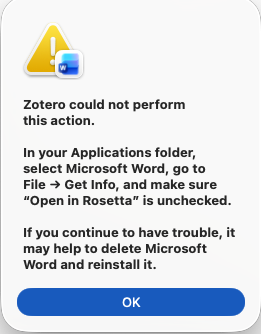
Any ideas about what to try next?
Thanks in advance!
I don't have Rosetta installed and this was not an option for me when I tried.
I am trying to avoid uninstalling and reinstalling Word if possible, as that seems to be a pretty drastic response to a Zotero upgrade?
https://s3.amazonaws.com/zotero.org/images/forums/u1570083/opun5exfbkcbhxo2kuxi.png
However, when I try to open the macro as you suggest using VB Editor, things get interesting... the project shows there, as does EndNote (which I haven't tested since I keep it there only as a backup). When I try to open either of the projects, I get this message:
https://s3.amazonaws.com/zotero.org/images/forums/u1570083/7cr2s9pcxzqy5j4mkucg.png
And, when I try to use EndNote in a fresh document, it doesn't work either. So, evidently, something weird is going on in Word with these plugins.
I may be forced to uninstall Word anyway, and see if this gets me somewhere.
I'll keep you posted, and thank you for the help with troubleshooting!
A reinstall solved the issue, whatever it was.
Sorry for the hassle, thanks for the help!