
 Upgrade Storage
Word integration laggy, stuttering, incorrect
(No Zotero updates available as of posting.)
When trying to add citations to mere 15-page document, response of popup interface is very slow and sometimes only resolved if I click over to Zotero main program. I can type in a keyword, there will be no response (only document showing is the one I input previously, which seems "stuck" to the results as a selected item, regardless of whether it matches keyword I typed). Possible matches will only appear after I return from having Zotero as foreground. Then, clicking the one I want will not respond - I have to click out of Word and over to main Zotero again. Then back. The citation will now be included twice in the popup.
Quite frustrating.
Additionally, the keyword matching is not pulling up like it used to, especially if diacritics are involved. I can search for "perez" in Zotero main, but in the Word popup, it will not populate. I have to go search in Zotero main window to find the other author's name (who thankfully doesn't have a diacritical, but is not the name I remember how to spell offhand), and go back to search in the Word popup for that name instead.
See screenshot pastes attached.
https://s3.amazonaws.com/zotero.org/images/forums/u10211737/4u9mkg9ljflzenfaohka.png
When trying to add citations to mere 15-page document, response of popup interface is very slow and sometimes only resolved if I click over to Zotero main program. I can type in a keyword, there will be no response (only document showing is the one I input previously, which seems "stuck" to the results as a selected item, regardless of whether it matches keyword I typed). Possible matches will only appear after I return from having Zotero as foreground. Then, clicking the one I want will not respond - I have to click out of Word and over to main Zotero again. Then back. The citation will now be included twice in the popup.
Quite frustrating.
Additionally, the keyword matching is not pulling up like it used to, especially if diacritics are involved. I can search for "perez" in Zotero main, but in the Word popup, it will not populate. I have to go search in Zotero main window to find the other author's name (who thankfully doesn't have a diacritical, but is not the name I remember how to spell offhand), and go back to search in the Word popup for that name instead.
See screenshot pastes attached.
https://s3.amazonaws.com/zotero.org/images/forums/u10211737/4u9mkg9ljflzenfaohka.png
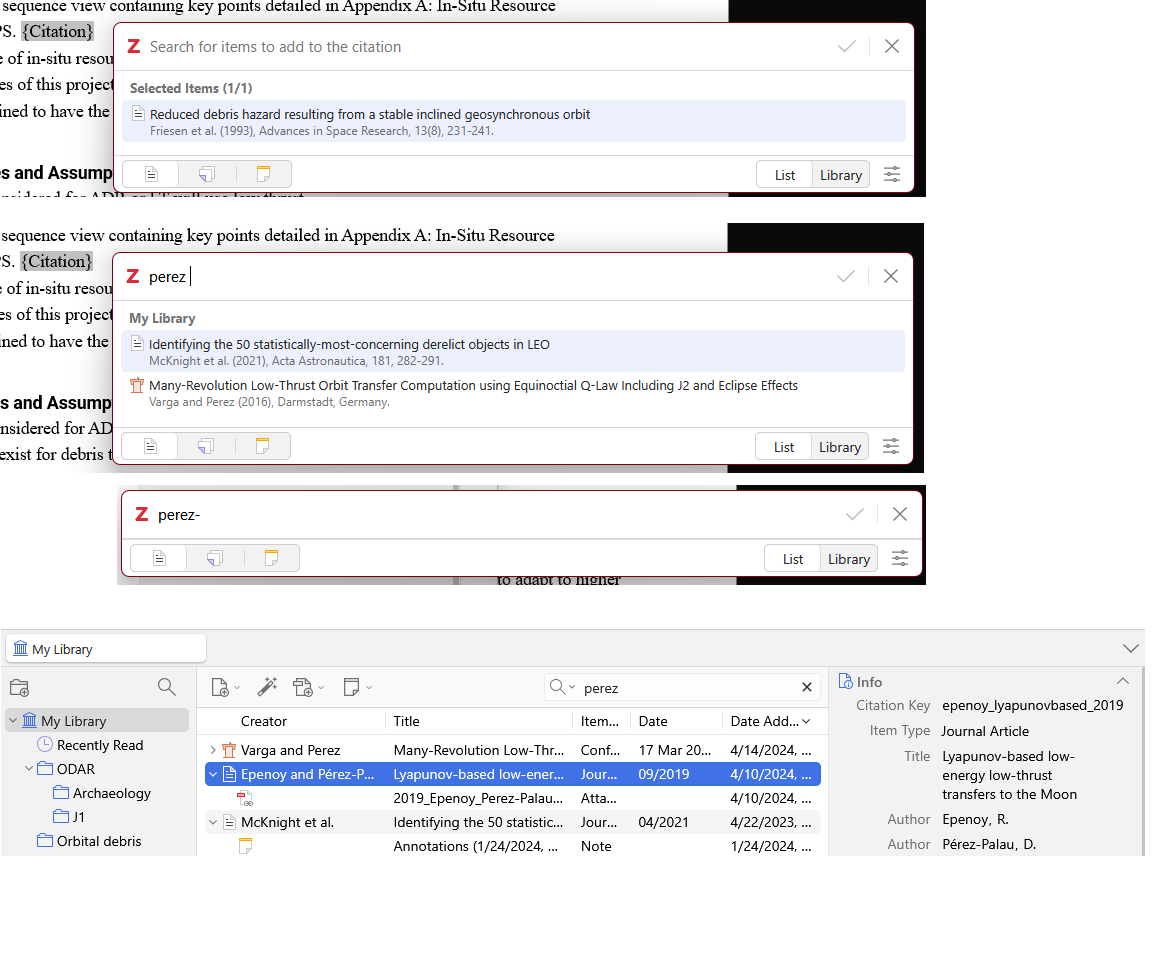
Note that the Word add-on should list items currently selected in Zotero, so you can just search in Zotero, then move to Word and the item would be listed in the Word add-on right after you click add/edit citation.
For the second issue, does this happen in troubleshooting mode, too? If so, I'd expect a debug ID for a broken add citation process would be helpful:
https://www.zotero.org/support/debug_output
2- now I understand why mystery items are appearing as selected. Ugh, duh! thanks.
3 - by second issue do you mean the lagging response? I will learn how to do a debug correctly and try to reproduce. I just restarted my whole system, so please give me a bit for that. Thanks
For the UI lag, you may also make a screen recording reproducing the issue, upload it to a file sharing platform and post the link here so we can see exactly what you are referring to.