
 Upgrade Storage
Broken links between "storage" folders and Zotero database
Hello, I have a large library, with >2,000 citations included. In summer 2025, I got a new computer. I moved my Zotero library and files to my new computer and have been using it since then, but my PDFs that I've saved over the years appear to have come unlinked.
When I navigate to the Zotero-->storage path on my computer where PDFs are stored and I open an individual folder, I can see that a PDF is there.
Then, if I go to Zotero to try to see where it's looking for the PDF, it shows me it's looking in the same "Zotero-->storage" but the random assortment of 8 letters/numbers is different (which tells me it is looking in the wrong spot). The trouble is, my computer doesn't contain a folder with that random assortment of letters.
I cannot reimport the PDF, because Zotero seems to "think" it has the PDF even though it's grayed out and gives me an error when I try to open it, saying "The attached file could not be found at the following path...[path]...It may have been moved or deleted outside of Zotero, or, if the file was added on another computer, it may not yet have been synced to or from zotero.org."
Does anyone have tips on what I should do? >2000 references is too many to go relink via these randomly assigned strings of letters. And, I cannot seem to reimport the PDFs because Zotero thinks it has them even though it cannot open them. Tips very welcome!!
https://s3.amazonaws.com/zotero.org/images/forums/u14203551/gxseyg971o26p8asv281.png
When I navigate to the Zotero-->storage path on my computer where PDFs are stored and I open an individual folder, I can see that a PDF is there.
Then, if I go to Zotero to try to see where it's looking for the PDF, it shows me it's looking in the same "Zotero-->storage" but the random assortment of 8 letters/numbers is different (which tells me it is looking in the wrong spot). The trouble is, my computer doesn't contain a folder with that random assortment of letters.
I cannot reimport the PDF, because Zotero seems to "think" it has the PDF even though it's grayed out and gives me an error when I try to open it, saying "The attached file could not be found at the following path...[path]...It may have been moved or deleted outside of Zotero, or, if the file was added on another computer, it may not yet have been synced to or from zotero.org."
Does anyone have tips on what I should do? >2000 references is too many to go relink via these randomly assigned strings of letters. And, I cannot seem to reimport the PDFs because Zotero thinks it has them even though it cannot open them. Tips very welcome!!
https://s3.amazonaws.com/zotero.org/images/forums/u14203551/gxseyg971o26p8asv281.png
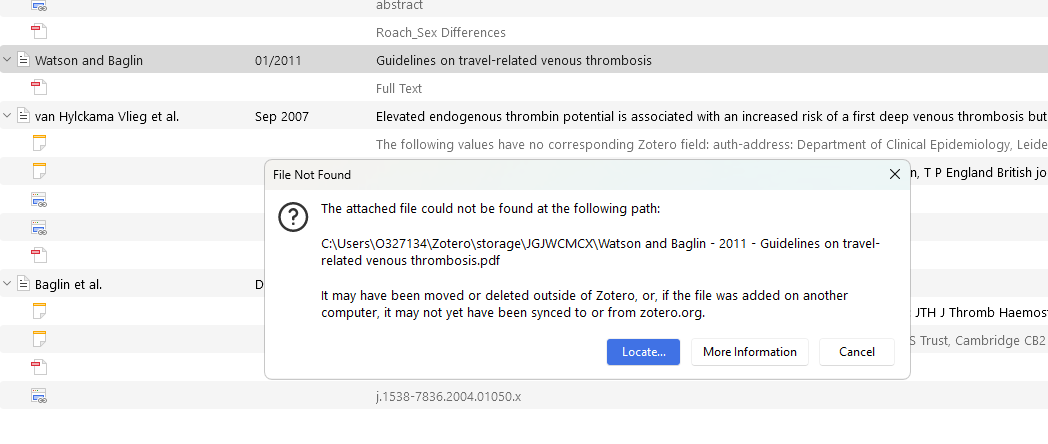
If you still have your old computer, you could either copy all the 'storage' subfolders to this computer or add a storage subscription and sync:
https://www.zotero.org/support/kb/transferring_a_library
(You might see another copy in your 'storage' folder from a group library or duplicate. Those are totally separate items, and they don't mean Zotero is looking in the wrong place.)
So, if I add a storage subscription and sync, do you think that this problem will be fixed?
(Can't tell you what you did when you copied the files, but I'm afraid you didn't copy them to the correct place. You can search your new computer for those folder names and see if they ended up somewhere else.)
I'd be happy to pay for the storage if this would fix it - but it sounds like unfortunately that may not do the trick for me at this stage. But maybe could save me in the future from this happening again.
I'll do some looking on my computer for the 8 character strings to see if I can find the files - good tip. Thanks.
If I accept this as what has happened, what would you recommend as next steps to get a large library back to functional again, where PDFs are openable? I think I could 1) pay for storage); 2) have Zotero look for PDFs by running in the background while I do other work; 3) relink anything it can't find by me finding them by hand.
But I'm a bit stuck with how to go about these steps and find the full text of these articles because I'm seeing a grayed out PDF image and no "find full text" option for these articles when I right click. I only see "find full text" for articles that I never pulled the PDF in for before. I welcome any ideas of how I can remedy this at this point.
Thank you for your help! I appreciate it.
https://github.com/SciImage/zotero-attachment-scanner
Once I've tagged all entries with broken attachments, is there a way to batch remove all broken attachments so that I can try to newly "find full text" for those currently broken? Thanks!