
 Upgrade Storage
iOS Debug ID D1387389261 and D979420693 ('The item "" has been removed ...)
How to reproduce:
- Be reading a PDF on the iOS or Have the iOS Zotero app just started
- In the desktop, add a paper or move some item to the Bin and empty the Bin.
- Shortly after, this message is shown in the iOS app: 'The item "" has been removed. Do you want to keep your changes?'
(This happens sometimes while opening another, totally unrelated paper ---D1387389261--- or while having another, totally unrelated paper, open and navigating back to the main Zotero UI ---D979420693---).
https://s3.amazonaws.com/zotero.org/images/forums/u301830/4abwzb0n6tg59vqxhsu6.jpg
- It does not matter whether one clicks on "Restore" or "Delete". The same popup appears. (Three clicks on Delete followed by three clicks on Restore in D979420693).
- What I do is "close" Zotero (move finger from center bottom up; quickly swipe up the iconified Zotero).
Details versions
- Zotero version on iPad: 2.0.7 Build 451. The problem started appearing a few days ago.
- iOS: 26.4.2
- Be reading a PDF on the iOS or Have the iOS Zotero app just started
- In the desktop, add a paper or move some item to the Bin and empty the Bin.
- Shortly after, this message is shown in the iOS app: 'The item "" has been removed. Do you want to keep your changes?'
(This happens sometimes while opening another, totally unrelated paper ---D1387389261--- or while having another, totally unrelated paper, open and navigating back to the main Zotero UI ---D979420693---).
https://s3.amazonaws.com/zotero.org/images/forums/u301830/4abwzb0n6tg59vqxhsu6.jpg
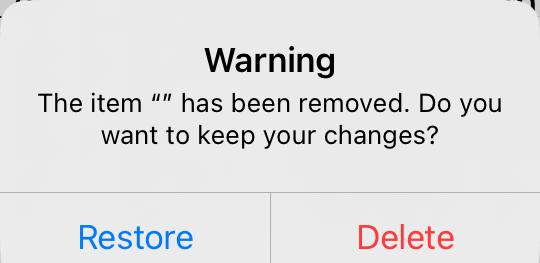
- It does not matter whether one clicks on "Restore" or "Delete". The same popup appears. (Three clicks on Delete followed by three clicks on Restore in D979420693).
- What I do is "close" Zotero (move finger from center bottom up; quickly swipe up the iconified Zotero).
Details versions
- Zotero version on iPad: 2.0.7 Build 451. The problem started appearing a few days ago.
- iOS: 26.4.2
Have you since then, deleted any items in the desktop that you were previously reading in the iPad?
A few weeks ago yes, I might have deleted an item in the desktop that I had open in the iPad; actually, I don't think an item, but a PDF. But the problem I am reporting is still happening and removing a PDF in the desktop from an item (that is not being read in the iPad) triggers it.
I can export the library and send it to you, of course. I understand as Zotero RDF and without notes (and without files and annotations)?
Additionally, when you get the alert again, try going through all alerts, there should be 31 in total, based in the debug log you sent. While these alerts with the empty item name shouldn't appear at all, and we are going to fix this, terminating the app during this process, will have the alerts appear again the next time a sync occurs.
Yes, you are right: there were 31 of the messages in total.
I am not aware of having changed anything in my usage patterns and Zotero's the version is the same (2.0.7, Build 451) though I've updated iOS (now in 26.5 ---but immediately after the iOS update I think I still experienced the problem).