
 Upgrade Storage
Opening PDF in read-only Group Library triggers "Permission Denied" on sync
Dear Zotero Team,
first of all, thank you for your fantastic software.
I am currently setting up a Group Library for our research group. Only a small number of selected members will have admin rights, while students are intended to have read-only access. I configured the group accordingly: Library and File Editing are set to "Only group admins".
However, we are encountering an issue:
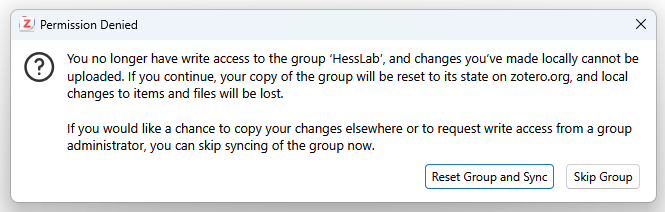
Every time students without write access open a PDF attachment from the Group Library, a "Permission Denied" error message appears during the next sync (see image). The message states that they no longer have write access and that local changes cannot be uploaded. However, these users never had write access to begin with, so they should not be able to modify any items. This suggests that simply opening a PDF attachment may somehow be treated as a local change, which then triggers the popup during synchronization.
Copying the items to "My Library" before opening them is a workaround, and I am suggesting this anyway so that students can add notes and annotations. However, I am wondering whether this is a known bug or expected behavior.
Here is the Debug ID: D532052420. It was generated after performing the following steps:
1. Open a PDF attachment in the Group Library without write access.
2. Manually click the sync button, causing the error to appear.
3. Click "Reset Group and Sync".
Thank you very much for your time and help.
https://s3.amazonaws.com/zotero.org/images/forums/u20613558/9q7djsej2sr1tt2cctqr.png
first of all, thank you for your fantastic software.
I am currently setting up a Group Library for our research group. Only a small number of selected members will have admin rights, while students are intended to have read-only access. I configured the group accordingly: Library and File Editing are set to "Only group admins".
However, we are encountering an issue:
Every time students without write access open a PDF attachment from the Group Library, a "Permission Denied" error message appears during the next sync (see image). The message states that they no longer have write access and that local changes cannot be uploaded. However, these users never had write access to begin with, so they should not be able to modify any items. This suggests that simply opening a PDF attachment may somehow be treated as a local change, which then triggers the popup during synchronization.
Copying the items to "My Library" before opening them is a workaround, and I am suggesting this anyway so that students can add notes and annotations. However, I am wondering whether this is a known bug or expected behavior.
Here is the Debug ID: D532052420. It was generated after performing the following steps:
1. Open a PDF attachment in the Group Library without write access.
2. Manually click the sync button, causing the error to appear.
3. Click "Reset Group and Sync".
Thank you very much for your time and help.
https://s3.amazonaws.com/zotero.org/images/forums/u20613558/9q7djsej2sr1tt2cctqr.png
-
dstillman Zotero TeamSorry about that. This is a bug introduced in Zotero 9. We'll have a fix out soon. Thanks for reporting.
-
dstillman Zotero Team@HessLab-Admin: This is fixed now in Zotero 9.0.4.
-
HessLab-AdminThank you for the quick bugfix!