
 Upgrade Storage
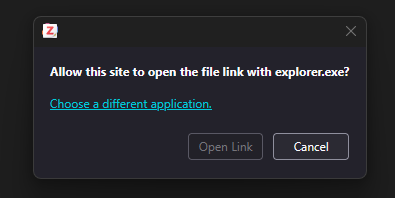
Is there a way to disable the popup "Allow this site to open the file link with explorer.exe?"
In my notes I have links to folders in my PC such as `file://C:\Users\user\Zotero Attachments`. There's always this popup that requires me to wait a little bit for the Open Link button to be enabled and then click on it:
https://s3.amazonaws.com/zotero.org/images/forums/u8904213/98m12jg1quk76l7ved2k.png
I've seen that there's a way to disable/skip this popup with Obsidian links https://forums.zotero.org/discussion/comment/452874/#Comment_452874. Wondering if there's a way to do the same with Windows Explorer?
I'm using Zotero 9.0.3 (64-bit) on Windows 11.
https://s3.amazonaws.com/zotero.org/images/forums/u8904213/98m12jg1quk76l7ved2k.png
I've seen that there's a way to disable/skip this popup with Obsidian links https://forums.zotero.org/discussion/comment/452874/#Comment_452874. Wondering if there's a way to do the same with Windows Explorer?
I'm using Zotero 9.0.3 (64-bit) on Windows 11.
With more and more apps support these link formats, I think there should be an easy way to set up exceptions to these security dialogs.