
 Upgrade Storage
Linter Rich Text Floating Toolbar Not Appearing
I am using Zotero 9.0.3 and recently tried Linter for Zotero version 3.1.0. I installed the plugin manually using the .xpi file.
The problem is that the Rich Text Editing toolbar does not appear when editing the Title field.
The keyboard shortcuts work correctly, for example:
Ctrl + B
Ctrl + I
Ctrl + =
Superscript/Subscript
However, the floating toolbar itself never appears.
To troubleshoot, I:
disabled all other plugins
uninstalled and reinstalled Linter multiple times
restarted Zotero
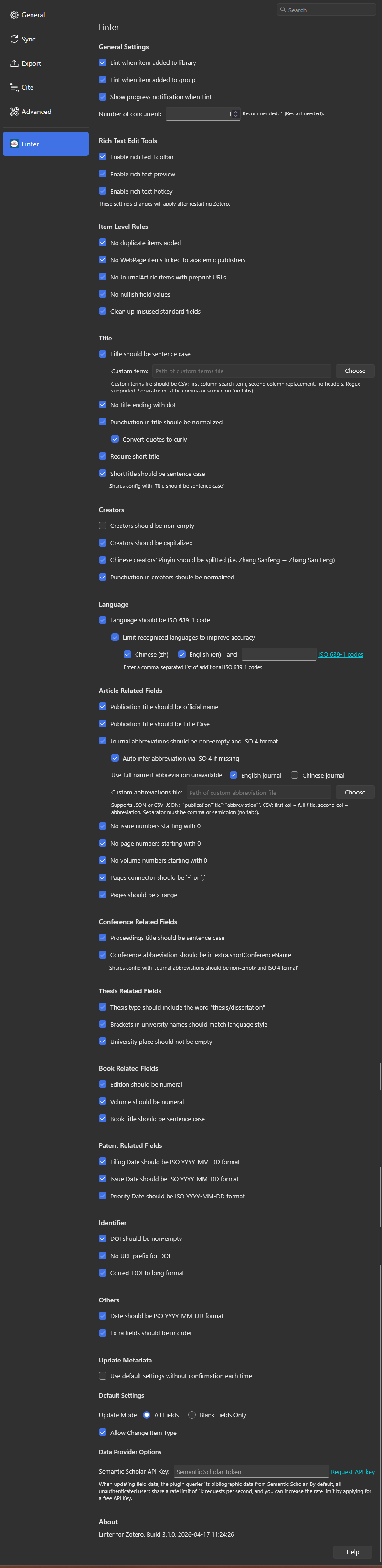
I also checked the Linter settings under Settings → Linter. All Rich Text Edit Tools options are enabled by default.
I tried:
selecting text in the Title field
double-clicking the field
waiting a few seconds
The issue still persists.
I have attached a screenshot of the settings of Linter.
Is this a compatibility issue with Zotero 9, or am I missing something?
https://s3.amazonaws.com/zotero.org/images/forums/u20290448/ibh49cel59ay5006loi9.png
The problem is that the Rich Text Editing toolbar does not appear when editing the Title field.
The keyboard shortcuts work correctly, for example:
Ctrl + B
Ctrl + I
Ctrl + =
Superscript/Subscript
However, the floating toolbar itself never appears.
To troubleshoot, I:
disabled all other plugins
uninstalled and reinstalled Linter multiple times
restarted Zotero
I also checked the Linter settings under Settings → Linter. All Rich Text Edit Tools options are enabled by default.
I tried:
selecting text in the Title field
double-clicking the field
waiting a few seconds
The issue still persists.
I have attached a screenshot of the settings of Linter.
Is this a compatibility issue with Zotero 9, or am I missing something?
https://s3.amazonaws.com/zotero.org/images/forums/u20290448/ibh49cel59ay5006loi9.png
https://s3.amazonaws.com/zotero.org/images/forums/u7424907/sdx0i9myougamjtkiynq.png
Are you tesing the title field in the library item list sidebar or the reader sidebar? Currently, Linter only supports the title field in the library item list sidebar and does not support the title field in the reader sidebar.
https://s3.amazonaws.com/zotero.org/images/forums/u7424907/hwqutm0cxmn59q6lk2c7.png
Sorry for the confusion and thank you for the help and examples — they helped me to identify the issue.