
 Upgrade Storage
Helper Install Blocking Opening Zotero
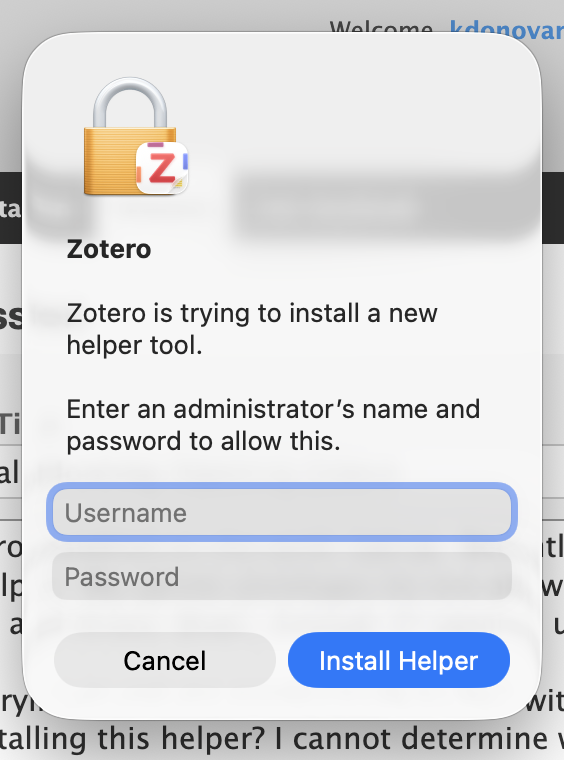
I have Zotero installed on my work laptop. Recently, when I try to open Zotero it wants to install a 'helper.' My admin privileges do not allow this. As a result, Zotero stops responding and closes down, instead of opening up.
Instead of trying to get my employer IT to deal with this, is there a way to start up Zotero without installing this helper? I cannot determine what the helper actually is.
(I have given Zotero full disk access in my MacOS System Settings.)
https://s3.amazonaws.com/zotero.org/images/forums/u1736478/7g9tkeuqzsglvlsd8f7o.png
Instead of trying to get my employer IT to deal with this, is there a way to start up Zotero without installing this helper? I cannot determine what the helper actually is.
(I have given Zotero full disk access in my MacOS System Settings.)
https://s3.amazonaws.com/zotero.org/images/forums/u1736478/7g9tkeuqzsglvlsd8f7o.png
1. Zip up the update logs and copy them to your Desktop:
cd ~/Library/Caches/Zotero/updates/Applications/Zotero && zip -r ~/Desktop/zotero-update-logs.zip updates2. Email ~/Desktop/zotero-update-logs.zip to support@zotero.org with a link to this forum thread.
3. Delete the updates folder so Zotero will open again (for the moment):
rm -rf ~/Library/Caches/Zotero/updates/Applications/Zotero/updates(Copy/paste in full and then press Return. Don't try to retype these.)
I have 9.0.3.
Should I do an update now?