
 Upgrade Storage
Feature Request: Add 'copy file' to right-click menu on file tabs
Hi Zotero Team,
With the increasing use of external AI tools and LLMs in research workflows, I find a frequent need to copy PDF files from Zotero to external chat interfaces or document processors.
Currently, this requires a four-step process: Right-click tab > 'Show in Library' > 'Show in Finder' > Copy file.
I propose adding a "Copy File" option directly to the file tab's context menu (or a dedicated button). This would allow users to place the file directly onto the system clipboard for immediate pasting into other applications.
https://s3.amazonaws.com/zotero.org/images/forums/u20430756/tu7djp3tfrp3omtm9h12.png
As a developer and frequent Zotero user, I would be happy to contribute to the implementation of this feature if the proposal is aligned with your current roadmap.
Thanks for your consideration,
Lmh-java
With the increasing use of external AI tools and LLMs in research workflows, I find a frequent need to copy PDF files from Zotero to external chat interfaces or document processors.
Currently, this requires a four-step process: Right-click tab > 'Show in Library' > 'Show in Finder' > Copy file.
I propose adding a "Copy File" option directly to the file tab's context menu (or a dedicated button). This would allow users to place the file directly onto the system clipboard for immediate pasting into other applications.
https://s3.amazonaws.com/zotero.org/images/forums/u20430756/tu7djp3tfrp3omtm9h12.png
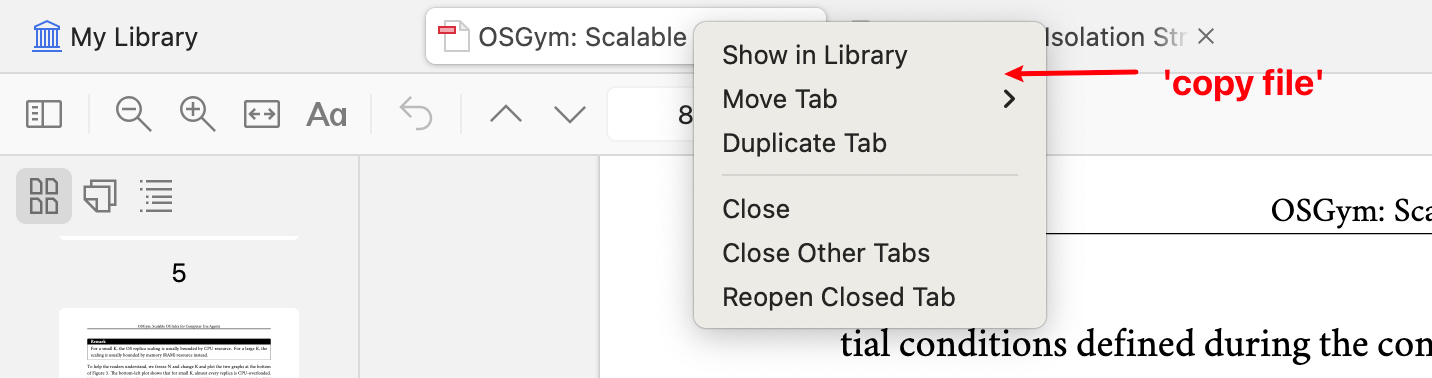
As a developer and frequent Zotero user, I would be happy to contribute to the implementation of this feature if the proposal is aligned with your current roadmap.
Thanks for your consideration,
Lmh-java
If you wanted a keyboard shortcut for that, I believe that the Zutilo shortcut creation UI is still broken ... but you may be able to add one for extensions.zutilo.shortcut.copyAttachmentPaths via this workaround:
https://github.com/wshanks/Zutilo/issues/280
Allow you to copy the best attachment.
Thanks for your help. I was looking for copying the binary file content, not the file path. But appreciate your input!