
 Upgrade Storage
Feature Request: Cover Flow or Book Jacket Image display View
Would it be possible in a future development for the Zotero team to consider putting a book cover (cover art) display option (perhaps including a field which stores the Book cover/jacket image as a jpeg). Its obviously less relevant for journal articles, but it would be a nice way to browse through the book items in ones library.
I would just like to know if this is possible and or being considered for a future build? And if so roughly when might we see something like this?
Programs like Bookpedia, Calibre, Bookends, DL, etc have this cover image view
https://s3.amazonaws.com/zotero.org/images/forums/u5479963/brmd3lm1qsbjworpasaq.png
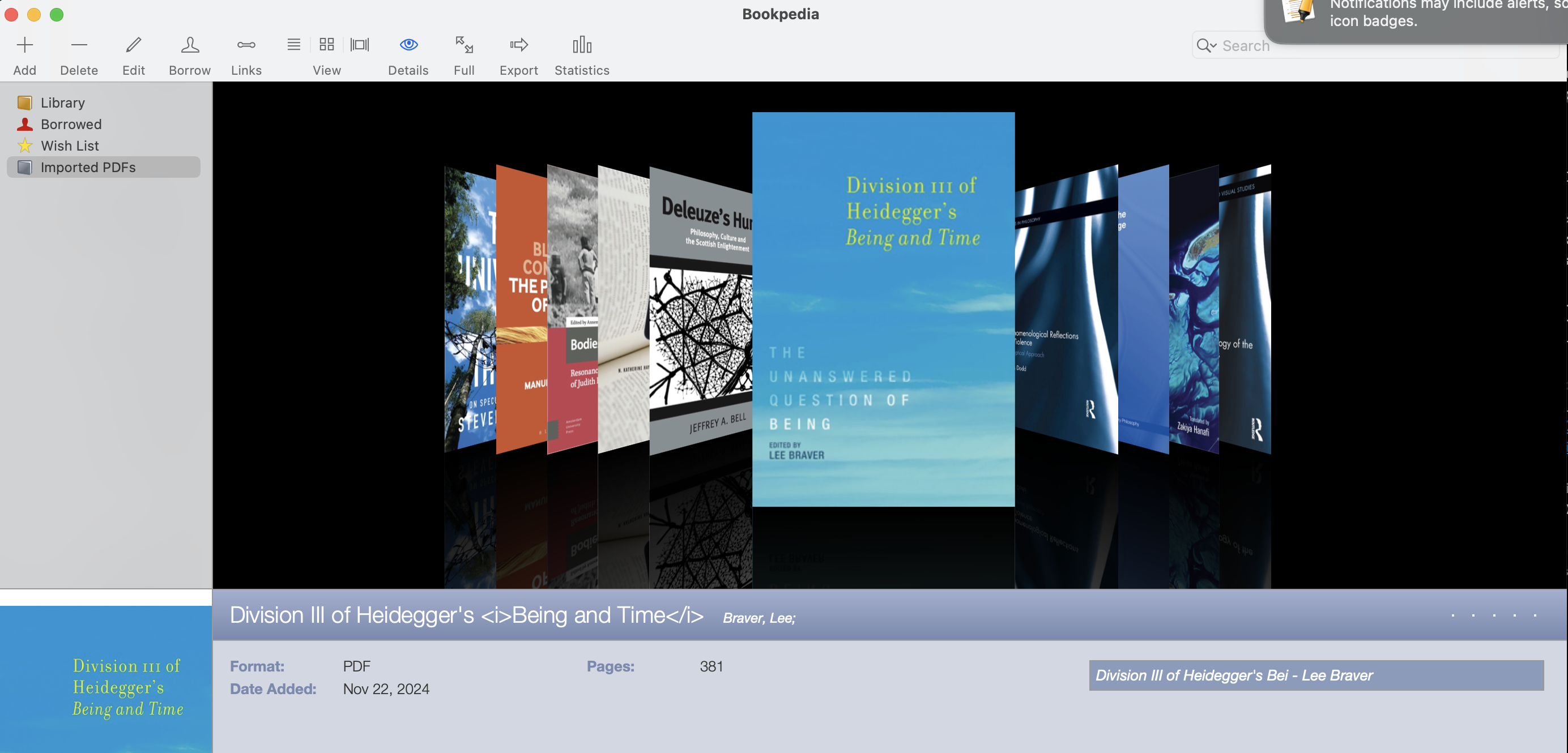
https://s3.amazonaws.com/zotero.org/images/forums/u5479963/xmmokoe4kv54m70epukl.jpg
https://s3.amazonaws.com/zotero.org/images/forums/u5479963/69l53wj1inds74t1andw.png
https://forums.zotero.org/discussion/123769/zotshelf-new-app-that-shows-zotero-epub-covers-on-android-open-for-beta-testers#latest
and on my website:
https://oyvindsolheim.com/other/zotshelf/
It's really great and it would be so useful ! Thanks a lot !
I work with a lot of comics, and to have a cover view in Zotero would be so nice.
Question : most of my comics in Zotero are references only (no epub nor pdf file). Would it be possible to make ZotShelf working as the Book Search + Dataview plugins in Obsidian about covers ? Meaning : import an image URL value with the Book Search plugin ("coverURL" value) and make it been displayed (through Dataview) ?
[EDIT : of course, the coverURL link targets an image which is saved locally. Works very smoothly and all parameters are very easy to set up]
I am not at all a developer, so what I am asking for may be totally irrelevant, or too different from what you are looking to achieve...
+1 too.
FG
1. The browser one is live here: zotshelf.netlify.app You can log in to your Zotero account and choose a collection and (if you like) a tag. Then the page renders (most) of the book covers from the epubs or pdfs. You can choose if you want the covers to link to the Zotero program (if you have it installed) or the web library if you are on an Android or without the program.
2. The Android one is not in public beta but I'm looking for beta testers so you can contact me at appbugge@gmail.com if you'd like to try. The app works the same way, you log in and it shows the book covers from a collection/tag. You can create multiple tabs, each showing a separate collection/tag combination. Since the Android Zotero app can't open epubs (nor have implemented the internal links) it only links to the web library but the epub reader there is very good.
Hope you like the apps! and please tell me if you have any comments or feedback.
Some problems.
On a collection, it did not find any eBook or PDF, so no cover to display (= normal).
On another (big) collection, it never ends loading.
See screenshots.
https://s3.amazonaws.com/zotero.org/images/forums/u11873/afa7ssuhyvwlj8mldnu1.jpg
https://s3.amazonaws.com/zotero.org/images/forums/u11873/rfsa7z7hs9s208izp57t.jpg
https://s3.amazonaws.com/zotero.org/images/forums/u11873/rtkjxbcnd0u10i4qtr2y.jpg
Regarding the first problem, can you try again with the first collection (no items) and check if it works if you just choose it again (or go in the settings and press apply changes)? I think it sometimes does not work and needs a little push.
Regarding the last problem (too many files) I can add a maximum limit. Currently there was first a max at 25 (because the API gives out 25 each time I think) and now it's unlimited. I'll try to add a max 50 and an option to increase it if you have a lot of time or are on a powerful computer.
'https://github.com/kovidgoyal/calibre has a cover grid and a cover browser that can be displayed alongside the list view. Implement both of these features as a plug-in for https://github.com/zotero/zotero. The covers should be generated from the first page of each item’s PDF.'
The result is surprisingly useful, but I have no idea about programming, so no guarantee for anything. I tested it on the recent Beta both in Linux and on Mac.
Here is the plugin: https://www.dropbox.com/scl/fi/gjxj65v8vl50jcr8qn3mi/cover-grid-1.0.0.xpi?rlkey=7mji3uux0hkc5csc1fcqil4fd&dl=1
Here is the full source of the plugin: https://www.dropbox.com/scl/fi/v95rasqy0rsv4y6uhho5z/files.zip?rlkey=k1xgoslapvynsdi4gjb3edftx&dl=1
It is extremely helpful to be able to grab a book (or an article !) by its cover, and not spend too much time searching it in a long list.
And thanks to @Burgarth for providing your plugin (and its source code), which indeed works magnificiently well!
It would be great if someone could publish this as a regular plugin, and maintain it?
Or better still, commit this to Zotero's main branch? (I have no idea on how open the zotero devs are to community contributions, but this one is really a simple and great addition that gives a wow effect to the software, so... maybe?)
Thank you very much @burgarth for sharing the plugin as it works great.
I believe making sure of some aspects mentioned by @mjthoraval about using ai in developing plugins, including prompting the ai to not change the main zotero sql database and saving any required changes in a separate database, inter alia, and making sure of their inclusion will be ensuring. Sorry for the cautious comment and
Thanks again for the great plugin.
https://oyvindsolheim.com/other/zotshelf
(I really need beta testers to get it on google play so please do if you have an android device)
https://github.com/paulluis-roehl/zotero-cover-view
Should hopefully install and integrate normally into Zotero, let me know if you find any bugs.
Features are still few, but I will keep updating them.
I have a quick question,
1) how is the cover image determined/generated, and is there a way to manually update it for any particular record (the get cover from internet options work on some but not others)
2) I was also wondering if one could over-ride the default image. Where do these cover jpg? files reside? or are they always recreated one the fly.
There are some files that have a very good pdf cover image but dont render in the cover view. Any insights into how to modify or what's under the hood would be greatly appreciated.
Either way I'm loving it.
Can only hope that the zotero developers implement something like this natively.
Thanks again, this is fantastic
Finally I can see my books
Regarding your questions:
1) The covers are sourced from https://openlibrary.org/ . If you find a cover you like there, adding that ISBN will quite reliably give you the right cover. The metadata search without ISBN is still very unstable. For those that you want to manually update/overwrite, I think the best option is to drag a jpg onto the entry as you suggested yourself.
This *should* overwrite the web-fetched cover immediately. If it doesn't, try changing tabs or reopening Zotero. If you have some time, a more detailed report on this would be helpful so I can track down any potential bugs.
2) The default images are currently generated on the fly. I have not yet put that much love and thought into them. I put the need for an option to choose them yourself on my todo list, but don't think I will come around to this any time soon.
Are you imagining very different default covers and want the ability to customise for yourself, or is something concrete about the current design bothering you? (The latter I might be able to get to quicker)
3) Your last point about the pdf images is definitely unintended behaviour. I will try to make pdf handling more robust as soon as I find time. If you can send me any pdf that isn't working as intended (ideally just the first page, if that suffices to reproduce the bug), that might help speed things up for me!
Ill start with 2)
There are a few PDF's that have rich cover images, but they do not show up.
In some cases if I switch on fetch from ISBN cover image populates, and if can always drag a copy.
https://s3.amazonaws.com/zotero.org/images/forums/u5479963/yp67dagh3he1octw5zgu.png
how would I send you the pdf in question?
(I did notice a folder of images and signature files, so Im assuming the fetch/render is one time?)
Regarding sending a (page of a) pdf: since the zotero forums do not seem to have direct messaging integrated, you could either
- for example upload it to google drive or dropbox and send a link here (and maybe delete it after I read it),
- if you feel more advanced, you can go to the github repository of the project https://github.com/paulluis-roehl/zotero-cover-view and open an issue (this is the preferred way),
- or alternatively you can navigate to my github account from there, which contains an email address of mine that you can send stuff to (sorry for the roundabout explanation, I am trying to broadcast my email addresses in as few places online as possible)