Upgrade Storage
PDF text annotations are clipped at the bottom in Zotero 10.0.8 (Windows)
I have encountered a display issue when using the "Add Text" annotation feature in Zotero's built-in PDF reader.
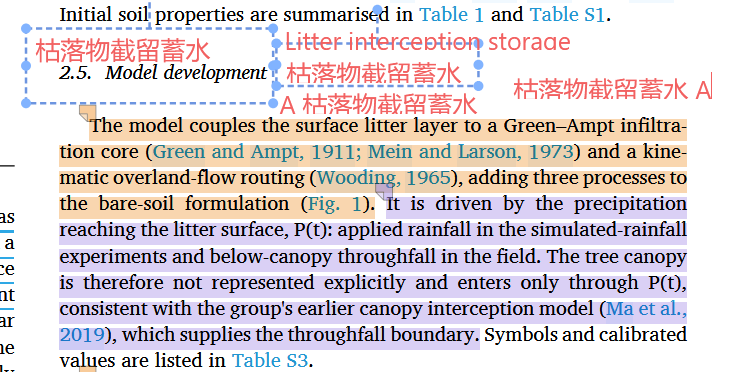
When I add a single-line text annotation directly to a PDF page, the lower portion of the text is clipped and cannot be fully displayed. However, if I press Enter to create a second line, the text on the first line becomes fully visible.
To investigate whether this issue is related to font compatibility, I tested four types of text annotations on the same PDF page using the same font size:
English text only
Chinese text only
English followed by Chinese text
Chinese followed by English text
Unfortunately, all four types of text annotations exhibit the same clipping issue, as shown in the attached screenshot.
This appears to be related to the automatic height calculation of the text annotation box or the text rendering area, rather than a language-specific font issue.
Environment:
Zotero version: 10.0.8 (64-bit)
Operating system: Windows
Feature: Add Text annotation in the built-in PDF reader
Has anyone encountered a similar issue? Is there a configuration setting or workaround that can resolve this problem without manually adding an extra line to every text annotation? Could this be a bug in the PDF reader?
Any assistance would be greatly appreciated.
Thank you!
https://s3.amazonaws.com/zotero.org/images/forums/u9558634/06rshqir9d1738hpq1o0.png