Upgrade Storage
Feature request: Finer page-width controls in PDF Reading Mode
Current behavior
On macOS with Zotero 10.0.9, the Page Width slider in PDF Reading Mode has three stops: 50%, 75%, and 100%. In a wide window, the 50% and 75% settings both leave substantial unused space on either side of the text. Moving from 75% to 100% makes the text span almost the entire window, producing much longer lines.
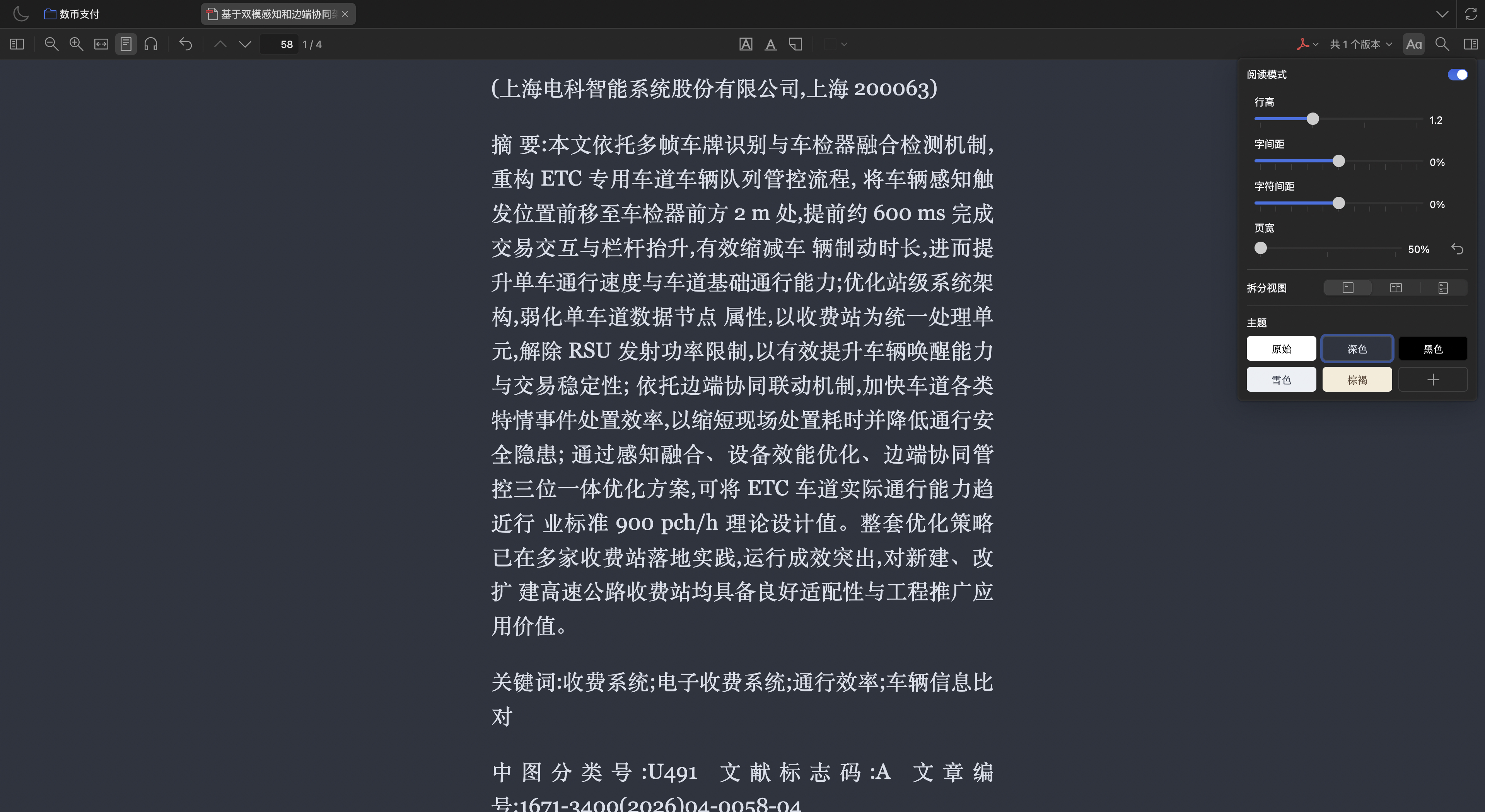
The two steps display the same 25-percentage-point increment, but the visual changes are uneven. In the screenshots below, the text column occupies roughly 34%, 42%, and 95% of the reader width, respectively. The 50% and 75% layouts are fairly close, while the jump from 75% to 100% is much larger.
Suggested improvement
Could the Page Width slider offer more stops, for example in 5-percentage-point increments from 50% to 100%? It would also help if the displayed percentage more closely reflected the share of available reader width occupied by the text. Intermediate settings such as 80%, 85%, and 90% would let users make better use of wide windows while keeping lines at a comfortable length.
A similar concern about the jump from 75% to 100% was raised in the PDF Reading Mode beta discussion.
Screenshots
Same PDF and window at 50%, 75%, and 100%, in that order. The Appearance panel is closed in the 100% screenshot.
https://s3.amazonaws.com/zotero.org/images/forums/u10060572/m5q57uefsn0ux16w4pau.png
https://s3.amazonaws.com/zotero.org/images/forums/u10060572/zfwzvgz8337jfkcxvj8x.png
https://s3.amazonaws.com/zotero.org/images/forums/u10060572/e7w6kf376pkfo2cd2odo.png
On macOS with Zotero 10.0.9, the Page Width slider in PDF Reading Mode has three stops: 50%, 75%, and 100%. In a wide window, the 50% and 75% settings both leave substantial unused space on either side of the text. Moving from 75% to 100% makes the text span almost the entire window, producing much longer lines.
The two steps display the same 25-percentage-point increment, but the visual changes are uneven. In the screenshots below, the text column occupies roughly 34%, 42%, and 95% of the reader width, respectively. The 50% and 75% layouts are fairly close, while the jump from 75% to 100% is much larger.
Suggested improvement
Could the Page Width slider offer more stops, for example in 5-percentage-point increments from 50% to 100%? It would also help if the displayed percentage more closely reflected the share of available reader width occupied by the text. Intermediate settings such as 80%, 85%, and 90% would let users make better use of wide windows while keeping lines at a comfortable length.
A similar concern about the jump from 75% to 100% was raised in the PDF Reading Mode beta discussion.
Screenshots
Same PDF and window at 50%, 75%, and 100%, in that order. The Appearance panel is closed in the 100% screenshot.
https://s3.amazonaws.com/zotero.org/images/forums/u10060572/m5q57uefsn0ux16w4pau.png
https://s3.amazonaws.com/zotero.org/images/forums/u10060572/zfwzvgz8337jfkcxvj8x.png

https://s3.amazonaws.com/zotero.org/images/forums/u10060572/e7w6kf376pkfo2cd2odo.png