Upgrade Storage
Zotero reMarkable Sync: plugin to sync PDFs and annotations with a reMarkable tablet
I have written (with Claude) a Zotero plugin that syncs PDFs and annotations between Zotero and a reMarkable tablet. It works with Zotero 8 to 10.
Source code: https://github.com/bpiwowar/zotero-remarkable-sync
XPI files are available on the project page (Releases). To install one, use Tools → Plugins → Install Plugin From File in Zotero.
What it does:
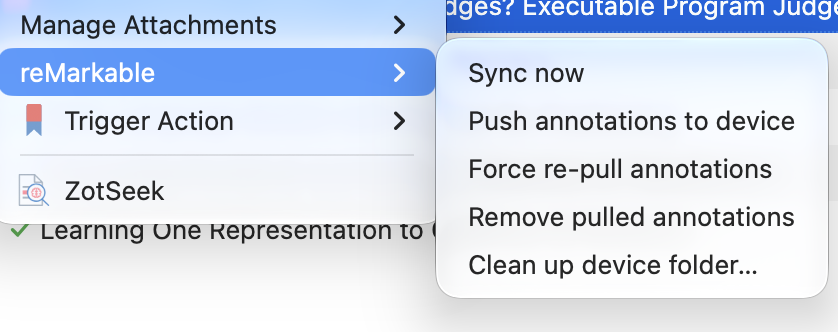
- PDF attachments with a tag (`@remarkable` by default, configurable) are uploaded to a folder on the reMarkable cloud. "reMarkable: Add to sync" in the item context menu adds the tag for you.
- Annotations made on the tablet come back into Zotero as native annotations. Text highlights become highlights, highlighter strokes become translucent highlights, pen strokes become ink annotations, rectangles drawn with the shape tool become image annotations, and page tags become a tagged note.
- Highlights and ink made in Zotero can also be sent to the tablet. This is off by default (see "safe mode" below).
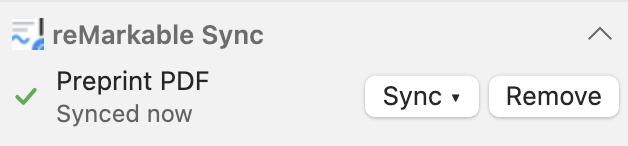
- Sync runs when you ask for it (toolbar button or menu), or on a timer.
- Several computers can sync the same Zotero library with the same reMarkable account.
- It talks to the reMarkable cloud directly. Nothing else needs to be installed: the code that reads and writes `.rm` files is a Rust library compiled to WebAssembly and included in the plugin.
- To connect, paste a one-time code from https://my.remarkable.com/device/browser/connect into the plugin preferences.
Safe mode is on by default. In safe mode the plugin only uploads PDFs and pulls annotations into Zotero. It never changes annotations that are already on the tablet. Turn it off in the preferences to also send Zotero annotations to the tablet.
Warning: the plugin is experimental. It reads and writes the undocumented `.rm` v6 format and makes changes in your reMarkable cloud account. Please back up your reMarkable data and your Zotero library before using it. In practice, sync works well in both directions. Zotero and reMarkable annotations do not map exactly onto each other, though, so some annotations do not transfer that well.
Known limitations:
- Tags added to a page in Zotero are not sent to the tablet, and document-level tags are not synced.
- Tag names that contain commas are not supported.
- If two computers sync the same PDF between two Zotero syncs, a pulled annotation can sometimes be created twice.
Please report bugs and send feedback on the GitHub issue tracker: https://github.com/bpiwowar/zotero-remarkable-sync/issues
The plugin is licensed under AGPL-3.0. It is built on zotero-plugin-template and zotero-plugin-toolkit. It also reuses work from rmapi-js, rmscene and rmc.
https://s3.amazonaws.com/zotero.org/images/forums/u904986/merv3jn66ygsd6alte7n.png
https://s3.amazonaws.com/zotero.org/images/forums/u904986/pqe9p4dbk7w2o55nqmjn.png
Source code: https://github.com/bpiwowar/zotero-remarkable-sync
XPI files are available on the project page (Releases). To install one, use Tools → Plugins → Install Plugin From File in Zotero.
What it does:
- PDF attachments with a tag (`@remarkable` by default, configurable) are uploaded to a folder on the reMarkable cloud. "reMarkable: Add to sync" in the item context menu adds the tag for you.
- Annotations made on the tablet come back into Zotero as native annotations. Text highlights become highlights, highlighter strokes become translucent highlights, pen strokes become ink annotations, rectangles drawn with the shape tool become image annotations, and page tags become a tagged note.
- Highlights and ink made in Zotero can also be sent to the tablet. This is off by default (see "safe mode" below).
- Sync runs when you ask for it (toolbar button or menu), or on a timer.
- Several computers can sync the same Zotero library with the same reMarkable account.
- It talks to the reMarkable cloud directly. Nothing else needs to be installed: the code that reads and writes `.rm` files is a Rust library compiled to WebAssembly and included in the plugin.
- To connect, paste a one-time code from https://my.remarkable.com/device/browser/connect into the plugin preferences.
Safe mode is on by default. In safe mode the plugin only uploads PDFs and pulls annotations into Zotero. It never changes annotations that are already on the tablet. Turn it off in the preferences to also send Zotero annotations to the tablet.
Warning: the plugin is experimental. It reads and writes the undocumented `.rm` v6 format and makes changes in your reMarkable cloud account. Please back up your reMarkable data and your Zotero library before using it. In practice, sync works well in both directions. Zotero and reMarkable annotations do not map exactly onto each other, though, so some annotations do not transfer that well.
Known limitations:
- Tags added to a page in Zotero are not sent to the tablet, and document-level tags are not synced.
- Tag names that contain commas are not supported.
- If two computers sync the same PDF between two Zotero syncs, a pulled annotation can sometimes be created twice.
Please report bugs and send feedback on the GitHub issue tracker: https://github.com/bpiwowar/zotero-remarkable-sync/issues
The plugin is licensed under AGPL-3.0. It is built on zotero-plugin-template and zotero-plugin-toolkit. It also reuses work from rmapi-js, rmscene and rmc.
https://s3.amazonaws.com/zotero.org/images/forums/u904986/merv3jn66ygsd6alte7n.png
https://s3.amazonaws.com/zotero.org/images/forums/u904986/pqe9p4dbk7w2o55nqmjn.png