
 Upgrade Storage
Zotero Word for Windows plugin font styling issue
Hi,
Since a couple of months I have an issue with the Word Plugin and font style. The inserted citations in the text do not follow the font defined in the "Normal" style of Microsoft Word.
This happens with Zotero 9 and 10 (10.0.8 now) and Microsoft Word 2019 and 2021 for Windows.
Steps to reproduce:
- Open a new Word document.
- Write some text with the "Normal" style and Calibri font.
- Insert a citation in the text (I use Chicago Manual of Style 17th ed., but the same happens with any other style).
- Change the font of the "Normal" style (by right-clicking it in the ribbon) to Times New Roman.
-The font of the rest of the text changes, but the citation font remains Calibri. Refreshing the bibliography or changing the citation style does not alter the font. Changing the default body font of the document doesn't help either.
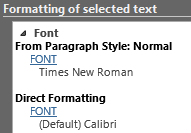
In the "Reveal Formatting" pane, I see that although the Paragraph Style Font is TNR, the citation text has a "Direct Formatting" property set to "(Default) Calibri".
https://s3.amazonaws.com/zotero.org/images/forums/u13322409/30dorcl2c7r5kgomqe0w.png
This issue only affects the citations in the text; the bibliography font updates properly. Could you help pinpoint the cause of this issue?
Thanks
Since a couple of months I have an issue with the Word Plugin and font style. The inserted citations in the text do not follow the font defined in the "Normal" style of Microsoft Word.
This happens with Zotero 9 and 10 (10.0.8 now) and Microsoft Word 2019 and 2021 for Windows.
Steps to reproduce:
- Open a new Word document.
- Write some text with the "Normal" style and Calibri font.
- Insert a citation in the text (I use Chicago Manual of Style 17th ed., but the same happens with any other style).
- Change the font of the "Normal" style (by right-clicking it in the ribbon) to Times New Roman.
-The font of the rest of the text changes, but the citation font remains Calibri. Refreshing the bibliography or changing the citation style does not alter the font. Changing the default body font of the document doesn't help either.
In the "Reveal Formatting" pane, I see that although the Paragraph Style Font is TNR, the citation text has a "Direct Formatting" property set to "(Default) Calibri".
https://s3.amazonaws.com/zotero.org/images/forums/u13322409/30dorcl2c7r5kgomqe0w.png
This issue only affects the citations in the text; the bibliography font updates properly. Could you help pinpoint the cause of this issue?
Thanks
-
adomasven Zotero TeamThis has always been the case. I'm pretty sure we're unable to change this due to the limits on the way we can insert text into Word, but I've created an issue to investigate this.