
 Upgrade Storage
Zotero 11 beta: title missing at the top of the item pane after reopening it in a PDF tab
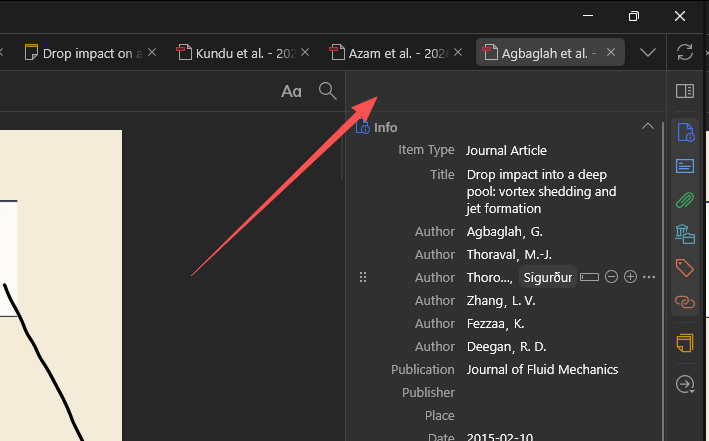
In a PDF tab, the header at the top of the item pane (the item's title) stays empty when the pane is opened on a PDF that was opened while the pane was closed. Zotero 10.0.8 shows it.
https://s3.amazonaws.com/zotero.org/images/forums/u265723/sqr3tbxe4u2h98veocpw.png
Zotero 11.0-beta.4 (11.0-beta.4+045d52044), Windows 11. Not in Zotero 10.0.8.
Steps to reproduce:
1. Open the PDF of an item (item A). The item pane on the right shows A's title at its top.
2. Close the item pane with the "Toggle Context Pane" button at the bottom of its side bar (the column of icons on the right).
3. Go back to My Library and double-click a second item (item B) to open its PDF.
4. In B's tab, click "Toggle Context Pane" again to open the item pane.
-> The pane opens with Info and the other sections, but its header is empty: no title (and no citation when the header is set to View As > Bibliography Entry). Closing and opening the pane again does not bring it back. Switching to A's tab and back to B's shows it.
https://s3.amazonaws.com/zotero.org/images/forums/u265723/sqr3tbxe4u2h98veocpw.png
Zotero 11.0-beta.4 (11.0-beta.4+045d52044), Windows 11. Not in Zotero 10.0.8.
Steps to reproduce:
1. Open the PDF of an item (item A). The item pane on the right shows A's title at its top.
2. Close the item pane with the "Toggle Context Pane" button at the bottom of its side bar (the column of icons on the right).
3. Go back to My Library and double-click a second item (item B) to open its PDF.
4. In B's tab, click "Toggle Context Pane" again to open the item pane.
-> The pane opens with Info and the other sections, but its header is empty: no title (and no citation when the header is set to View As > Bibliography Entry). Closing and opening the pane again does not bring it back. Switching to A's tab and back to B's shows it.