Upgrade Storage
Attachment preview: page drawn too small, arrows below it
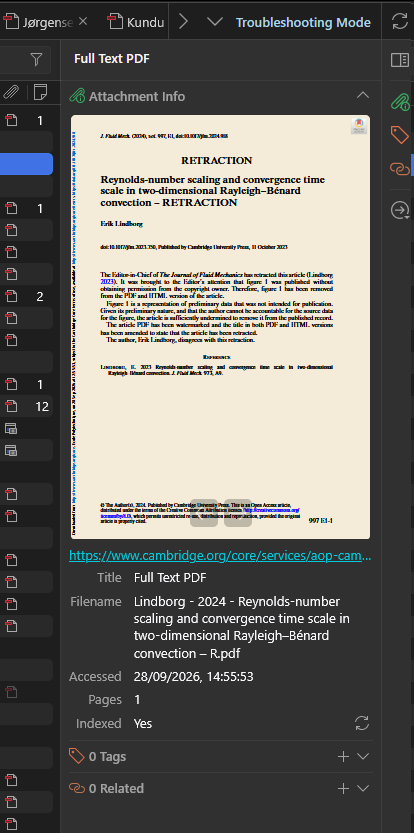
In Zotero 11.0-beta.2 (Windows 11), the attachment preview sometimes draws the PDF page smaller than the preview box, so the previous/next arrows sit below the page instead of over its bottom edge (screenshot). I haven't found steps that reproduce it reliably; it happens now and then when selecting a PDF attachment.
I also notice that the previews are loading quite slowly, which makes it difficult to quickly scan through the previews of several papers.
https://s3.amazonaws.com/zotero.org/images/forums/u265723/2mvp52m4zk1ebmkop33a.png
Instead of:
https://s3.amazonaws.com/zotero.org/images/forums/u265723/3rajqmvtobksid9jej7u.png
I also notice that the previews are loading quite slowly, which makes it difficult to quickly scan through the previews of several papers.
https://s3.amazonaws.com/zotero.org/images/forums/u265723/2mvp52m4zk1ebmkop33a.png
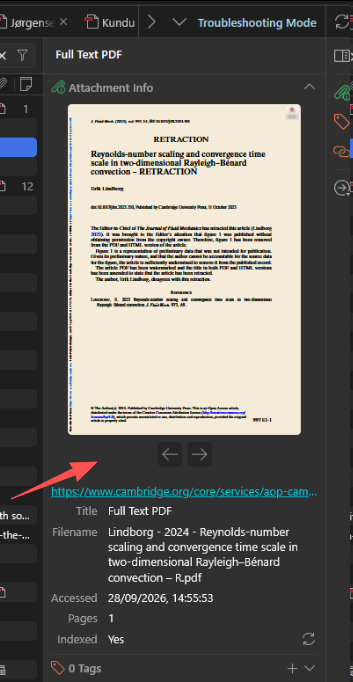
Instead of:
https://s3.amazonaws.com/zotero.org/images/forums/u265723/3rajqmvtobksid9jej7u.png