Upgrade Storage
provide several 'Copy' options (all functional)
Hi,
This is both a feature suggestion and a bug report maybe?
# Feature Suggestion
The idea is already there, just go one step further:
Copy PMID --> copy PMID only
Copy DOI --> copy DOI only
Copy Title --> copy Title only
Copy Citation --> e.g. (Author, Year)
Copy Reference --> e.g. "Title (Year). Authors. Journal volume: pages. DOI. PMID"
The problem with the current way things work is that we need to go through Settings--> to set our preferences for the _only_ two copy commands available (standard Copy, Ctrl+C, and the special Quick Copy, Shift+Ctrl+C).
Going through settings is slow, and sometimes I need to just copy the article title (e.g. to then use it somewhere else -- google, gemini, claude), or its DOI or PMID. And sometimes I need to copy the full reference for sending in an email (not formatted for latex). And I don't want to go the full path of settings-->quick copy just for one off copy.
Can we have more copy actions mapped to a context (right-click) sub-menu? We can then map these to keyboard shortcuts if we want. But this will give us some powerful ways to interact with our collections of papers.
Message is: even though our primary is Better BibLatex, we always need other ways to copy for one-off quick/fast actions (sending mails, posting to social media, etc). Do not force us into the Latex or writing manuscripts-only view of the world.
# Bug maybe?
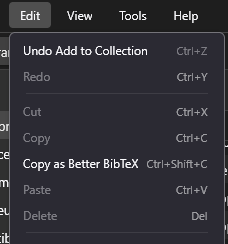
I have configured my quick copy in settings to 'Copy as Better BibTex' however, I am now left with no standard copy function (it's greyed out). Is there a way in which I could have the standard copy active and functional? I guess that was the idea because each command has its own keyboard shortcut ... but apparently it's not working for me, nor the menu nor using the keyboard (Ctrl + C) work for copying.
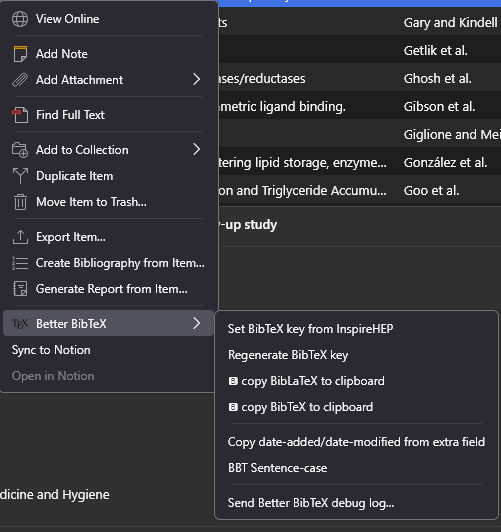
While here, if I click on any reference, and right-click to access the context menu, there is no 'Copy' command, although there are some (2) copy commands in the BetterBibTex sub-menu.
Attached are some screenshots:
https://s3.amazonaws.com/zotero.org/images/forums/u5490589/degikrvnoyijuwkauwlf.png
https://s3.amazonaws.com/zotero.org/images/forums/u5490589/zpr4v1h8iqsdvygwl9ds.png
This is both a feature suggestion and a bug report maybe?
# Feature Suggestion
The idea is already there, just go one step further:
Copy PMID --> copy PMID only
Copy DOI --> copy DOI only
Copy Title --> copy Title only
Copy Citation --> e.g. (Author, Year)
Copy Reference --> e.g. "Title (Year). Authors. Journal volume: pages. DOI. PMID"
The problem with the current way things work is that we need to go through Settings--> to set our preferences for the _only_ two copy commands available (standard Copy, Ctrl+C, and the special Quick Copy, Shift+Ctrl+C).
Going through settings is slow, and sometimes I need to just copy the article title (e.g. to then use it somewhere else -- google, gemini, claude), or its DOI or PMID. And sometimes I need to copy the full reference for sending in an email (not formatted for latex). And I don't want to go the full path of settings-->quick copy just for one off copy.
Can we have more copy actions mapped to a context (right-click) sub-menu? We can then map these to keyboard shortcuts if we want. But this will give us some powerful ways to interact with our collections of papers.
Message is: even though our primary is Better BibLatex, we always need other ways to copy for one-off quick/fast actions (sending mails, posting to social media, etc). Do not force us into the Latex or writing manuscripts-only view of the world.
# Bug maybe?
I have configured my quick copy in settings to 'Copy as Better BibTex' however, I am now left with no standard copy function (it's greyed out). Is there a way in which I could have the standard copy active and functional? I guess that was the idea because each command has its own keyboard shortcut ... but apparently it's not working for me, nor the menu nor using the keyboard (Ctrl + C) work for copying.
While here, if I click on any reference, and right-click to access the context menu, there is no 'Copy' command, although there are some (2) copy commands in the BetterBibTex sub-menu.
Attached are some screenshots:
https://s3.amazonaws.com/zotero.org/images/forums/u5490589/degikrvnoyijuwkauwlf.png
https://s3.amazonaws.com/zotero.org/images/forums/u5490589/zpr4v1h8iqsdvygwl9ds.png