
 Upgrade Storage
PDF Rendering Issue in Zotero 11.0: Equations Appear Excessively Slanted
https://s3.amazonaws.com/zotero.org/images/forums/u17782740/gg5cwx2bonhsvp6fwgrz.jpg
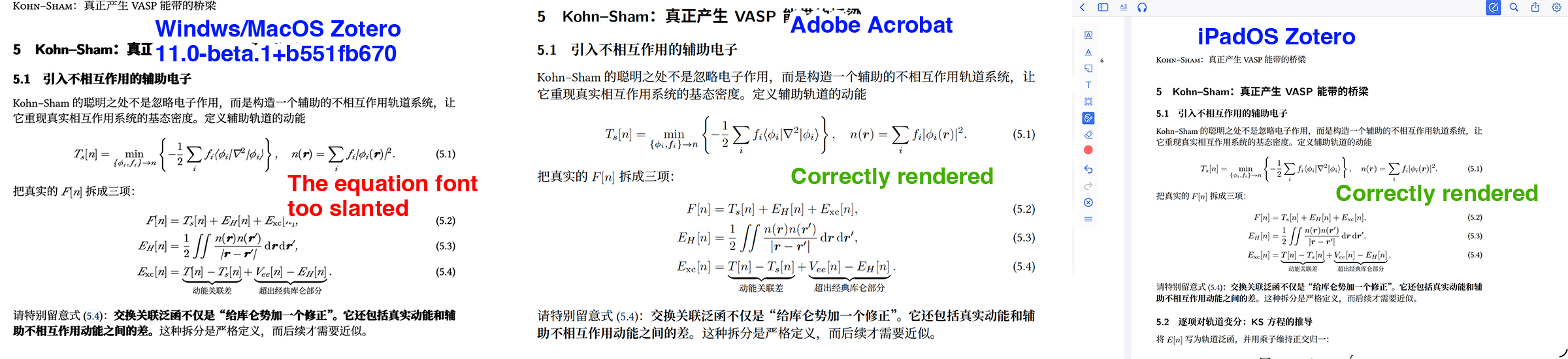
Here are three screenshots of the same page from the same PDF file for comparison.
In the desktop version of Zotero (Windows and macOS), the mathematical equations appear excessively slanted and look strange (left panel).
However, when I open exactly the same PDF file in Adobe Acrobat on my computer, the equations are rendered correctly using the standard LaTeX Computer Modern font, which looks much better (middle panel).
I also tried opening the synchronized PDF in Zotero on my iPad, and the equations are displayed correctly there as well (right panel).
By the way, the PDF was generated using LaTeX, so I don't think there's anything wrong with the PDF itself.
The PDF should theoretically look the same across all platforms and PDF viewers, but I can't figure out why the desktop version of Zotero renders the equations differently.
Does anyone know what might be causing this issue or how to fix it?
Here are three screenshots of the same page from the same PDF file for comparison.
In the desktop version of Zotero (Windows and macOS), the mathematical equations appear excessively slanted and look strange (left panel).
However, when I open exactly the same PDF file in Adobe Acrobat on my computer, the equations are rendered correctly using the standard LaTeX Computer Modern font, which looks much better (middle panel).
I also tried opening the synchronized PDF in Zotero on my iPad, and the equations are displayed correctly there as well (right panel).
By the way, the PDF was generated using LaTeX, so I don't think there's anything wrong with the PDF itself.
The PDF should theoretically look the same across all platforms and PDF viewers, but I can't figure out why the desktop version of Zotero renders the equations differently.
Does anyone know what might be causing this issue or how to fix it?
-
poettlihttps://forums.zotero.org/discussion/134219/fonts-in-latest-beta