
 Upgrade Storage
Issue with Referencing in Only Office
Finally made the plunge to a more open source world. Gone from Windows+Word+Mendeley to Ubuntu+ONLYOFFICE+Zotero. I am trying to set up a document for my Thesis before I start writing in earnest. Currently I am having the following issue: When I add references sometimes it will only import the paper title, not the full reference data including author/journal/volume/year etc. and i cannot discern the difference between where it does and doesn't do this. I am never ticking "Omit Author". In all cases the data is auto fetched from modern papers 2020+ with DOI no issue. All the data is in Zotero.
https://s3.amazonaws.com/zotero.org/images/forums/u12626264/1ifq3gp1825r4h5rl3p4.png
In this image reference [3] is just a title no other info and i have no idea why.
The data is definitely in zotero:
https://s3.amazonaws.com/zotero.org/images/forums/u12626264/jluklhtbk5j7jqts0cud.png
The same issue was occurring for reference [1]. I deleted and re-imported a few times and it all worked but i have no idea what i did. Now i have done the same for reference [3] but unable to fix the issue. Any help is appreciated.
KR, Jack
https://s3.amazonaws.com/zotero.org/images/forums/u12626264/1ifq3gp1825r4h5rl3p4.png
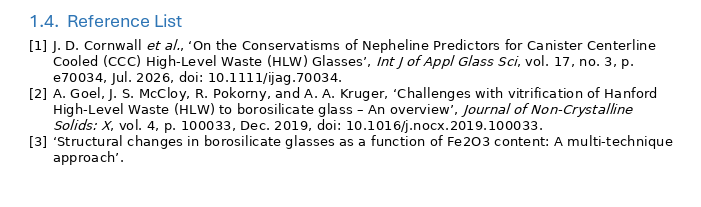
In this image reference [3] is just a title no other info and i have no idea why.
The data is definitely in zotero:
https://s3.amazonaws.com/zotero.org/images/forums/u12626264/jluklhtbk5j7jqts0cud.png
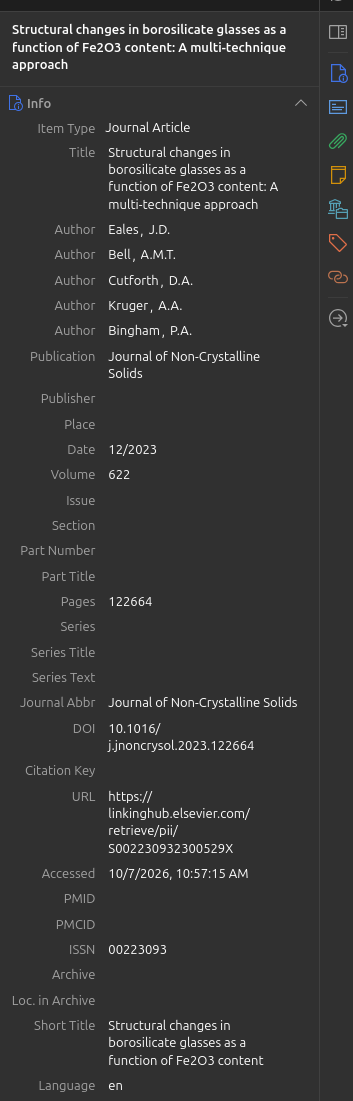
The same issue was occurring for reference [1]. I deleted and re-imported a few times and it all worked but i have no idea what i did. Now i have done the same for reference [3] but unable to fix the issue. Any help is appreciated.
KR, Jack
You should generally avoid deleting entries in Zotero's that you've cited (you can update or merge them instead)
Brand new document 3 references added and none bibliography inserted, none have details beyond the title even though they are the same reference that has all that info in a different doc.
https://s3.amazonaws.com/zotero.org/images/forums/u12626264/9h7uoq0rr0pp7akxykvd.png
I will update here if I find a solution.