
 Upgrade Storage
Misplaced red dot in citation hover previews — possible crop-coordinate bug in Zotero 10.0.5
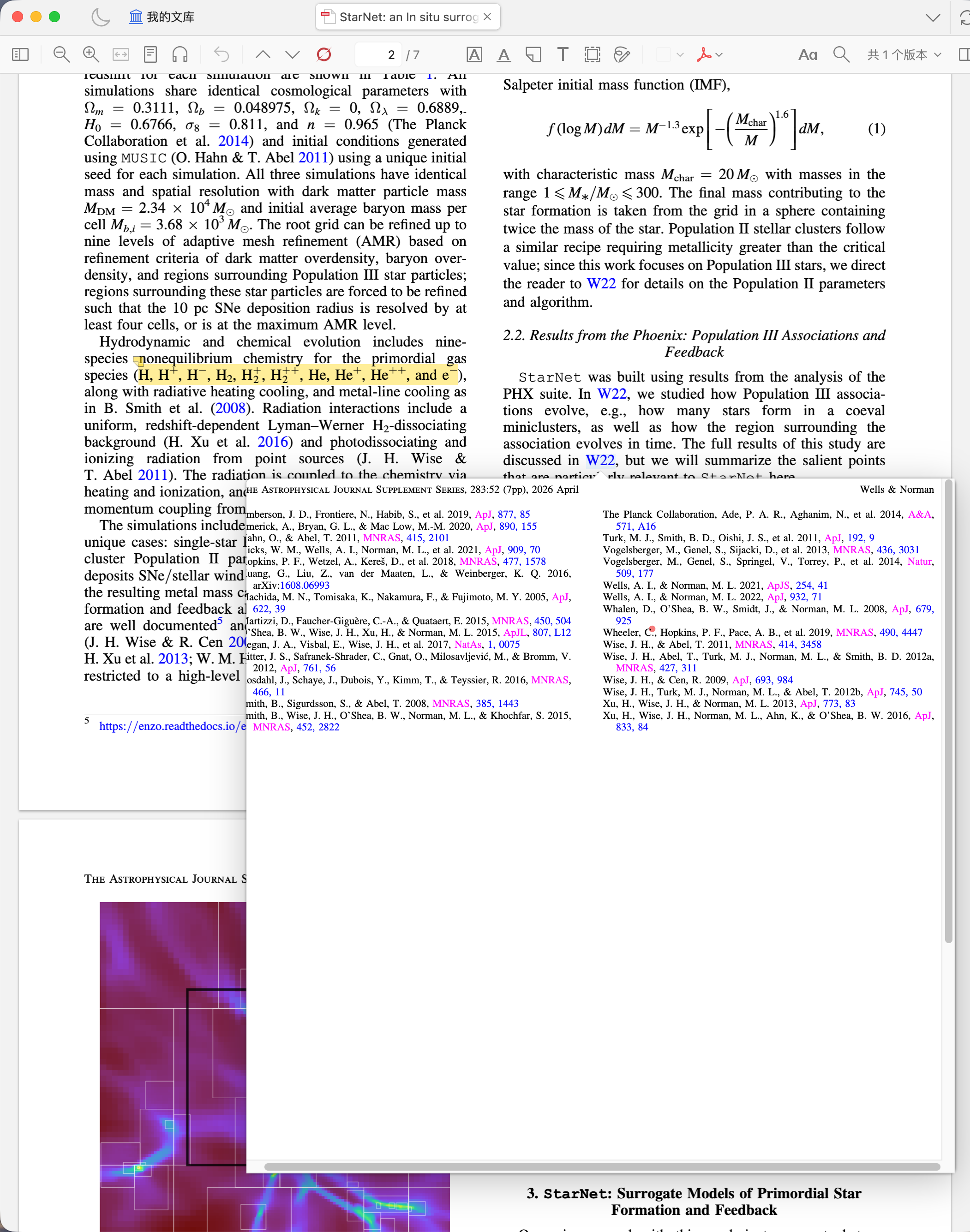
In Zotero 10.0.5 on macOS, the red dot in a citation hover preview appears displaced from the PDF’s internal-link target, making it look as though it points to a different reference.
A previous forum report describes similar symptoms. I’m opening this thread to provide a reproducible example and a code-level finding.
Example PDF
Wells & Norman (2026), StarNet: An In Situ Surrogate Model of Primordial Star Formation and Feedback for Astrophysical Simulations https://doi.org/10.3847/1538-4365/ae42c5
Original behavior:
https://s3.amazonaws.com/zotero.org/images/forums/u10691190/cxfzkrh5kg7q9ln4mkgs.png
Code-level finding
Inspection of the reader.js bundled with Zotero 10.0.5 identified a coordinate mismatch in PDFRenderer.renderPreviewPage() (upstream file: src/pdf/pdf-renderer.js).
After _trimCanvas(canvas, ctx, 15) removes the page margins, the image content is shifted by (-rect2[0], -rect2[1]). The dot branch still calculates its center using the original viewport coordinates:
let centerX = (rect[0] + rect[2]) / 2;
let centerY = (rect[1] + rect[3]) / 2;
The rectangle-marker branch already subtracts the crop origin. Applying the same translation to the dot, and clamping within the trimmed canvas, would give:
let centerX = (rect[0] + rect[2]) / 2 - rect2[0];
let centerY = (rect[1] + rect[3]) / 2 - rect2[1];
centerX = Math.max(radius, Math.min(canvas2.width - radius, centerX));
centerY = Math.max(radius, Math.min(canvas2.height - radius, centerY));
An isolated test of the extracted original method reproduced a displacement exactly equal to the crop origin.
Temporary workaround
With help from OpenAI’s Codex, I investigated the issue and developed a small workaround, Reference Marker Fix. Codex assisted with the code analysis, implementation, and testing, and I confirmed that the plugin resolves the positioning problem in my setup.
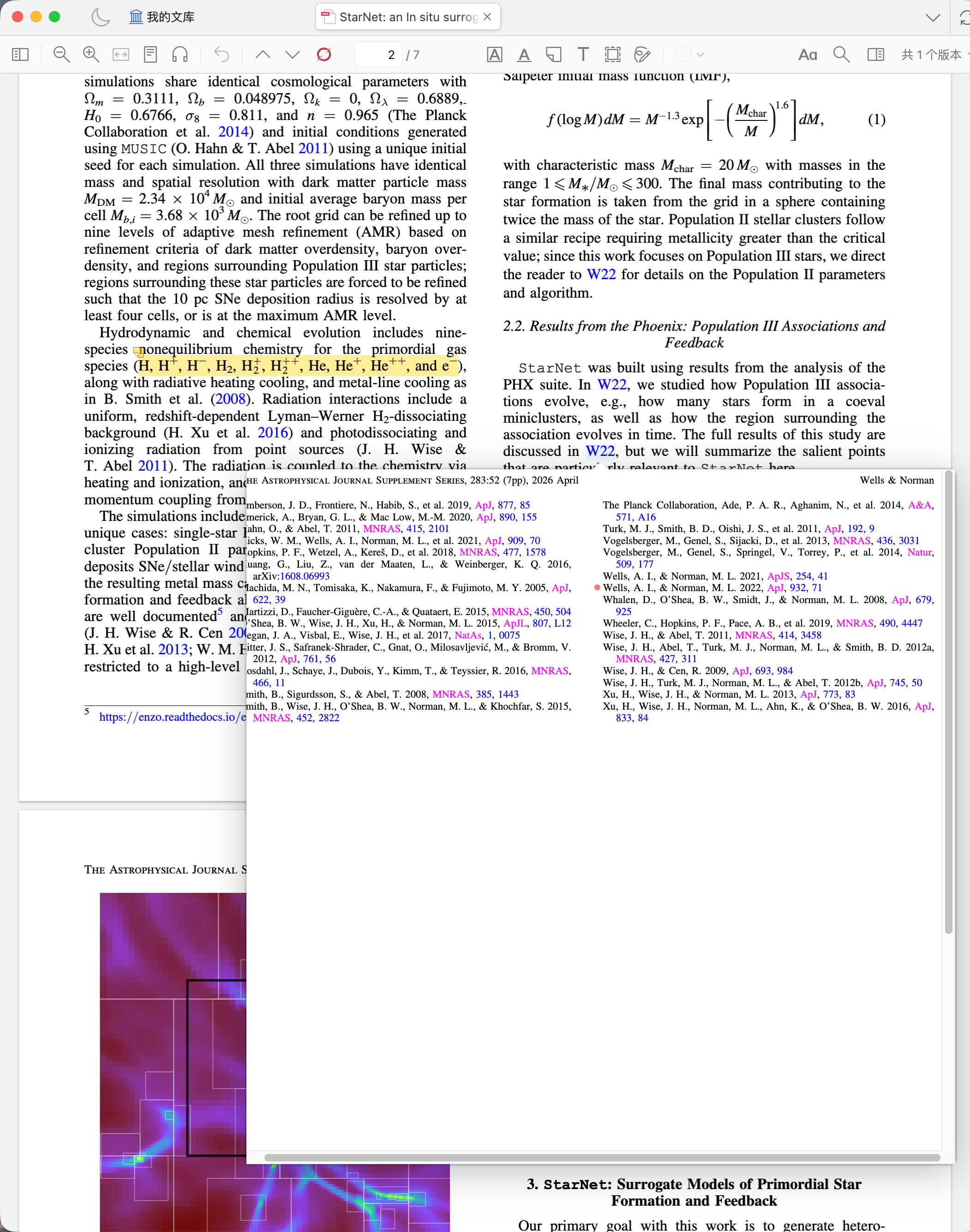
It also includes a separate visual adjustment: placing the dot to the left of the reference’s first line and centering it on the visible letters. The screenshot below includes both the coordinate correction and this additional alignment adjustment:
https://s3.amazonaws.com/zotero.org/images/forums/u10691190/oxt6qoma83ego0b0di9d.png
Could you check whether the missing crop-offset adjustment is a bug in the built-in reader? Thank you!
A previous forum report describes similar symptoms. I’m opening this thread to provide a reproducible example and a code-level finding.
Example PDF
Wells & Norman (2026), StarNet: An In Situ Surrogate Model of Primordial Star Formation and Feedback for Astrophysical Simulations https://doi.org/10.3847/1538-4365/ae42c5
Original behavior:
https://s3.amazonaws.com/zotero.org/images/forums/u10691190/cxfzkrh5kg7q9ln4mkgs.png
Code-level finding
Inspection of the reader.js bundled with Zotero 10.0.5 identified a coordinate mismatch in PDFRenderer.renderPreviewPage() (upstream file: src/pdf/pdf-renderer.js).
After _trimCanvas(canvas, ctx, 15) removes the page margins, the image content is shifted by (-rect2[0], -rect2[1]). The dot branch still calculates its center using the original viewport coordinates:
let centerX = (rect[0] + rect[2]) / 2;
let centerY = (rect[1] + rect[3]) / 2;
The rectangle-marker branch already subtracts the crop origin. Applying the same translation to the dot, and clamping within the trimmed canvas, would give:
let centerX = (rect[0] + rect[2]) / 2 - rect2[0];
let centerY = (rect[1] + rect[3]) / 2 - rect2[1];
centerX = Math.max(radius, Math.min(canvas2.width - radius, centerX));
centerY = Math.max(radius, Math.min(canvas2.height - radius, centerY));
An isolated test of the extracted original method reproduced a displacement exactly equal to the crop origin.
Temporary workaround
With help from OpenAI’s Codex, I investigated the issue and developed a small workaround, Reference Marker Fix. Codex assisted with the code analysis, implementation, and testing, and I confirmed that the plugin resolves the positioning problem in my setup.
It also includes a separate visual adjustment: placing the dot to the left of the reference’s first line and centering it on the visible letters. The screenshot below includes both the coordinate correction and this additional alignment adjustment:
https://s3.amazonaws.com/zotero.org/images/forums/u10691190/oxt6qoma83ego0b0di9d.png
Could you check whether the missing crop-offset adjustment is a bug in the built-in reader? Thank you!
-
martynas_b Zotero TeamWe’re fixing this. Thanks for the detailed report!
-
dstillman Zotero TeamThis should be fixed in the latest Zotero beta.