
 Upgrade Storage
Add Text annotation popup overlaps text box as it grows while typing
Report ID: 793306566
1. Open a PDF in Zotero, sidebar hidden
https://s3.amazonaws.com/zotero.org/images/forums/u15240242/r4paiu89ldv115tllck5.png
2. Select "Add Text" from the annotation toolbar.
https://s3.amazonaws.com/zotero.org/images/forums/u15240242/6u0khu8p6nqrttoqec5y.png
3. Click in the PDF to create a text box and start typing.
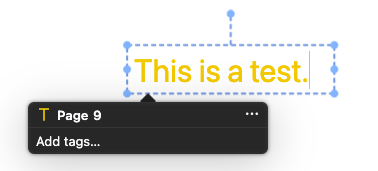
4. The text-entry annotation popup appears below the text box.
https://s3.amazonaws.com/zotero.org/images/forums/u15240242/d1vt7kflh473hota8h3z.png
5. Continue typing so that the text box grows vertically.
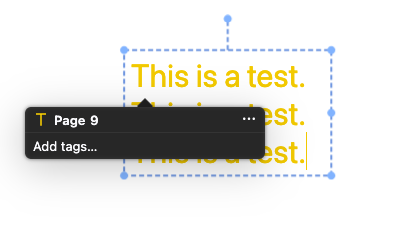
6. Eventually, the popup overlaps the text box, making the text being typed difficult or impossible to see.
https://s3.amazonaws.com/zotero.org/images/forums/u15240242/qeb3klb7dw2ckbp3ps1x.png
Expected behavior: The popup should reposition itself as the text box grows, so that it does not cover the text being entered.
1. Open a PDF in Zotero, sidebar hidden
https://s3.amazonaws.com/zotero.org/images/forums/u15240242/r4paiu89ldv115tllck5.png

2. Select "Add Text" from the annotation toolbar.
https://s3.amazonaws.com/zotero.org/images/forums/u15240242/6u0khu8p6nqrttoqec5y.png

3. Click in the PDF to create a text box and start typing.
4. The text-entry annotation popup appears below the text box.
https://s3.amazonaws.com/zotero.org/images/forums/u15240242/d1vt7kflh473hota8h3z.png
5. Continue typing so that the text box grows vertically.
6. Eventually, the popup overlaps the text box, making the text being typed difficult or impossible to see.
https://s3.amazonaws.com/zotero.org/images/forums/u15240242/qeb3klb7dw2ckbp3ps1x.png
Expected behavior: The popup should reposition itself as the text box grows, so that it does not cover the text being entered.