
 Upgrade Storage
[Plugin] Z-Search: Academic, web, repository and vector search for Zotero
Hi everyone,
I'd like to share my plugin Z-Search - a standalone search plugin that brings search capabilities inside and outside your library into one window.
Free and open source (MIT): https://github.com/Liozhang/z-search
Install: download z-search.xpi from the Releases page, then in Zotero go to Tools > Plugins > gear menu > Install Plugin From File. Compatible with Zotero 9 and 10. Installed users receive updates automatically.
https://github.com/Liozhang/z-search/releases
What it does:
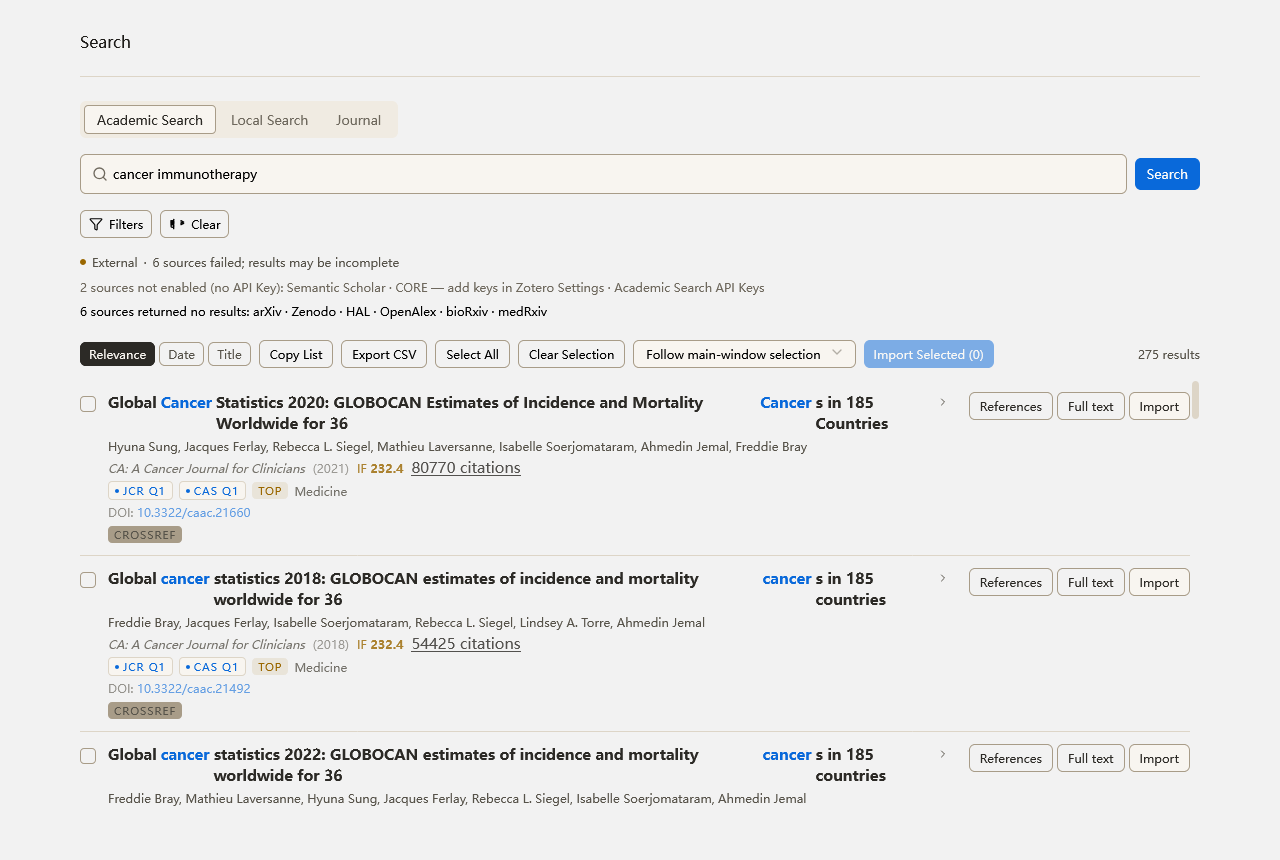
1. Academic search - parallel search across 13 sources (OpenAlex, Semantic Scholar, Crossref, arXiv, bioRxiv, medRxiv, DOAJ, Zenodo, HAL, CORE, Europe PMC, PubMed, GitHub), merged and deduplicated by DOI. Results render first-come-first-served, and partial failures are reported explicitly. One-click import into your library, with open-access PDFs auto-attached and already-in-library marking to prevent duplicates. Cited-by/references traversal is available on every result card.
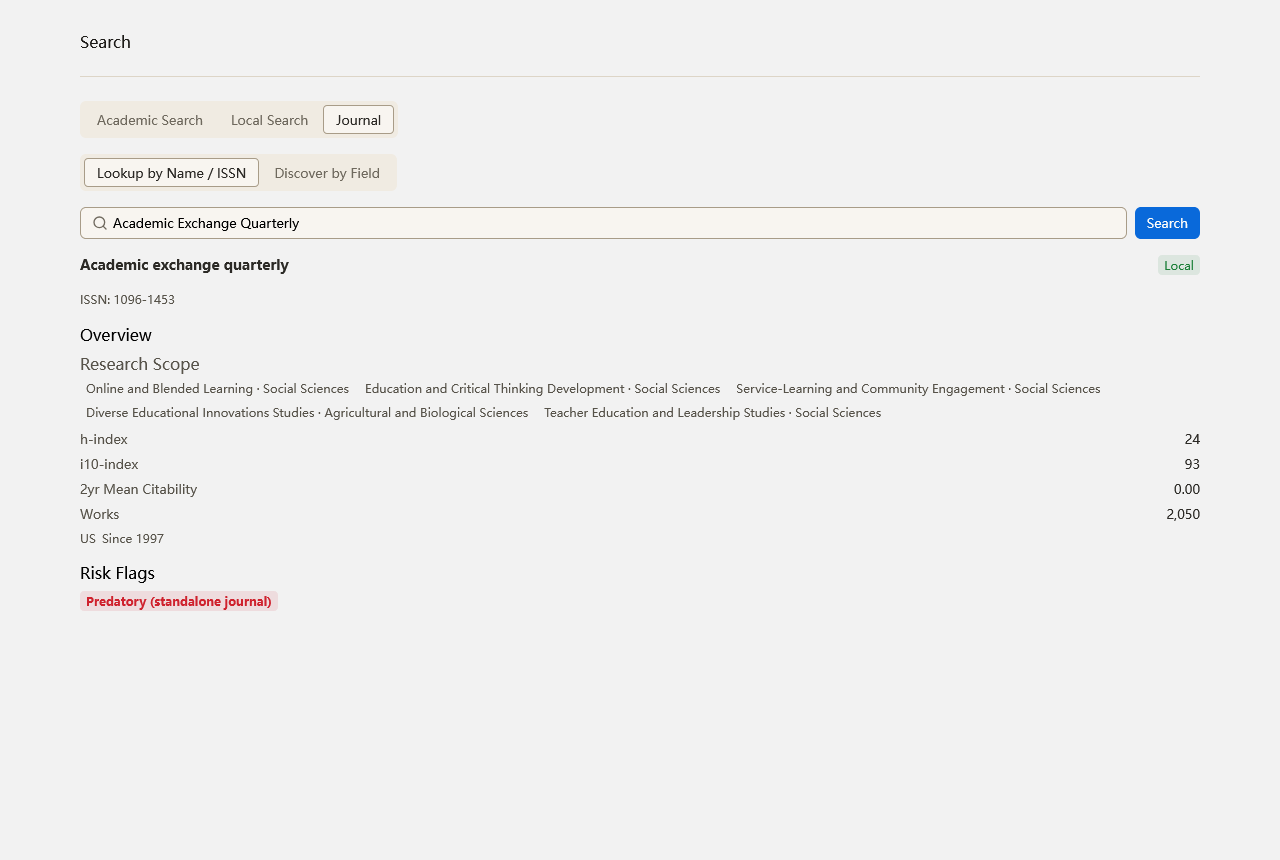
2. Journal quality badges, fully offline - result cards show citation count, impact factor, JCR quartile (JCR 2024), CAS major-category quartile (CAS partition table 2025), top-journal flag, and warning/predatory-journal markers (international warning list and Beall's list, exact-name matches only, with the cutoff date shown on the badge). These come from offline databases bundled with the plugin, so there is no network cost at query time. The same badges are available as a column in the item list.
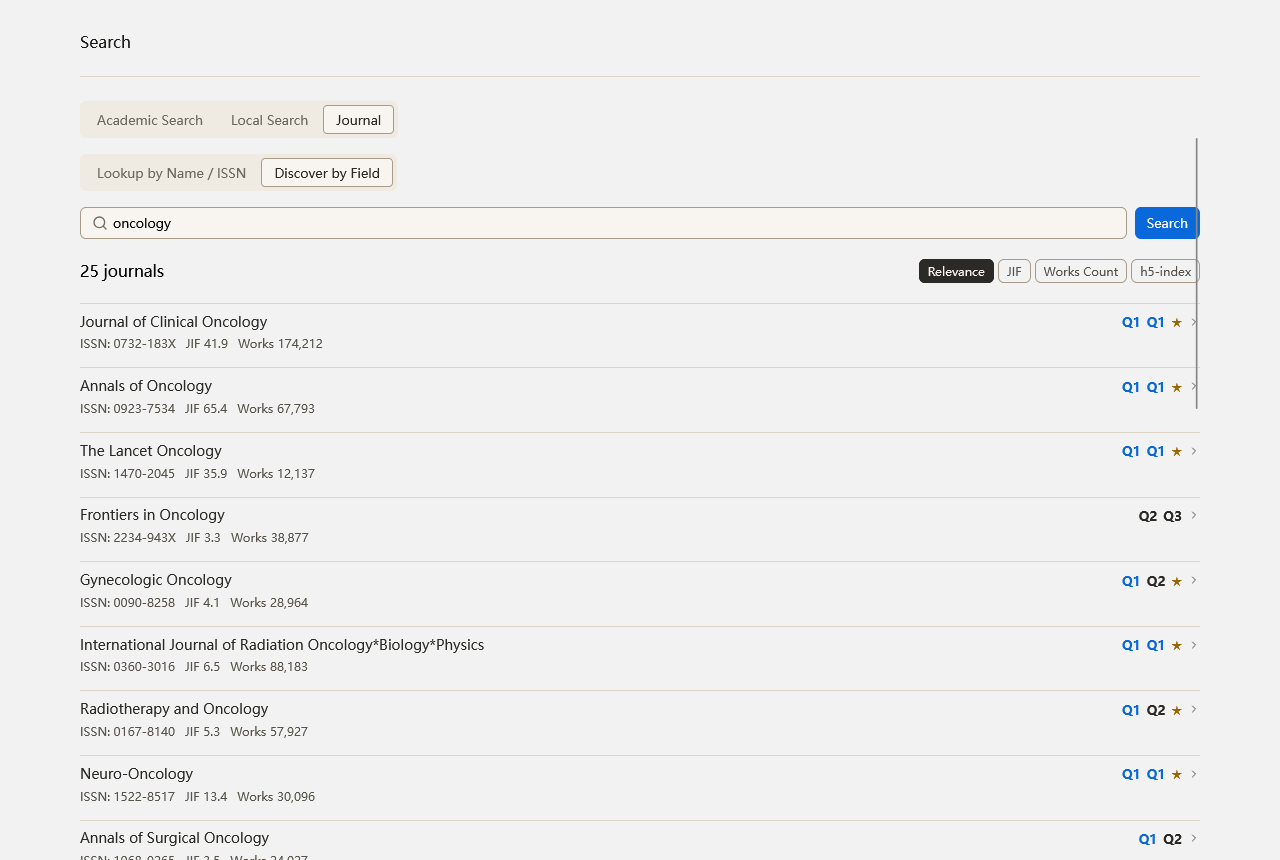
3. Journal metrics card - look up a journal by name or ISSN for a full profile (impact factor, quartiles, h-index, scope, risk flags), plus a "discover by field" mode.
4. Web search - 13 sources: DuckDuckGo, Bing, Wikipedia and Archive.org work without keys; SearXNG, Tavily, Brave, Exa, Serper, SerpAPI, Google, Perplexity and Bing API use your own keys. A management panel runs one real test search per source and classifies failures.
5. Repository search - GitHub repository search, mapped into the same result pipeline.
6. In-library vector search - semantic search over title/abstract and PDF full-text chunks (notes and annotations included), fused and ranked with RRF, with a BM25+FTS keyword channel as automatic fallback. Local ONNX embeddings by default (multilingual-e5-small, zero configuration), or embedding models from your AI provider. Find-similar and duplicate-scan tools included.
7. Unified search page - one input fans out to in-library semantic search and external academic search, deduplicated into a single list, with a per-engine status bar so failures never masquerade as empty results.
Abstract translation (Google/Bing/DeepL/AI) and CSV export are built in. Entry points: the magnifier toolbar button, Ctrl/Cmd+Shift+K, or Tools > Open Search Center; right-click a single item > Find Similar Items.
Screenshots:
https://raw.githubusercontent.com/Liozhang/z-search/main/docs/screenshots/search-results-en.png
https://raw.githubusercontent.com/Liozhang/z-search/main/docs/screenshots/journal-metrics-en.png
https://raw.githubusercontent.com/Liozhang/z-search/main/docs/screenshots/journal-discover-en.png
Feedback and bug reports are welcome, either in this thread or on GitHub:
https://github.com/Liozhang/z-search/issues
I'd like to share my plugin Z-Search - a standalone search plugin that brings search capabilities inside and outside your library into one window.
Free and open source (MIT): https://github.com/Liozhang/z-search
Install: download z-search.xpi from the Releases page, then in Zotero go to Tools > Plugins > gear menu > Install Plugin From File. Compatible with Zotero 9 and 10. Installed users receive updates automatically.
https://github.com/Liozhang/z-search/releases
What it does:
1. Academic search - parallel search across 13 sources (OpenAlex, Semantic Scholar, Crossref, arXiv, bioRxiv, medRxiv, DOAJ, Zenodo, HAL, CORE, Europe PMC, PubMed, GitHub), merged and deduplicated by DOI. Results render first-come-first-served, and partial failures are reported explicitly. One-click import into your library, with open-access PDFs auto-attached and already-in-library marking to prevent duplicates. Cited-by/references traversal is available on every result card.
2. Journal quality badges, fully offline - result cards show citation count, impact factor, JCR quartile (JCR 2024), CAS major-category quartile (CAS partition table 2025), top-journal flag, and warning/predatory-journal markers (international warning list and Beall's list, exact-name matches only, with the cutoff date shown on the badge). These come from offline databases bundled with the plugin, so there is no network cost at query time. The same badges are available as a column in the item list.
3. Journal metrics card - look up a journal by name or ISSN for a full profile (impact factor, quartiles, h-index, scope, risk flags), plus a "discover by field" mode.
4. Web search - 13 sources: DuckDuckGo, Bing, Wikipedia and Archive.org work without keys; SearXNG, Tavily, Brave, Exa, Serper, SerpAPI, Google, Perplexity and Bing API use your own keys. A management panel runs one real test search per source and classifies failures.
5. Repository search - GitHub repository search, mapped into the same result pipeline.
6. In-library vector search - semantic search over title/abstract and PDF full-text chunks (notes and annotations included), fused and ranked with RRF, with a BM25+FTS keyword channel as automatic fallback. Local ONNX embeddings by default (multilingual-e5-small, zero configuration), or embedding models from your AI provider. Find-similar and duplicate-scan tools included.
7. Unified search page - one input fans out to in-library semantic search and external academic search, deduplicated into a single list, with a per-engine status bar so failures never masquerade as empty results.
Abstract translation (Google/Bing/DeepL/AI) and CSV export are built in. Entry points: the magnifier toolbar button, Ctrl/Cmd+Shift+K, or Tools > Open Search Center; right-click a single item > Find Similar Items.
Screenshots:
https://raw.githubusercontent.com/Liozhang/z-search/main/docs/screenshots/search-results-en.png
https://raw.githubusercontent.com/Liozhang/z-search/main/docs/screenshots/journal-metrics-en.png
https://raw.githubusercontent.com/Liozhang/z-search/main/docs/screenshots/journal-discover-en.png
Feedback and bug reports are welcome, either in this thread or on GitHub:
https://github.com/Liozhang/z-search/issues