
 Upgrade Storage
PDF toolbar display/scaling issue when Zotero window is narrow
Hi,
I am seeing a UI scaling/display problem in the PDF reader when the Zotero window is reduced to a relatively narrow width.
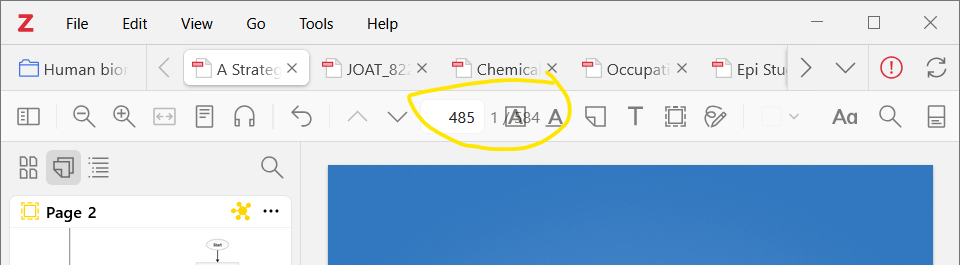
As shown in the attached screenshot, the page-number/zoom controls in the PDF toolbar begin to overlap. The current page number, total number of pages, and adjacent controls are rendered on top of one another, making them difficult to read and use.
The problem appears when the Zotero window is made smaller horizontally and disappears when the window is widened.
Steps to reproduce:
1. Open a PDF in Zotero.
2. Reduce the width of the Zotero window.
3. Observe the page/zoom controls in the PDF toolbar.
Expected behavior: Toolbar elements should resize, collapse, or move without overlapping.
Actual behavior: Toolbar elements overlap when the available horizontal space becomes limited.
Report ID: 459036571
https://s3.amazonaws.com/zotero.org/images/forums/u5549091/3z5utmzptpp8lg8lxeq9.png
Thank you for the great work.
I am seeing a UI scaling/display problem in the PDF reader when the Zotero window is reduced to a relatively narrow width.
As shown in the attached screenshot, the page-number/zoom controls in the PDF toolbar begin to overlap. The current page number, total number of pages, and adjacent controls are rendered on top of one another, making them difficult to read and use.
The problem appears when the Zotero window is made smaller horizontally and disappears when the window is widened.
Steps to reproduce:
1. Open a PDF in Zotero.
2. Reduce the width of the Zotero window.
3. Observe the page/zoom controls in the PDF toolbar.
Expected behavior: Toolbar elements should resize, collapse, or move without overlapping.
Actual behavior: Toolbar elements overlap when the available horizontal space becomes limited.
Report ID: 459036571
https://s3.amazonaws.com/zotero.org/images/forums/u5549091/3z5utmzptpp8lg8lxeq9.png
Thank you for the great work.