
 Upgrade Storage
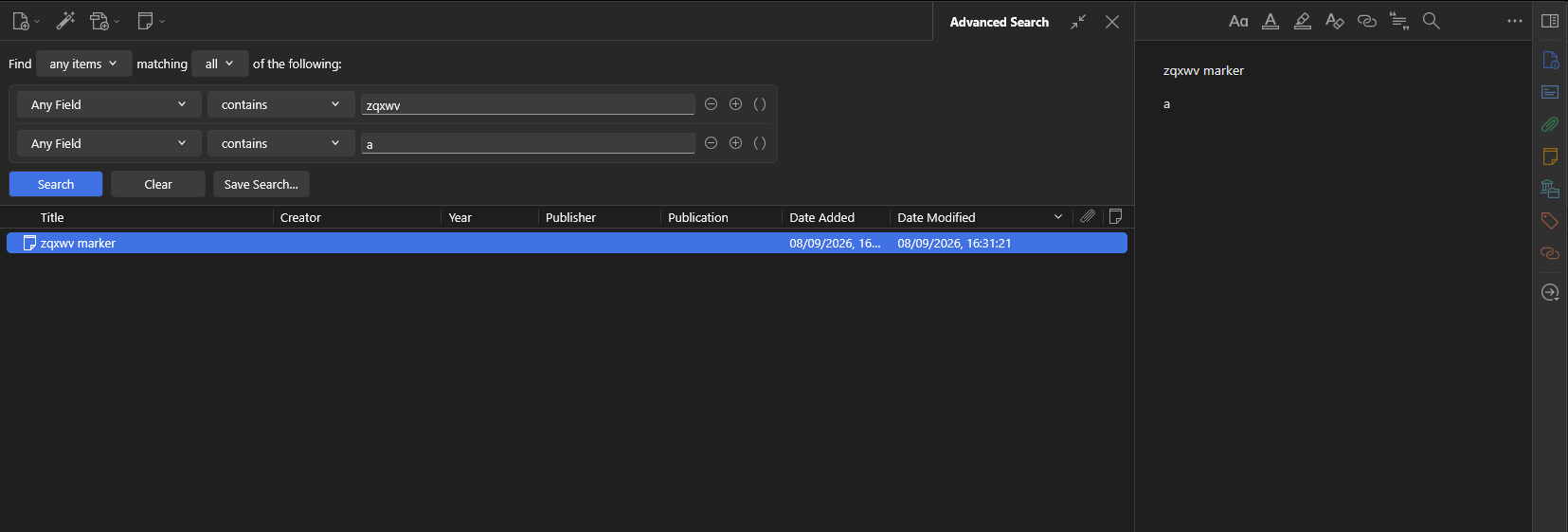
More search results after opening Advanced Search from Quick Search
Opening the Advanced Search from a Quick Search does not keep consistent search results.
No result for a quick search of "zqxwv a":
https://s3.amazonaws.com/zotero.org/images/forums/u265723/s8nvuakatiyz3bs4naxe.png
One note result after opening the advanced search:
https://s3.amazonaws.com/zotero.org/images/forums/u265723/ulpaihg0gqvgwjebwx5i.png
Zotero 10.0.2-beta.7+a5b4b4d20 (64-bit) in Troubleshooting Mode
Windows 11
No result for a quick search of "zqxwv a":
https://s3.amazonaws.com/zotero.org/images/forums/u265723/s8nvuakatiyz3bs4naxe.png

One note result after opening the advanced search:
https://s3.amazonaws.com/zotero.org/images/forums/u265723/ulpaihg0gqvgwjebwx5i.png
Zotero 10.0.2-beta.7+a5b4b4d20 (64-bit) in Troubleshooting Mode
Windows 11
-
dstillman Zotero TeamThis is by design. The unquoted "a" in the quick search isn't really a legitimate search term and is ignored to avoid a scan while typing something longer. In Advanced Search, searching is an explicit manual action, so we search for it anyway, since ignoring it would be confusing there. If you really want the same results in quick search, you can quote the "a" and trigger the search by pressing Enter.
-
mjthoravalThanks for the explanation.