
 Upgrade Storage
Bringing a large amount of files into an existing Zotero instance
This is just a quick note to explain what I recently did as it may be of help to others.
I had an existing Zotero instance that had a good amount of data already in it. In turn I also had a larger amount of pdfs etc that had managed to go "feral". Files on memory sticks, files on other machines, files on network drives etc etc. I decided to end the confusion and bring everything together under Zotero - but there were duplicates and lots of them.
To get around the duplicates problem I used another app called Krokiet:
https://github.com/qarmin/czkawka/blob/master/krokiet/README.md
This is an app created to find duplicates in media collections but works great in this context as well. Unlike the Zotero dup finding, ISBN, name, author etc, this works on a hashing of the actual digital data that makes up the files. Not the info contained within the file but the actual 1's & 0's that make up the file.
Firstly the feral files ARE NOT in Zotero yet. It is a purging of the data based on hashes, not contained data. It is worth remembering that with hashing, a single bit, 0 or 1 difference, will produce totally different numbers.
I grabbed all of the feral files and brought them together under one dir. Next was setting the Zotero "storage" dir as the home/master/authoritative dir[1] and then compared the ferals to it using Krokiet. It takes a bit of time as it has to generate all of the hashes but it will find duplicates down to the digital "bit". It was then a case of selecting the dupes and deleting them - you can select single or select all.
Once I had the feral duplicates purged, it was then a simple matter to bring the remaining into Zotero for sorting/massaging/classification. If you do find yourself in a situation where this note may be of benefit, please create some test data first and test until you are confident. It took me a few tries to get things right but in the long run, it has saved me lots of time, effort and frustration.
https://s3.amazonaws.com/zotero.org/images/forums/u21244052/yruv32xa65z2ro9y5u3y.png
[1] Notice the blue tick - this sets authoritative and in turn when lists of dups are produced, files in this dir won't be selectable for deletion/moving.
I had an existing Zotero instance that had a good amount of data already in it. In turn I also had a larger amount of pdfs etc that had managed to go "feral". Files on memory sticks, files on other machines, files on network drives etc etc. I decided to end the confusion and bring everything together under Zotero - but there were duplicates and lots of them.
To get around the duplicates problem I used another app called Krokiet:
https://github.com/qarmin/czkawka/blob/master/krokiet/README.md
This is an app created to find duplicates in media collections but works great in this context as well. Unlike the Zotero dup finding, ISBN, name, author etc, this works on a hashing of the actual digital data that makes up the files. Not the info contained within the file but the actual 1's & 0's that make up the file.
Firstly the feral files ARE NOT in Zotero yet. It is a purging of the data based on hashes, not contained data. It is worth remembering that with hashing, a single bit, 0 or 1 difference, will produce totally different numbers.
I grabbed all of the feral files and brought them together under one dir. Next was setting the Zotero "storage" dir as the home/master/authoritative dir[1] and then compared the ferals to it using Krokiet. It takes a bit of time as it has to generate all of the hashes but it will find duplicates down to the digital "bit". It was then a case of selecting the dupes and deleting them - you can select single or select all.
Once I had the feral duplicates purged, it was then a simple matter to bring the remaining into Zotero for sorting/massaging/classification. If you do find yourself in a situation where this note may be of benefit, please create some test data first and test until you are confident. It took me a few tries to get things right but in the long run, it has saved me lots of time, effort and frustration.
https://s3.amazonaws.com/zotero.org/images/forums/u21244052/yruv32xa65z2ro9y5u3y.png
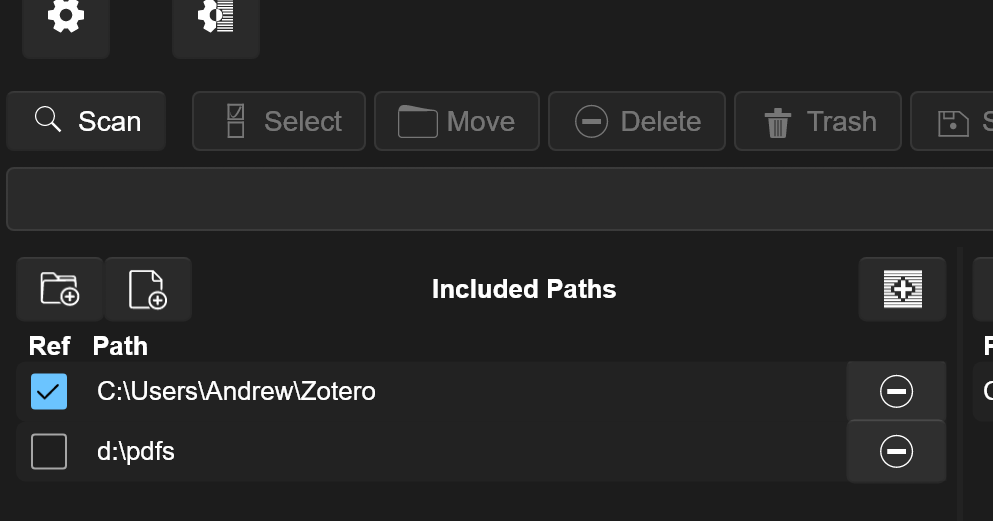
[1] Notice the blue tick - this sets authoritative and in turn when lists of dups are produced, files in this dir won't be selectable for deletion/moving.