
 Upgrade Storage
[New Plugin] Zotero TTS: enhance Zotero 10's Read Aloud — more voices, highlight colours, shortcuts
Hi everyone,
I've written a plugin that enhances Zotero 10's built-in Read Aloud: it adds voices from providers of your choice, and gives you more control over highlighting and playback. Free and open source (AGPL): https://github.com/xujialiu/Zotero-TTS
What it does:
- More voices in the Read Aloud popup, under the Local tier: Azure Speech, a local Kokoro-FastAPI server, OpenAI or any OpenAI-compatible server. Zotero's Standard and Premium voices stay as they are.
- Word and sentence highlighted at the same time, in colors and opacities you pick — this works with Zotero's own voices too. Word-by-word highlighting follows the voice's word timings (Azure and Kokoro report them; OpenAI-compatible voices highlight by sentence — the plugin never guesses word positions).
- Keyboard shortcuts, all rebindable: speed down / up / reset (Shift+X / Shift+C / Shift+Z), previous / next sentence (arrow keys) and paragraph (Shift+arrows) while Read Aloud is open.
- Optionally the same voice and speed for every document, instead of Zotero's per-language choice.
- Settings backup and restore, to a file or a WebDAV folder.
Everything runs inside Read Aloud itself — no second player. The sentence segmentation, the skip buttons, the position, the popup are all Zotero's, with the added voices as ordinary entries. A short GIF of the word-in-sentence highlighting: https://raw.githubusercontent.com/xujialiu/Zotero-TTS/main/assets/word-highlight.gif
About the providers: Azure Speech needs a key + region (the free tier gives 500,000 characters a month, word timings included); Kokoro-FastAPI is a free local server (CPU or GPU); the OpenAI-compatible option takes a custom base URL, model and voice list, plus extra headers for a server behind a gateway. The repo has setup tutorials for Azure and for running Kokoro or Chatterbox in Docker.
Install: download zotero-tts.xpi from https://github.com/xujialiu/Zotero-TTS/releases/latest, then Tools → Plugins → gear icon → Install Plugin From File…, restart Zotero, and enable a provider under Edit → Settings → TTS (there's a Test connection button). Later updates install themselves. For word-by-word highlighting, also set Zotero's Settings → General → Read Aloud → Highlight current → Word.
A few honest caveats: Zotero 10 desktop only. Read Aloud has no plugin API yet, so the plugin hooks Zotero's internal Read Aloud interface per reader tab — a Zotero update can break the added voices until I ship a fix; Zotero's own voices are never affected. You bring your own provider account, so Azure/OpenAI usage is billed to you (Azure's free tier goes a long way, Kokoro is free and local), and API keys are stored in Zotero's preferences in plain text, like other plugin settings.
Feedback, feature requests and bug reports are very welcome — here or on GitHub: https://github.com/xujialiu/Zotero-TTS/issues
I've written a plugin that enhances Zotero 10's built-in Read Aloud: it adds voices from providers of your choice, and gives you more control over highlighting and playback. Free and open source (AGPL): https://github.com/xujialiu/Zotero-TTS
What it does:
- More voices in the Read Aloud popup, under the Local tier: Azure Speech, a local Kokoro-FastAPI server, OpenAI or any OpenAI-compatible server. Zotero's Standard and Premium voices stay as they are.
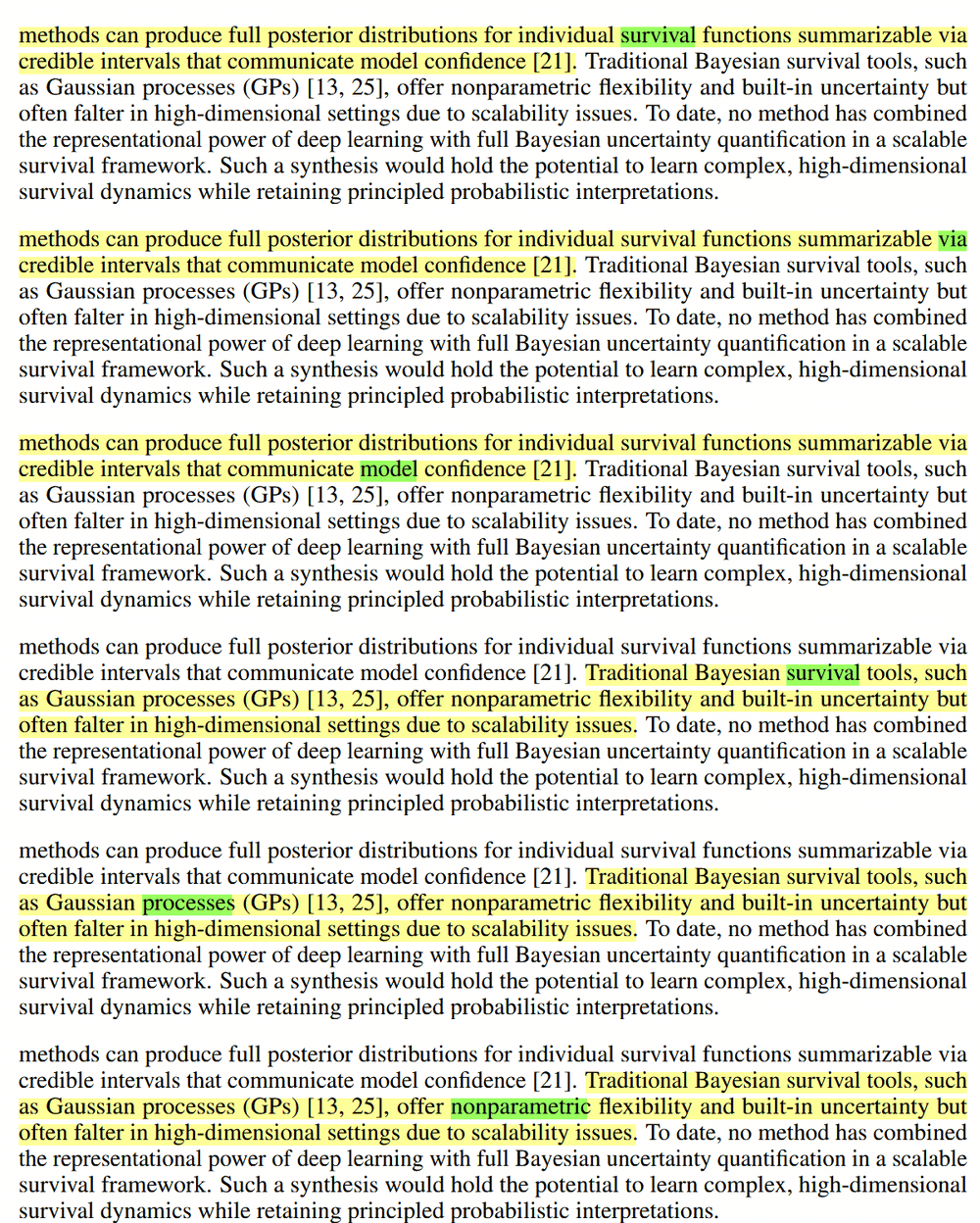
- Word and sentence highlighted at the same time, in colors and opacities you pick — this works with Zotero's own voices too. Word-by-word highlighting follows the voice's word timings (Azure and Kokoro report them; OpenAI-compatible voices highlight by sentence — the plugin never guesses word positions).
- Keyboard shortcuts, all rebindable: speed down / up / reset (Shift+X / Shift+C / Shift+Z), previous / next sentence (arrow keys) and paragraph (Shift+arrows) while Read Aloud is open.
- Optionally the same voice and speed for every document, instead of Zotero's per-language choice.
- Settings backup and restore, to a file or a WebDAV folder.
Everything runs inside Read Aloud itself — no second player. The sentence segmentation, the skip buttons, the position, the popup are all Zotero's, with the added voices as ordinary entries. A short GIF of the word-in-sentence highlighting: https://raw.githubusercontent.com/xujialiu/Zotero-TTS/main/assets/word-highlight.gif
About the providers: Azure Speech needs a key + region (the free tier gives 500,000 characters a month, word timings included); Kokoro-FastAPI is a free local server (CPU or GPU); the OpenAI-compatible option takes a custom base URL, model and voice list, plus extra headers for a server behind a gateway. The repo has setup tutorials for Azure and for running Kokoro or Chatterbox in Docker.
Install: download zotero-tts.xpi from https://github.com/xujialiu/Zotero-TTS/releases/latest, then Tools → Plugins → gear icon → Install Plugin From File…, restart Zotero, and enable a provider under Edit → Settings → TTS (there's a Test connection button). Later updates install themselves. For word-by-word highlighting, also set Zotero's Settings → General → Read Aloud → Highlight current → Word.
A few honest caveats: Zotero 10 desktop only. Read Aloud has no plugin API yet, so the plugin hooks Zotero's internal Read Aloud interface per reader tab — a Zotero update can break the added voices until I ship a fix; Zotero's own voices are never affected. You bring your own provider account, so Azure/OpenAI usage is billed to you (Azure's free tier goes a long way, Kokoro is free and local), and API keys are stored in Zotero's preferences in plain text, like other plugin settings.
Feedback, feature requests and bug reports are very welcome — here or on GitHub: https://github.com/xujialiu/Zotero-TTS/issues