Upgrade Storage
Chinese IME input is interrupted in PDF annotation comments on Zotero 9.0.6
Hi,
I am experiencing a reproducible Chinese IME input issue in Zotero 9.0.6 on Windows.
The problem occurs specifically in the PDF Reader annotation text fields, including both:
Sticky note annotations
Comments attached to highlights
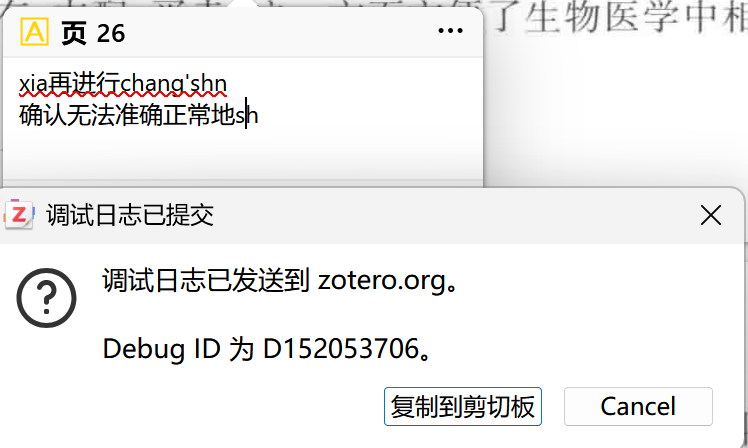
When I type Chinese using Microsoft Pinyin, the IME composition is sometimes interrupted when I select a candidate word. Instead of committing the Chinese characters normally, Zotero leaves part of the unfinished pinyin in the annotation, for example strings such as xiang'zh, chang'shn, or other truncated pinyin fragments.
The same Chinese input works normally in regular Zotero notes / item notes. I have not encountered this problem outside the PDF annotation editor.
I have already tried:
Restarting Zotero
Disabling all third-party plugins
Reproducing the issue again with all plugins disabled
The problem still occurs with all plugins disabled.
Environment:
Zotero 9.0.6
Windows
Microsoft Pinyin IME
Debug ID from a reproduction with all plugins disabled:
D152053706
I have also attached a screenshot showing the interrupted pinyin input in a PDF annotation.
Could you please check whether this is an IME composition issue in the PDF annotation editor?
Thank you!
https://s3.amazonaws.com/zotero.org/images/forums/u12534408/jm8w74j4uh1inuwpkgkv.png
https://s3.amazonaws.com/zotero.org/images/forums/u12534408/w6gc99gly9qqo9l1nl07.png
I am experiencing a reproducible Chinese IME input issue in Zotero 9.0.6 on Windows.
The problem occurs specifically in the PDF Reader annotation text fields, including both:
Sticky note annotations
Comments attached to highlights
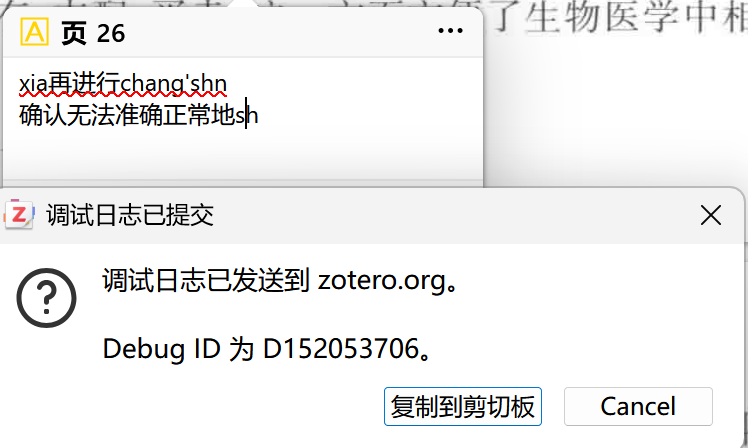
When I type Chinese using Microsoft Pinyin, the IME composition is sometimes interrupted when I select a candidate word. Instead of committing the Chinese characters normally, Zotero leaves part of the unfinished pinyin in the annotation, for example strings such as xiang'zh, chang'shn, or other truncated pinyin fragments.
The same Chinese input works normally in regular Zotero notes / item notes. I have not encountered this problem outside the PDF annotation editor.
I have already tried:
Restarting Zotero
Disabling all third-party plugins
Reproducing the issue again with all plugins disabled
The problem still occurs with all plugins disabled.
Environment:
Zotero 9.0.6
Windows
Microsoft Pinyin IME
Debug ID from a reproduction with all plugins disabled:
D152053706
I have also attached a screenshot showing the interrupted pinyin input in a PDF annotation.
Could you please check whether this is an IME composition issue in the PDF annotation editor?
Thank you!
https://s3.amazonaws.com/zotero.org/images/forums/u12534408/jm8w74j4uh1inuwpkgkv.png
https://s3.amazonaws.com/zotero.org/images/forums/u12534408/w6gc99gly9qqo9l1nl07.png