
 Upgrade Storage
Change Saved Files in File Explorer to Folder Structure as in Zotero
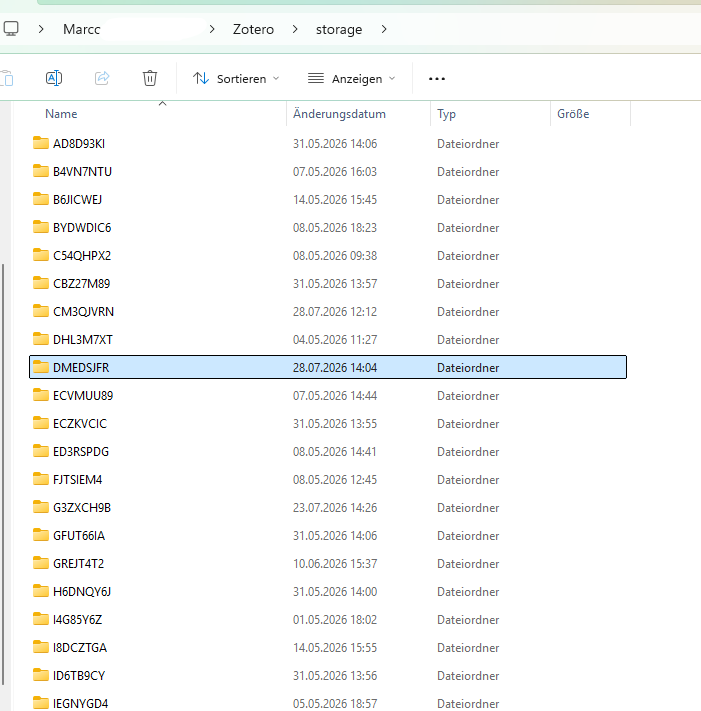
Hey, inside the Zotero Desktop-App, we can use folders. But, the files, that are being saved, e.g. PDF Files / Screenshots, are randomly placed in storage/%%%%%/Example.PDF
insted of doing it storage/Folder(same as Desktop-App)/Files (all in there)
Would be much nicer to be able to find the files manually in the Folder Structure and e.g. provide it to Claude Desktop etc.
https://s3.amazonaws.com/zotero.org/images/forums/u20425926/wq4zhjkztrk1bq4bpt4p.png
insted of doing it storage/Folder(same as Desktop-App)/Files (all in there)
Would be much nicer to be able to find the files manually in the Folder Structure and e.g. provide it to Claude Desktop etc.
https://s3.amazonaws.com/zotero.org/images/forums/u20425926/wq4zhjkztrk1bq4bpt4p.png
https://www.zotero.org/support/collections_and_tags#the_zotero_collections_model
In general, you do not need to access the files directly with your file explorer.
If you explain what you want to do, people on the forums could give you advice.
There are different plugins that give Claude access to your library.