
 Upgrade Storage
图书馆数据问题
1.当前数据目录中所有以“zotero.sqlite”开头的文件的名称、大小和日期:
https://s3.amazonaws.com/zotero.org/images/forums/u21078842/fid8jbean6gq8ventptu.png
2.没有一个名为“存储”的文件夹
3.当前数据目录位于默认位置
4.我之前下载了zotero,但是插件Awesome GPT下载下来之后需要密钥才能使用,我按照教程操作,但是“/”无触发反应!并且我发现我下载的Awesome GPT图标和教材里的不一样,如下图:
https://s3.amazonaws.com/zotero.org/images/forums/u21078842/4x9lp1vrygf0oxrtttwv.png
我以为是我的zotero版本不对,所以我通过控制面板-卸载,卸载了zotero,然后下载了zotero9.0、zotero8.0,但是当我安装完成之后打不开,一直显示需要检查更新。我通过查阅zotero文档下载了zotero-10.0-beta.12+ccbeab61e_x64版本,可是当我想要下载对应的Awesome GPT时,发现图标没有发生变化!也没有触发反应!这导致我没有办法安装教程获得密钥,我好像又回到了起点。
5.我在“图书馆数据问题”找到了解决办法,想要降级zotero,可是我按照步骤执行到“从上次升级备份恢复”时发现我并没有zotero.sqlite.[num].bak”文件。到这里我卡住了。
以上就是我的问题,希望广大zotero开发者能帮我解决这个问题,万分感谢!
https://s3.amazonaws.com/zotero.org/images/forums/u21078842/fid8jbean6gq8ventptu.png
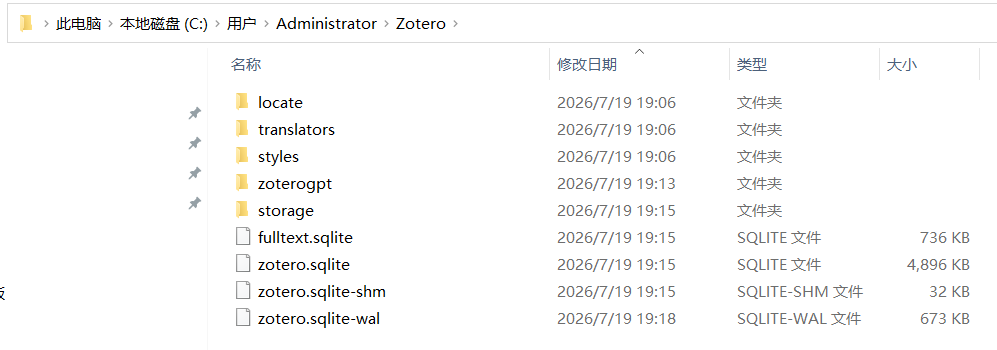
2.没有一个名为“存储”的文件夹
3.当前数据目录位于默认位置
4.我之前下载了zotero,但是插件Awesome GPT下载下来之后需要密钥才能使用,我按照教程操作,但是“/”无触发反应!并且我发现我下载的Awesome GPT图标和教材里的不一样,如下图:
https://s3.amazonaws.com/zotero.org/images/forums/u21078842/4x9lp1vrygf0oxrtttwv.png
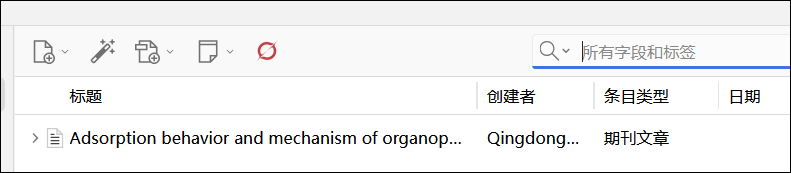
我以为是我的zotero版本不对,所以我通过控制面板-卸载,卸载了zotero,然后下载了zotero9.0、zotero8.0,但是当我安装完成之后打不开,一直显示需要检查更新。我通过查阅zotero文档下载了zotero-10.0-beta.12+ccbeab61e_x64版本,可是当我想要下载对应的Awesome GPT时,发现图标没有发生变化!也没有触发反应!这导致我没有办法安装教程获得密钥,我好像又回到了起点。
5.我在“图书馆数据问题”找到了解决办法,想要降级zotero,可是我按照步骤执行到“从上次升级备份恢复”时发现我并没有zotero.sqlite.[num].bak”文件。到这里我卡住了。
以上就是我的问题,希望广大zotero开发者能帮我解决这个问题,万分感谢!
https://www.zotero.org/support/kb/newer_db_version
For problems with a plugin, you'll need to contact the plugin developer.