
 Upgrade Storage
Bulk Merge in Duplicate Items sends all items to Trash (Zotero 9)
I'm using Zotero 9 on Windows and have encountered an issue with the Duplicate Items feature.
When I merge a small number of duplicate groups (for example, the first 10 groups), everything works as expected.
However, if I click "Merge 145 Items", instead of merging the duplicates, Zotero moves all selected items to the Trash.
The items are not just removed from the Duplicate Items view—they are actually moved to the Trash and need to be restored.
Is this a known bug in Zotero 9? Has anyone experienced the same issue, and is there a workaround other than merging the duplicates in small batches?
Thank you.
https://s3.amazonaws.com/zotero.org/images/forums/u21076776/dftkcmc4uxax2oe18p3r.jpg
When I merge a small number of duplicate groups (for example, the first 10 groups), everything works as expected.
However, if I click "Merge 145 Items", instead of merging the duplicates, Zotero moves all selected items to the Trash.
The items are not just removed from the Duplicate Items view—they are actually moved to the Trash and need to be restored.
Is this a known bug in Zotero 9? Has anyone experienced the same issue, and is there a workaround other than merging the duplicates in small batches?
Thank you.
https://s3.amazonaws.com/zotero.org/images/forums/u21076776/dftkcmc4uxax2oe18p3r.jpg
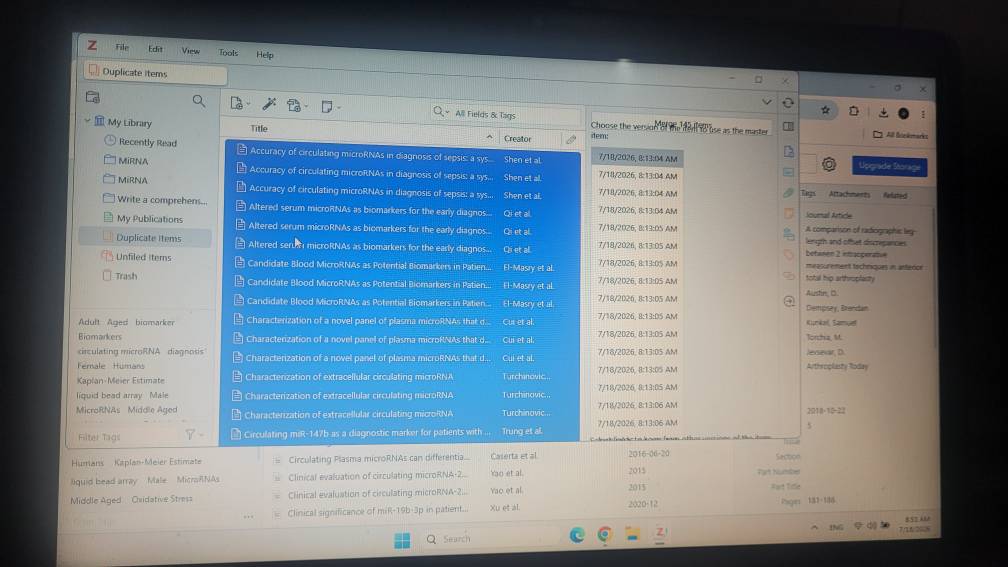
(In a future version, there will likely be a way to automatically merge all sets of duplicates, but it wouldn't present it like this — you can see in the right-hand pane that it's just showing all selected items as one set.)